

 Reply With Quote
I would start by making a backup image of the disk to a spare disk.
Have a look at http://www.shockfamily.net/cedric/knoppix/ about rescuing data.
Seems like the partition table is bad. You can try gpart in knoppix to recreate it.


Recently had a power failure that caused a desktop computer to power off all of a sudden. When we got home to turn the computer back on, it seems that we were stuck in a rebooting loop as mentioned by someone else here.
I first booted up in Knoppix and saw that both partitions I had were recognized, and in the main hda1 partition, I could see the files just fine.
I followed the instructions in the above link by running Windows Recovery Console, running
1) chkdsk /r
2) fixboot
Rebooted, and received the following error: NTLDR is missing. Press any key to restart.
Followed instructions here by using the Windoes disk to copy over new NTLDR and ntdetect.com files to the root directory. Still no good.
I booted up in Knoppix again, and now the hda1 is still recognized, but the files all have junk names. The only files with normal names are the 2 files that I copied over above. HELP! What did I do? What can be done?
*edit*
Another thread found that is VERY similar to my current problem here and here.
I would start by making a backup image of the disk to a spare disk.
Have a look at http://www.shockfamily.net/cedric/knoppix/ about rescuing data.
Seems like the partition table is bad. You can try gpart in knoppix to recreate it.
Is using gpart appropriate for where issue is now? It is almost identical to the first post found here. After running fixboot, it seems that my hard drive is only showing 10MB! And when I view the files, I get some weird name files with boxes and weird symbols as file names.
No, you are right, it does not sound like a partition table problem any longer. It looks like major corruption of the file tables. I rather expect if you look at the partition table that it will look exactly like you would expect it to look, the way it was before all of this started. At this point I doubt that gpart would do any additonal harm, but the chances that it will help are pretty minimal.Originally Posted by OpenIntro
The partition size is easily checked with "sudo fdisk -l". It should also tell you if the partition is recognised as NTFS or FAT.
Here are the results from running "sudo fdisk -l"
Disk /dev/hda: 61.4 GB, 61492838400 bytes
255 heads, 63 sectors/track, 7476 cylinders
Units = cylinders of 16065 * 512 = 8225280 bytes
Device Boot Start End Blocks Id System
/dev/hda1 * 1 2040 16386268+ c W95 FAT32 (LBA)
/dev/hda2 2041 7476 43664670 f W95 Ext'd (LBA)
/dev/hda5 2041 7476 43664638+ b W95 FAT32
Any guesses as to why the partition is viewable but the files are not on hda1? They were all there BEFORE I ran fixboot :/
I assume the partition is supposed to be FAT32 like reported by fdisk instead of NTFS or some other FAT?
If it used to be NTFS you can look at the last post in http://data-recovery-hub.com/phpBB2/viewtopic.php?p=70&
This is also a guess at what went wrong by fixboot changing the file system indicator if that is what happened.
Howdy Markus,
You have just reminded me that iv'e got to get an UPS unit soon
Before you touch or do anything concerning the bootsector, back it up to a floppy first.
From Knoppix, as root, do ...
Zero the floppy first ...
]# dd if=/dev/zero of=/dev/fd0 bs=1024 count=1440
Then do ...
]# dd if=/dev/hda of=/dev/fd0 bs=512 count=1
Zero the floppy first ...
]# dd if=/dev/zero of=/dev/fd0 bs=1024 count=1440
That table output is saying that hda1 is typed as having a "W95 FAT32 (LBA)" filesystem, hda2 is a "W95 Ext'd (LBA)" (windows extended partition), and hda5 being an extended logical partition, it has a "W95 FAT32" filesystem.
Above your refering to a NTFS !!!.
There are some wires crossed here somewhere.
Questions:
[code]
# What windows are you talking of ?
# Why do you mention NTFS above ?
The type fields for a NTFS, if thats the case, should be "0x07" and not "0x0b" for hda1.
The type field will be used by programs that use the table so that they can deal with a partition in terms of the indicated filesystem. The bios will also use it in that regard too. Otherwise it shouldn't interfer with anything. NTFS being the MS beast it is, it is likely to utilise the bios in some way ... no one quite knows exactly what a NTFS does, which is why MS promote and prefer it to FAT32. Though they will tout it as being the increased file size and partition size it allows. Rubbish. It's there to bind you to a single OS system occupying the whole disk. That is its' primary purpose.
You could try changing the type field to "7" but ....
Do make the floppy backup first, make a couple of them.
And even try changing the field in a floppy copy first, rather than mucking about with your disk, and see if you can get results booting via the floppy image first.
]# fdisk /dev/fd0
You will be risking your data, so why not try to minimise the risk as muck as possible. After all, that's what floppies are for. If you can fix it that way, then go to the actual hdd and repeat the operation there.
>>
They were all there BEFORE I ran fixboot
>>
You'll have to forgive my ignorance of Windows. Obviously the windows version/type is hinted there. And i have heard of the program before. But i thought its' purpose was to just rewrite a bootstrap, in case of bootstrap corruption. I'm pretty sure it wont be having anything to do with your table.
The scambled files could be due to the lack of write support for the NTFS in Linux. Read support exists, but writing to the bugger is only supported in a very limited way. The write must be to an existing file, and it must not change the size of the file. All MS fault, not Linux. MS have locked down all info on the internals of their NTFS. NTFS is one of MS major Anti-Open source/Linux strategies ... by the way, and shouldn't be touched with a ten foot pole as a response. It is there to cause you problems, not as any solution to anything, other than to make life difficult.
You say you used the windows disk to copy over those files. As long as you don't try to do a write from Knoppix, the above support problem shouldn't be an issue.
I agree with the above comment too, copy all your data over to another disk if you can.
Good Luck, and post back an update
jm
Code:-: - If the system is the answer, then the question must have been really stupid -:-
 Posting Permissions


Vintage Apple USB Mouse M4848 Bondi Blue iMac G3 Hockey Puck - Tested Working
$22.99

Vintage Apple Monitor IIc 9" Green Monochrome 06/1985 A2M4090 October 1984 Stand
$275.00
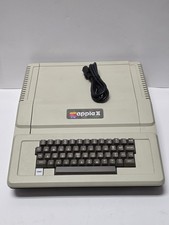
Apple II Plus Model A2S1048A Vintage Personal Computer Powers On, Read
$150.00
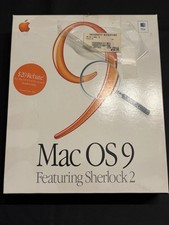
Vintage Apple Mac OS 9 Retail Box 1999 Sherlock 2 Original CD Manuals
$50.00
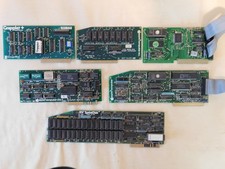
Apple Computer cards Super Serial SCSI AST -Orange Micro ++ Vintage 1980's
$169.00

Lot of 3 VIntage Apple Computer Rainbow Logo Sticker Decal Macintosh 1980s NOS
$7.00
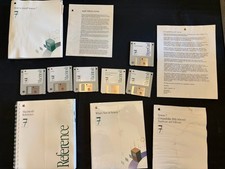
Vintage Apple Macintosh System 7 OS Software 8 Floppy Disks Manuals Original
$99.99

Rare Vintage Macintosh Apple Wooden Disk Storage Box Dovetailed
$69.95

Vintage Apple Color RGB Color Monitor A2M6014. Used.
$199.99

Apple cloth fabric banner iBook tangerine orange New Old Stock Vintage
$99.00
