-
4 Computer and still can't boot it.
I have tried using KNOPPIX to boot 4 computers, all with Windows XP.
Now it is posible my CD burned wrong but here is what happened:
One computer simply went right to windows (a setting must stop it from booting from CD)
The other THREE prompted me to boot.
I pressed enter.
The CD detected all my hardware and such and then I got the message is caps: "ERROR: CANNOT UNITE READ-ONLY MEDIA AND INITIAL RAMDISK"
Of the three computers, two were laptops running XP Pro and one was a desktop running XP Home.
Any idea?
Thanks! ~ Mooga
Edit: BTW, I have to experence with Linux 
-
Senior Member
registered user
Welcome to Knoppix.net. Sorry to hear about it not booting.
The Downloading & Burning FAQs http://www.knoppix.net/wiki/Downloading_FAQ is where you should start. In particular you need to make sure the downloaded Knoppix ISO file is not corrupt, see the section in the FAQ about MD5 checksums.
-
Q: What are the ASC files that accompany the CD ISO images and MD5 files?
A: The files with the .asc extension are PGP-signed messages that contain the md5sum used for verifying the ISO CD images. With this you can be sure the ISO image and accompanying MD5 file are genuine, because the .asc file containing the MD5 is signed with Klaus Knopper's PGP key. This could only be compromised if someone got hold of the secret key used to sign the message. To verify the file, you need to import PGP key ID 0xBA8F038D from your favorite keyserver, then in Linux you can type "gpg --verify KNOPPIX_Vxxxxxxxxxxxxxxxxx.iso.md5.asc". Then you must check that the MD5 checksum in the .asc file is the same that the MD5 checksum in the .md5 file.
If you want to verify the signed md5 file and the ISO file in one step, you can type:
That means absolutly nothing to me 
Can you give me some hints? Like do you thing the iso is messed up? BC Nero 5 did give me a funny pop up when I went to burn the ISO. Would you recomend I Download a new ISO?
-
Senior Member
registered user

Originally Posted by
Mooga
Can you give me some hints? Like do you thing the iso is messed up? BC Nero 5 did give me a funny pop up when I went to burn the ISO. Would you recomend I Download a new ISO?
"Funny pop-up" is a sure sign something is not quite right. Yes, ISO is probably messed up. Yes, download a new ISO. Then follow the answer to Question 5 in the FAQ, including the link to burning the ISO with Nero.
Let us know how things go.
Regards,
- Robert
http://www.cwelug.org/
-
Senior Member
registered user
Originally Posted by
Mooga
Q: What are the ASC files that accompany the CD ISO images and MD5 files?
A: The files with the .asc extension are PGP-signed messages that contain the md5sum used for verifying the ISO CD images. With this you can be sure the ISO image and accompanying MD5 file are genuine, because the .asc file containing the MD5 is signed with Klaus Knopper's PGP key. This could only be compromised if someone got hold of the secret key used to sign the message. To verify the file, you need to import PGP key ID 0xBA8F038D from your favorite keyserver, then in Linux you can type "gpg --verify KNOPPIX_Vxxxxxxxxxxxxxxxxx.iso.md5.asc". Then you must check that the MD5 checksum in the .asc file is the same that the MD5 checksum in the .md5 file.
If you want to verify the signed md5 file and the ISO file in one step, you can type:
That means absolutly nothing to me
Can you give me some hints? Like do you thing the iso is messed up? BC Nero 5 did give me a funny pop up when I went to burn the ISO. Would you recomend I Download a new ISO?
I have been editing & rewitting the FAQs to make them easier to read. That particular FAQ entry has been re-written. See 3 Q: What are these strange MD5 files that accompany the ISO CD images? and 4 Q: What are these strange ASC files that accompany the ISO CD images?
Similar Threads
-
By maxloren in forum Hardware & Booting
Replies: 2
Last Post: 08-08-2008, 05:37 PM
-
By surfbass in forum General Support
Replies: 1
Last Post: 11-17-2005, 03:31 AM
-
By Particle in forum Hdd Install / Debian / Apt
Replies: 1
Last Post: 01-19-2005, 03:25 PM
-
By Jefff in forum General Support
Replies: 4
Last Post: 04-25-2004, 08:13 AM
-
By xenocypraz in forum Hdd Install / Debian / Apt
Replies: 0
Last Post: 02-07-2003, 06:37 PM
 Posting Permissions
- You may not post new threads
- You may not post replies
- You may not post attachments
- You may not edit your posts
-
Forum Rules


🔀 Juniper Networks EX2300-C-12P 12× Gigabit PoE+ • 2× 10G SFP+ Compact Switch ⚡
$119.00

Juniper EX2300 12-Port Gigabit PoE+ Managed Network Switch P/N: EX2300-C-12P
$149.99

JUNIPER NETWORKS MIST AI AP63-US HIGH PERFORMANCE OUTDOOR ACCESS POINT - WHITE
$59.99

Juniper Network QFX5100-48S-AFO 48x SFP/SFP+ 6x 40GbE QSFP+ Switch w/ Dual power
$223.20
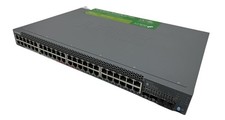
Juniper Networks EX2300 (EX2300-48P) 48 Ports Ethernet Switch
$249.99

Juniper SRX320 8-Port Security Services Gateway Appliance w/ AC Adapter
$59.99
New Juniper SRX345-SYS-JB-2AC Junos Router Firewall Services Gateway 16GbE SFP
$560.15
Juniper Networks EX4550-32F-AFI 32-Port SFP+ Gigabit Ethernet Switch w/ Cords
$250.00

Juniper QFX5100-48S-3AFI 48-Port SFP+ 6 QSFP+ 2x SFP/RJ-45 Management
$249.97

Juniper Networks EX2300-48P 48-Port Gigabit PoE Managed Ethernet Switch
$79.99



 Reply With Quote