

 Reply With Quote
Have you tried different settings in KMix? KMix either sits in the taskbar (loudspeaker symbol) or you can start it manually from the menu (Multimedia --> KMix).


I booted up in KNOPPIX from the CD-R and tried to listen to mp3 files that are on my hard drive. The audio player kicked off and LOOKED like it was playing the song, but I couldn't hear anything. I have a year-old Dell Inspiron 9100. All the hardware works in Windows.
Have you tried different settings in KMix? KMix either sits in the taskbar (loudspeaker symbol) or you can start it manually from the menu (Multimedia --> KMix).
The loudspeaker symbol in the taskbar has a red X over it. When I hang the mouse over it, the pop-up message reads, "Mixer cannot be found."
When I run Kmix, there is nothing in the drop-down box to the right of "Mixer:". It won't let me click on the arrow to the right of the drop-down box.
probably your sound device was not recognized, you should run recognition process in the system settings button.Originally Posted by bagabag
I'm sorry, but I guess I need more basic instructions. I simply cannot find a button called "System Settings." Could you tell me how to get there?
I tried some other things:
I clicked on the Knoppix button--Configure--Soundcard Configuration. This ran a text-based program called sndconfg. The opening page read: "A probe will now be performed for any PNP cards that will be automatically configured." I hit Enter for OK. The next screen read, "You don't seem to be running a kernel with modular sound enabled. (souncore.o was not found in the module search path) To use sndconfg, you must be running a kernel with modular sound, such as the kernel shipped with Debia GNU/Linux or a 2.2 kernel, and sound must be compiled as modules." I pressed OK and and that exited me from the sndconfg program.
I also went into the Control Center--Sound & Multimedia--Sound System. Under the General tab I checked the box "Enable Sound System" and click the button "Apply." This still did not resolve my problem. Under the Hardware Tab the "Select the audio device" box read Autodetect.
Under Info Center--Sound, the Sound Driver listed is 3.8.1a-980706(ALSA v1.0.8 emulation Mode)
 Posting Permissions


Macintosh Platinum Mouse - Apple 128K 512K 512Ke Mac Plus Lisa IIe M0100 - NEW
$49.99

1984 APPLE MACINTOSH 128K FIRST MAC Model M0001 PICASSO KIT Discs Harvard Rare
$1800.00

1984 APPLE MACINTOSH 128K MATCHING # BOX Set Original Mac Model M0001 WORKS RARE
$6299.00

Apple Macintosh Mac 128k - 512k Boot / Diagnostics 2 Disk Set for Classic Macs
$14.99

Vintage Apple Macintosh 128K 512K Carrying Case Rainbow Logo Excellent Cond
$140.00
Macintosh Platinum Mouse - Apple 128K 512K 512Ke Mac Plus Lisa IIe M0100 - NEW
$59.99

Keyboard Cable Cord - Apple Macintosh Mac 128K 512K 512Ke Plus
$12.99
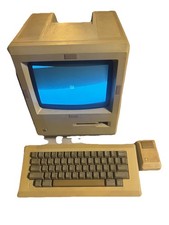
The First 1984 APPLE MACINTOSH 128K Model M0001 Set with Travel Bag VTG ORIGINAL
$824.50

Apple Macintosh 128k Desktop computer. Upgraded to 512k
$300.00

Apple Keyboard for Macintosh 128k 512k Mac Plus RARE Vintage M0110 (010)
$149.00