

 Reply With Quote
Did you try going through the screen output options? Most laptops have a Ctrl + Function key that will change between LCD and external monitor. This happened to my Laptop all of the time.

I've installed Knoppix as HDD-Install on My Laptop, but when I close the Laptop with knoppix running, and open it again, its freeze.
The screen remains black and doesn't turn on again.
Hope someon can help me
ths
Morph

Did you try going through the screen output options? Most laptops have a Ctrl + Function key that will change between LCD and external monitor. This happened to my Laptop all of the time.
This happens to me as well, anyone know how to fix this issue?
You're using apm or acpi? With apm, just right-click on the battery icon and choose suspend, and then close the lid. This puts the laptop into suspend to ram mode which is close to hibernation. When you crack open the lid again, you'll be right back to your desktop and it shouldn't freeze. I don't know if this works with acpi though as I have acpi issues so I use apm as that is a more proven feature.
ACPI isn't functioning properly under the 2.4x kernel which is what I've narrowed this issue down to. My Dell doesn't support APM. I'm currently downloading Knoppix 3.4 with the 2.6x kernel so hopefully that will resolve my issue!
And it's a NO GO. Knoppix 3.4 still doesn't fix the lid freeze problem seen on Dell Precision M60s. The issue revolves around the driver Knoppix is using for Nvidia cards as some others on the acpi.sourceforge.net mailing list have been able to get their D800s to work properly.
If anyone from the Knoppix team happens to read this please check out this thread: http://sourceforge.net/mailarchive/m...msg_id=4871797
I really want to use linux but without being able to close the lid its impossible! Someone please help us new Dell laptop users out!
I've got the situation figured out (thanks to Kanotix which loads acpid, not sure if knoppix does the same, haven't checked). Basically what the problem (for my laptop at least) was is there is no default event created in /etc/acpi/events for "lidbtn" which would cause something (acpid?) to hang/freeze/lock up.
My solution was to create a default action called "lidbtn" in /etc/acpi/events. My action was as simple as "echo "works"" which resulted in nothing happening when I hit the lid button. Also, I can report that when this event is in place (which results in your screen NOT locking up) that the lid state is reported correctly.
This information pretains to a Dell Precision M60.
-------------
With all this in mind.. I'd like to make the following recommendation to the knoppix team for the upcoming downloadable 3.4 iso:
Please create a default event for the lid button ("lidbtn") in the /etc/acpi/events directory. Ideally the action for this event would blank the screen or shut it down.. but that's not necessary if you don't know how to do that universally on all monitors. Just at least create the event so that users don't have to create on their own everytime they boot knoppix.
 Posting Permissions


Intel Core i7-9700 Octa-Core 3 GHz Desktop Processor LGA 1151
$79.99

RYZEN 7 9800X3D 8-Core, 16-Thread Desktop Processor
$475.00

INTEL CORE I7-870 SLBJG 2.93GHZ LGA1156 4 CORE CPU PROCESSOR
$23.00

INTEL CORE I9-10940X X-SERIES PROCESSOR | 3.30GHZ | SRGSH
$179.99

AMD Ryzen 5 5600X Desktop Processor (3.7GHz, 6 Cores, AM4 CPU) 100-100000065
$135.00

Intel Core i9-9900 3.10GHz CPU Processor SRG18
$165.00
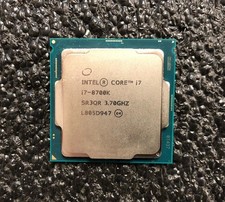
Intel i7-8700K Coffee Lake 3.7 GHz (4.7 GHz Turbo) LGA 1151 Unlocked
$69.99

Intel Core i5-7500 SR335 3.4GHz 4-Core LGA 1151 CPU PROCESSOR
$14.99

Lot of (7) Intel Core CPU Processors
$219.00

*Brand New-Sealed* AMD Ryzen 9 9950X3D2 Dual Ed. 4.3GHz 16Core AM5 (Bulk+Fast)
$790.00