

 Reply With Quote
Not sure why you want to set the path for it. Have you tried: update-alternatives --config java
How are you installing java? With java-package?


Every time I upgrade to a new version of java, I forget how to set the PATH variable.
I know you can use export, but I've manually editted the PATH var so as to remove the old path setting from
/usr/java/j2sdk1.4.2_08/bin/java
to
/usr/java/jdk-1_5_0_04/bin/java
TIA,
AJG
Not sure why you want to set the path for it. Have you tried: update-alternatives --config java
How are you installing java? With java-package?
Well, I'm installing the self-extracting *.bin from java.sun.com
The instructions say to download it whereever, say /root
Then, cd to the dir you want to extract it to, say /usr/bin/java and execute the *.bin creating a subdir there.
Now, I want all the users on this server to use the new executables for java, javac, appletviewer and javadoc versions 1.5
I think I remember now, all I did in the past wasto edit the path line and then reboot orCode:kwrite /etc/profileBTW, is there a way to see the current path without opening the file /etc/profile?Code:source /etc/profile
Also, to uninstall the old jdk, do I simply remove its dir from the path and delete that dir and all its subdirs?
TIA,
AJG
Have you seen this? http://serios.net/content/debian/jav...va-package.php
The point with java-package is that you create a .deb with it which can then be (un)installed with dpkg.
For a single user I sometimes just export the path manually with PATH=/some/new/path:$PATH && export PATH but you said you don't want this so how about:
sed -i 's/sbin/sbin:\/some\/new\/path/' /etc/profile
You can choose something else than sbin of course, I didn't even check if it's mentioned only once. Or you can echo the path somewhere.
OK, I'll have to look at your link. However, I seem to remember having a problem the first time I installed java with a *.deb
Sun Micro provides the *.bin and a *.rpm so i used alien to convert the *.rpm to a *.deb and tried to install it with kpackage. However, the *.deb generated was incomplete. I figured alien couldn't handle such a large file....
Thanx for the help,
AJG
I didn't see a question there so I neglected to answer, perhaps I should have. Did it work? As you probably noticed java-package uses the bin from sun as well, so it isn't that different except that you get a deb out of it.
Thanx for your concern. However, I have to wait until I get back to school after Labor day to play around with this.
Regards,
AJG
That was fast
 Posting Permissions


Dell PowerEdge VRTX 2.5"x25 Bay Blade Enclosure 4x1600W + 4X M640 (4X Blades)
$1599.99

Dell PowerEdge M640 Blade Barebone Server Dell P/N: HHB006 Tested Working
$149.99

Dell PowerEdge M630 Blade Server 2x Xeon E5-2680 v4, 2F3MP , 4GDP5 ,R10KJ ,JVFVR
$96.60

Dell PowerEdge M620 Blade Server 2x Xeon E5-2680v2 256GB DDR3 RAM NO HDD
$349.99

Datto S4P10 1U Blade Rack Server Intel Xeon D-2143IT 2.20GHz 48GB DDR4 4-Bay PSU
$197.76

NETAPP HCI NAF-1701 SuperMicro Server 4X BLADE H410C 8X GOLD 5120 4 NODE SERVER
$1499.97
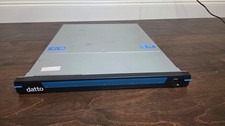
Datto S3P6000 4x 3.5" 1U Blade Rack Server Intel Xeon D-1541 @2.10GHz 48GB DDR4
$154.76

Dell Poweredge C6400 24x 2.5’’ 2x 2400W 4x C6420 Nodes H330 | 2x SFP | 8x Trays
$799.99

Cisco UCS 5108 Blade Server Chassis Enclosure N20-C6508 4x PSU 8x Fans 2x Fabric
$174.99

Dell Poweredge VRTX 25Bay 2.5" 2x PERC 8, 2xCMC, I/O 1GB Pass Through, 4x PS
$578.08