

 Reply With Quote
Originally Posted by pt-1
I've gotten that far, how do you save your settings once you've edited ### isk to ramdisk?


Ah ok. Is there any emergency command that can rewrite the HD? Or another program that can do that? (I read Grub somewhere in this thread). If I can get over this, I think I'll choose something other than Knoppix as a HD based Linux distro heh.
I've gotten that far, how do you save your settings once you've edited ### isk to ramdisk?
Ok, I have Adriane Knoppix 6 installed to my second SCSI drive. I got the same error when appending the Adriane to the /boot/grub/menu.lst which was already working for me.
This is the menu.lst generated by 0wn..
This is the /boot/grub/menu.lst generated by TeenPup Linux and with the 0wn generated entry for Adriane appended.default 0
timeout 30
color cyan/blue white/blue
title KNOPPIX
root (hd2,1)
kernel /boot/vmlinuz root=/dev/sdb2 lang=us keyboard=dvorak apm=power-off vga=791 nomce loglevel=0 quiet lang=us keyboard=dvorak rw
title Windows
rootnoverify (hd0,1)
chainloader +1
And highlighted.
This is the boot message I get when booting either variant...# GRUB configuration file '/boot/grub/menu.lst'.
# generated by 'grubconfig'. Sun May 17 02:59:55 2009
#
# Start GRUB global section
#timeout 30
color light-gray/blue black/light-gray
# End GRUB global section
# Linux bootable partition config begins
title Linux (on /dev/sda1)
root (hd1,0)
kernel /boot/vmlinuz root=/dev/sda1 ro vga=normal
# Linux bootable partition config ends
# Other bootable partition config begins
title Windows (on /dev/hda2)
map (hd0,0) (hd0,1)
map (hd0,1) (hd0,0)
rootnoverify (hd0,1)
makeactive
chainloader +1
# Other bootable partition config ends
# Linux bootable partition config begins
title Linux (on /dev/hda3)
root (hd0,2)
kernel /boot/vmlinuz root=/dev/hda3 ro vga=normal
# Linux bootable partition config ends
# Linux bootable partition config begins
title Linux (on /dev/sdb2)
root (hd2,1)
kernel /boot/vmlinuz root=/dev/sdb2 ro vga=normal
# Linux bootable partition config ends
title Install GRUB to floppy disk (on /dev/fd0)
pause Insert a formatted floppy disk and press enter.
root (hd0,2)
setup (fd0)
pause Press enter to continue.
title Install GRUB to Linux partition (on /dev/hda3)
root (hd0,2)
setup (hd0,2)
pause Press enter to continue.
title - For help press 'c', then type: 'help'
root (hd0)
title - For usage examples, type: 'cat /boot/grub/usage.txt'
root (hd0)
First partition is Knoppix 5.1"[ 0.499891] dca service started, version 1.4
[ 0.558761] pci 000:01:00.0: BAR 6: Can't allocate mem resource [0xfe000000-0xfdffffff]
[ 0.572854] alg: cipher : Test 1 failed on encryption for aes-asm
[ 3.319802] IO APIC resources could not be allocated.
[ 4.044099] Kernel panic - not syncing: VFS: Unable to mount root fs on unknown-block(0,0)
Second is M$ Windoze 2000
Third is Puppy Linux.
/sda1 is Freespire
All of them boot OK.
SCHEISSE...
I declined to install grub... this last time...
and installed Grub from Puppy linux.
Didn't have the "quiet" option.
SCSI.
At the last part, hundreds of lines of error messages... finally it comes to that.
(hd2,0) is a SCSI drive.
If I recall correctly there's a cheat-code to force recognition of SCSI.
It listed available partitions to boot, but all on IDE.
 Posting Permissions


GIGABYTE A520M DS3H AC AMD AM4 Motherboard mATX
$59.99

Intel H310 LGA1151 8-9th Gen DDR4 M.2 NVMe mATX Motherboard IO Shield Battery
$54.99

GIGABYTE Z790 AORUS ELITE AX LGA 1700 Intel Z790 ATX Motherboard with DDR5
$189.99

ASUS PRIME Z490-V Motherboard Intel Z490 10th gen DDR4 LGA 1200 ATX w/ IO Shield
$84.99

GIGABYTE B365 HD3 LGA1151 Intel 9th Gen motherboard
$59.99

Intel H81 Motherboard M.2 NVMe LGA 1150 mATX w/ IO Shield (Random Slot Color)
$29.90

ASUS PRIME B360M-C MicroATX Intel LGA1151 DDR4 HDMI VGA USB RJ-45 Audio
$34.99

ASUS TUF GAMING B550-PLUS WIFI II AM4 AMD B550 ATX AMD Motherboard
$90.99

ASUS ROG STRIX X870E-E GAMING WIFI
$289.99
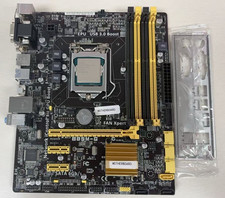
B85M-G Motherboard Intel Core i7-4770 CPU LGA1150 mATX 4 DIMM IO Shield
$75.96