
This may be a dumb question, how can one configure X server ? I know there is the /etc/X11/XF86Config-4 file ? Is that the only one or are there some user friendly method to do it ?


This may be a dumb question, how can one configure X server ? I know there is the /etc/X11/XF86Config-4 file ? Is that the only one or are there some user friendly method to do it ?
xf86config
If that doesn't work maybe
/usr/X11R6/bin/XFree86 -configure
Not at my box right now and I haven't done it for a while.
Try this:
As root run kxconfig
Or choose it from the kde control center.
Oh I did not know about a GUI for such a thing.Originally Posted by aay
 Posting Permissions


Intel Core i5-12500T SRL5W 2GHz 18MB 6 Core Socket LGA1700 Desktop CPU Processor
$114.99

INTEL CORE I9-10940X X-SERIES PROCESSOR | 3.30GHZ | SRGSH
$179.99

Lenovo ThinkCentre M920s SFF Barebones PC Motherboard PSU DVD No CPU RAM SSD
$27.99

Intel 6th Gen Core i7-6700K 4.0GHz (Turbo 4.2GHz) 4-Core LGA1151 CPU SR2L0
$38.00

Intel Core i7-9700 Octa-Core 3 GHz Desktop Processor LGA 1151
$79.99

Intel Core i7-3770K 3.5 GHz Processor
$39.00
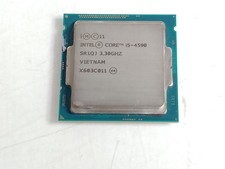
Intel Core i5-4590 3.3 GHz 5 GT/s LGA 1150 Desktop Processor CPU SR1QJ
$10.99

Intel Xeon E3-1230 v3 SR153 3.3GHz Quad Core LGA 1150 CPU Processor
$14.49

AMD - Ryzen 7 5800X3D 8-Core - 16-Thread 3.4 GHz (4.5 GHz Max Boost) w/ Ice Pad
$355.99

INTEL CORE I9-10980XE PROCESSOR | 3.00GHZ | SRGSG
$299.99

 Reply With Quote