

Since everyone seems to have a different way to remaster, here's my 2 euro cents. The three scripts below are taken from the ParallelKnoppìx CD. They use Xdialogs. The first copies the CD contents to HD. The second gets a CHROOT environment going, and the third creates the ISO image. I have used cute little devils to mark the beginning and end of each.
#!/bin/bash
# 1-CopySourceForRemaster copy the CD to HD for remastering
PATH="/bin:/sbin:/usr/bin:/usr/sbin"
export PATH
XDIALOG_HIGH_DIALOG_COMPAT=1
export XDIALOG_HIGH_DIALOG_COMPAT
# Get root
[ "`id -u`" != "0" ] && exec sudo "$0" "$@"
TMP="/tmp/saveconfig.tmp$$"
bailout(){
rm -f "$TMP" "$TMP.done" "$TMP.err"
echo ""
echo "Done"
exit 0
}
DIALOG="dialog"
[ -n "$DISPLAY" ] && [ -x /usr/bin/Xdialog ] && DIALOG="Xdialog"
trap bailout 1 2 3 15
# LANGUAGE etc.
[ -f /etc/sysconfig/knoppix ] && . /etc/sysconfig/knoppix
[ -z "$LANG" ] && export LANG
[ -z "$LANGUAGE" ] && export LANGUAGE
[ -z "$CHARSET" ] && export CHARSET
DESKTOPKB="$(du -sk $HOME/Desktop 2>/dev/null | awk '{print $1}')"
TITLE1="ParallelKnoppix: Copy source to HD for remastering"
MESSAGE1="Select a hard disk partition on which the source should be copied.
A directory called parallel_knoppix_remaster will be created at the root level
of that partition. Which partition would you like to use? (about 2GB free space is needed)"
ERROR="That didn't work!"
# Directory selector
PARTITIONS=""
for i in `awk '/^\/dev\/[hs]d[a-z].*\/mnt\/[hs]d[a-z]/{if(!/ntfs/){print $2}}' /etc/fstab`; do
PARTITIONS="$PARTITIONS ${i} [Disk/Partition] off"
done
rm -f "$TMP"
Xdialog --clear --title "$TITLE1" --radiolist "$MESSAGE1" 18 75 9 $PARTITIONS 2>"$TMP" || bailout
ParKnoppixPART="$(<$TMP)"
[ -z "$ParKnoppixPART" -o ! -e "$ParKnoppixPART" ] && bailout
# mount the partition requested
rm -f "$TMP.err"
mount | grep -q "$ParKnoppixPART" || mount -r "$ParKnoppixPART" >"$TMP.err"
[ "$?" != "0" ] && { $DIALOG --title "$TITLE1" --msgbox "$ERROR `cat $TMP.err`" 10 75; bailout; }
mount | grep -q "$ParKnoppixPART.*ntfs" && { $DIALOG --title "$TITLE1" --msgbox "$ERROR NTFS" 10 75; bailout; }
mount -o remount,rw "$ParKnoppixPART"
# create the ParKnoppixPART, etc
mkdir $ParKnoppixPART/parallel_knoppix_remaster
export ParKnoppixDIR=$ParKnoppixPART/parallel_knoppix_remaster
# get rid of old, if it exists
rm -R -f $ParKnoppixDIR
# copy the new
mkdir $ParKnoppixDIR
mkdir $ParKnoppixDIR/source
mkdir $ParKnoppixDIR/source/KNOPPIX
mkdir $ParKnoppixDIR/master
mkdir $ParKnoppixDIR/master/KNOPPIX
mkdir $ParKnoppixDIR/master/boot
mkdir $ParKnoppixDIR/master/boot/isolinux
cp /cdrom/boot/isolinux/* $ParKnoppixDIR/master/boot/isolinux
cp -Rp /KNOPPIX/* $ParKnoppixDIR/source/KNOPPIX
cp /cdrom/index.html $ParKnoppixDIR/master/
# cp /cdrom/parallelknoppix.png $ParKnoppixDIR/master/
cd /cdrom/KNOPPIX/
find . -size -100000 -type f -exec cp -p --parents {} $ParKnoppixDIR/master/KNOPPIX/ \;
cp -a $ParKnoppixDIR/source/KNOPPIX/boot $ParKnoppixDIR/master
echo "Finish configuring desktop, then reboot normal distro"
echo "and proceed to chroot activities"
# final report
SUCCESS="OK, the ParallelKNoppix source is now on the HD, ready for remastering"
$DIALOG --title "$TITLE1" --msgbox "$SUCCESS" 12 65
bailout
#!/bin/bash
# 2-StartCHROOT: Start up a chroot environment in parallel_knoppix_remaster and do some stuff
PATH="/bin:/sbin:/usr/bin:/usr/sbin"
export PATH
XDIALOG_HIGH_DIALOG_COMPAT=1
export XDIALOG_HIGH_DIALOG_COMPAT
# Get root
[ "`id -u`" != "0" ] && exec sudo "$0" "$@"
TMP="/tmp/saveconfig.tmp$$"
bailout(){
rm -f "$TMP" "$TMP.done" "$TMP.err"
echo ""
echo "Done"
exit 0
}
DIALOG="dialog"
[ -n "$DISPLAY" ] && [ -x /usr/bin/Xdialog ] && DIALOG="Xdialog"
trap bailout 1 2 3 15
# LANGUAGE etc.
[ -f /etc/sysconfig/knoppix ] && . /etc/sysconfig/knoppix
[ -z "$LANG" ] && export LANG
[ -z "$LANGUAGE" ] && export LANGUAGE
[ -z "$CHARSET" ] && export CHARSET
DESKTOPKB="$(du -sk $HOME/Desktop 2>/dev/null | awk '{print $1}')"
TITLE1="ParallelKnoppix: Get into CHROOT environment"
MESSAGE1="This asks you where you copied the source, then gets you into a CHROOT
environment"
ERROR="That didn't work!"
# Directory selector
PARTITIONS=""
for i in `awk '/^\/dev\/[hs]d[a-z].*\/mnt\/[hs]d[a-z]/{if(!/ntfs/){print $2}}' /etc/fstab`; do
PARTITIONS="$PARTITIONS ${i} [Disk/Partition] off"
done
rm -f "$TMP"
$DIALOG --clear --title "$TITLE1" --radiolist "$MESSAGE1" 18 75 9 $PARTITIONS 2>"$TMP" || bailout
ParKnoppixPART="$(<$TMP)"
[ -z "$ParKnoppixPART" -o ! -e "$ParKnoppixPART" ] && bailout
# mount the partition requested
rm -f "$TMP.err"
mount | grep -q "$ParKnoppixPART" || mount -r "$ParKnoppixPART" >"$TMP.err"
[ "$?" != "0" ] && { $DIALOG --title "$TITLE1" --msgbox "$ERROR `cat $TMP.err`" 10 75; bailout; }
mount | grep -q "$ParKnoppixPART.*ntfs" && { $DIALOG --title "$TITLE1" --msgbox "$ERROR NTFS" 10 75; bailout; }
umount "$ParKnoppixPART"
mount -rw -nosuid -nodev "$ParKnoppixPART"
SUCCESS="The proper partition has been mounted with the needed options. Now an
xterm will open, chrooted to the KNOPPIX directory. You will need to follow the
directions in Remaster.html in there.
"
$DIALOG --title "$TITLE1" --msgbox "$SUCCESS" 12 70
/usr/X11R6/bin/xterm -e chroot $ParKnoppixPART/parallel_knoppix_remaster/source/KNOPPIX
umount "$ParKnoppixPART"
# final report
SUCCESS="Leaving chroot environment now. Bye."
$DIALOG --title "$TITLE1" --msgbox "$SUCCESS" 12 65
bailout
#!/bin/bash
# 3-MakeISO: make the ISO image of the remastered filesystem
PATH="/bin:/sbin:/usr/bin:/usr/sbin"
export PATH
XDIALOG_HIGH_DIALOG_COMPAT=1
export XDIALOG_HIGH_DIALOG_COMPAT
# Get root
[ "`id -u`" != "0" ] && exec sudo "$0" "$@"
TMP="/tmp/saveconfig.tmp$$"
bailout(){
rm -f "$TMP" "$TMP.done" "$TMP.err"
echo ""
echo "Done"
exit 0
}
DIALOG="dialog"
[ -n "$DISPLAY" ] && [ -x /usr/bin/Xdialog ] && DIALOG="Xdialog"
trap bailout 1 2 3 15
# LANGUAGE etc.
[ -f /etc/sysconfig/knoppix ] && . /etc/sysconfig/knoppix
[ -z "$LANG" ] && export LANG
[ -z "$LANGUAGE" ] && export LANGUAGE
[ -z "$CHARSET" ] && export CHARSET
DESKTOPKB="$(du -sk $HOME/Desktop 2>/dev/null | awk '{print $1}')"
TITLE1="ParallelKnoppix: make ISO image"
MESSAGE1="Select the hard disk partition on which your remastered filesystem
resides. An ISO image will be created in the parallel_knoppix_remaster
subdirectory"
ERROR="That didn't work!"
# Directory selector
PARTITIONS=""
for i in `awk '/^\/dev\/[hs]d[a-z].*\/mnt\/[hs]d[a-z]/{if(!/ntfs/){print $2}}' /etc/fstab`; do
PARTITIONS="$PARTITIONS ${i} [Disk/Partition] off"
done
rm -f "$TMP"
$DIALOG --clear --title "$TITLE1" --radiolist "$MESSAGE1" 18 75 9 $PARTITIONS 2>"$TMP" || bailout
ParKnoppixPART="$(<$TMP)"
[ -z "$ParKnoppixPART" -o ! -e "$ParKnoppixPART" ] && bailout
# mount the partition requested
rm -f "$TMP.err"
mount | grep -q "$ParKnoppixPART" || mount -r "$ParKnoppixPART" >"$TMP.err"
[ "$?" != "0" ] && { $DIALOG --title "$TITLE1" --msgbox "$ERROR `cat $TMP.err`" 10 75; bailout; }
mount | grep -q "$ParKnoppixPART.*ntfs" && { $DIALOG --title "$TITLE1" --msgbox "$ERROR NTFS" 10 75; bailout; }
mount -o remount,rw "$ParKnoppixPART"
export PARALLELKNOPPIXDIR=$ParKnoppixPART/parallel_knoppix_remaster
echo "OK, All seems well. Create image? Enter to continue"
echo "Press <ENTER> to continue: "
read nothing #Waiting for Enter
# make sure the tool to create compressed fs is available
cp -f $PARALLELKNOPPIXDIR/source/KNOPPIX/usr/bin/create_compressed_fs /usr/bin/
# get rid of the old, if it exists
rm -f $PARALLELKNOPPIXDIR/master/KNOPPIX/KNOPPIX
# create the new compressed file
mkisofs -R -U -V "ParallelKnoppix" -publisher "pareto.uab.es/mcreel/ParallelKnoppix" -hide-rr-moved -cache-inodes -no-bak -pad $PARALLELKNOPPIXDIR/source/KNOPPIX | nice -5 /usr/bin/create_compressed_fs - 65536 > $PARALLELKNOPPIXDIR/master/KNOPPIX/KNOPPIX
cd $PARALLELKNOPPIXDIR/master/
rm -f KNOPPIX/md5sums; find -type f -not -name md5sums -not -name boot.cat -exec md5sum {} \; >> KNOPPIX/md5sums
mkisofs -pad -l -r -J -v -V "ParallelKnoppix" -no-emul-boot -boot-load-size 4 -boot-info-table -b boot/isolinux/isolinux.bin -c boot/isolinux/boot.cat -hide-rr-moved -o $PARALLELKNOPPIXDIR/parallelknoppix-`date +%F`.iso $PARALLELKNOPPIXDIR/master
echo "Place a blank CD in the burner"
echo "Press <ENTER> to continue: "
read nothing #Waiting for Enter
cdrecord dev=/dev/hdc -dao -driveropts=burnfree speed=8 $PARALLELKNOPPIXDIR/parallelknoppix-`date +%F`.iso

 Posting Permissions

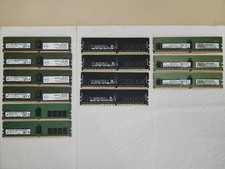
Lot of 13 Various 16GB 2666 Server RAM. For Parts. May have damage, not tested.
$500.00
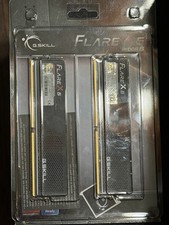
G.Skill Flare X5 DDR5-6000 RAM/Memory 32GB(2x16GB) 36-36-36-96 1.35V
$385.00
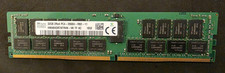
SK HYNIX 32GB 2RX4 PC4 2666V ECC SERVER RAM
$199.00

TF/SD Card Adapter Camera Reader Android Type-c For iPhone17 Pro Max Plusm lot
$573.98

USB 3.0 Flash Drive 32GB 64GB 128GB Memory Stick Thumb Stick Lot Pack
$826.09

Kingston 32GB 64GB 128GB 256GB USB 3.0 Flash Drive Thumb Memory Stick Pen lot
$285.90
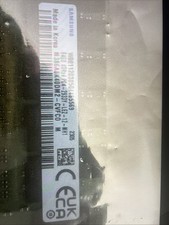
M386A8K40DM2-CVF SAMSUNG 64GB (1X64GB) 4DRX4 PC4-2933Y SERVER MEMORY
$1400.00

USB 3.0 Micro SD SDHC TF Card Reader Memory Adapter for PC Laptop Camera lot
$3.75

5 in 1 Memory Card Reader USB 3.0 OTG Adapter SD Card Reader For iPhone/iPad LOT
$9.99
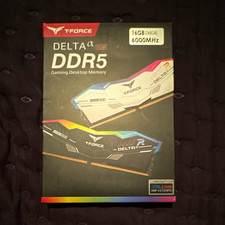
T-FORCE DELTA α RGB DDR5 16GB (2x8GB) 6000MHz DIMM Desktop Memory Kit
$225.00


 Reply With Quote