

 Reply With Quote
add my name to list of people who are having problems with printers under knoppix

i have a d145 i used the print set up in knoppix but at the end i went to test and the message said page sent to printer successfuly but it never printed ??????? how do i set up a hpd145 printer i have it connected to a usb port? thanks for your help i am new to knoppix.

add my name to list of people who are having problems with printers under knoppix
me too. especially the fact that even IF you do get your printer working in linux odds are you will have to set it up under MULTIPLE different programs to get anthing worthwhile, (the proud owner of a NEW canon i850 that Linux HATES!)
Using the 2002-12-12 release:
I went through the KDE wizard to setup my HP PSC 750, and that went smoothly. Printing the test page however, didn't.
After rooting around the /proc/bus/usb, I noticed the permissions might be wrong. I tried to change it using chmod, however I have permission denied due to a read only fs.
If I could only get this HP PSC 750 working properly on my parent's machine! I didn't even dare try scanning !
Hmmm "Persistent Home CD" seems to solve some USB issues, although nothing is mentioned about printers...
Can I get my HP Laserjet 4 Plus to work on KNOPPIX or am I too old?
Should not be a problem (even for an old hippy) the hplj4+ is old so it's well supported.
In the past I've had my hplj4+ running with several linux distros, but it is now my wifes printer so hands off to me.
What problems are you having?
Are you running from CD or a hdd install?
rock
I am running from the CD.
Just get "EMPTY PRINT COMMAND"
I've got a new computer still in the wrapper waiting to become a LINUX box, but.............
The oldhippy got the printer working!!!!
But, based on that success I unwrapped my new Compaq Presario 6000 and tried to install KNOPPIX. First thing WinXP started and showed me a screen where I would agree to bend over for the XP install. Hey, I ain't going to use it so DON'T AGREE! Shut it down, restart into BIOS and selected boot from CD, tried to install KONPPIX but no go. Tried to partition from floppy using Partition Commander, no go!! Looked on the WEB for help, somebody said that I was blocked by M$. Is this true?
Does anybody need a unused 60gig HD?
I can't get the HP 4L running from the CD version. It looks like it's working, but it doesn't.
Thanks for your help.
I could use a 60GB HD.... whats the catch? =)Originally Posted by oldhippy
 Posting Permissions


Netac DDR4 32GB 16GB DDR4 3200MHz UDIMM C16 Desktop Internal Memory RAM Kit
$99.99

16GB KIT (2x8GB) DDR4 Gamer Desktop RAM PC4 MIXED BRANDS
$65.00

Samsung 8GB DDR4 SO-DIMM PC4-3200AA 260-Pin RAM M471A1G44BB0-CWE Module
$29.25

A-Tech 8GB DDR3 1600 PC3-12800 Laptop SODIMM 204-Pin Memory RAM PC3L DDR3L 1x 8G
$21.68
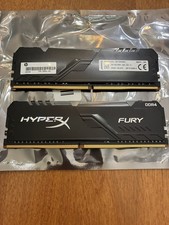
Kingston HyperX Fury 16GB (2x8GB) RAM DDR4 3200MHz HP32D4U8S8HC-8XR
$70.00

MINT Micron Cisco 32GB PC4-2400T DDR4 2Rx4 RDIMM RAM MTA36ASF4G72PZ-2G3 LOT
$159.99
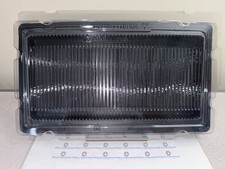
50x RAM Box Tray DDR2 DDR3 DDR4 DDR5 ESD DIMM Memory Shipping Storage Transport
$9.99

Major Brand 16GB (2x8GB) PC3-12800U DDR3-1600MHz DDR3-12800 DESKTOP RAM NON-ECC
$29.99

Corsair Vengeance DDR3 8GB 16GB 32GB 1866MHz PC3-14900 Desktop RAM Memory DIMM
$85.00

RAMAXEL Lenovo 32GB LPDDR5X CAMM2 7500MHz Laptop RAM | UNTESTED
$445.00