
I'm not positive, but I believe Ndiswrapper is written to best use the WinXP drivers & not Win98 drivers. So try the WinXP drivers.Originally Posted by zx2max


I'm not positive, but I believe Ndiswrapper is written to best use the WinXP drivers & not Win98 drivers. So try the WinXP drivers.
thanks i'll give that a try.
Yeah try a driver for Windows 2k or Xp....
I'm new to linux too but tonight I had been lucky...
with knoppix 4.0.2 (live cd) on a sony laptop without ndiswrapper
I ran iwconfig to see that eth1 was my interface wi-fi because I've got wireless extension...
knoppix@0[knoppix]$ iwconfig
lo no wireless extensions.
eth0 no wireless extensions.
eth1 IEEE 802.11g ESSID:"USR9106"
Mode:Managed Frequency:2.462 GHz Access Point: 00:C0:49:5D:8D:43
Bit Rate:54 Mb/s Tx-Power:50 dBm Sensitivity=0/3
Retryff RTS thr
Power Management
Link Quality=53/94 Signal level=-42 dBm Noise level=-95 dBm
Rx invalid nwid:0 Rx invalid crypt:0 Rx invalid frag:0
Tx excessive retries:0 Invalid misc:0 Missed beacon:0
sit0 no wireless extensions.
knoppix@0[knoppix]$
I had to set ESSID, Access Point and Key of encription with
su root
iwconfig eth1 essid USR9106 ap 00:C0:49:5D:8D:43 key sxxxxxxxxxxxxxxxxxxxxxxxxx
with xxxxxxx that in ascii is your key (if enabled)
than (with the gateway already DHCP enabled) I ran from menu Network/Internet the Network card configuration (actually I don't remember if I tried it also with knoppix 3.7 o ubuntu 5.10...so I run to try it)
and the system got his IP 192.168.1.2 and so on...
knoppix@0[knoppix]$ ifconfig
eth1 Link encap:Ethernet HWaddr 00:0E:9B:01:F8:22
inet addr:192.168.1.2 Bcast:192.168.1.255 Mask:255.255.255.0
inet6 addr: fe80::20e:9bff:fe01:f822/64 Scope:Link
UP BROADCAST RUNNING MULTICAST MTU:1500 Metric:1
RX packets:11898 errors:95 dropped:0 overruns:0 frame:95
TX packets:12284 errors:0 dropped:0 overruns:0 carrier:0
collisions:0 txqueuelen:199
RX bytes:10432154 (9.9 MiB) TX bytes:1855399 (1.7 MiB)
Interrupt:11 Memory:e0ea0000-e0eb0000
ciao
leo
i tried using the .inf file in the winxp drivers folder on the dlink cd but i think it is the same file no matter what version of windows. it has the same name in all folders and when i try it i get a msg that says its already installed. now when i do the dmesg i dont understand all the stuff it displays but at the end it says:
Code: Bad EIP Value <3> ndiswrapper (wrapperinit:1645): loadndiswrapper failed (11) check system log for messages from 'loadndiswrapper'
Ryan
It seems as if that driver file isn't compatible w/ ndiswrapper. You'll have to do alittle googling to find a D-link driver that is compatible w/ your chipset and ndiswrapper. It's unfortunate that ndiswrapper doesn't support more drivers.
i found something at http://www.linux-wlan.org/index.html but i am still trying to figure out how to install it.
one of the steps during the installation asks for an alternate target install root directory on host. What should i enter for a directory?
Is your card compatable with that software? I'm looking @ the FAQ and it lists
The following vendors are selling hardware using a similar design as the Intersil PRISM card. The following vendors have proven to have compatible hardware:
Zoom Telephonics
Intalk/Nokia
Samsung (Korea)
DDBTEL (Taiwan)
GemTek (Taiwan)
MELCO (Japan)
Bay Networks
If you have a card that is not supported by the Linux WLAN project, then you might want to check the Linux Wireless LAN HOWTO ( http://www.hpl.hp.com/personal/Jean_Tourrilhes/Linux/ ), where you can find a list of other known Linux WLAN drivers.
Hi,
I followed the instructions from previous posts to install my wireless card driver and I got it partly working. The driver gets installed successfully but the power led is on but the link led is dimmed. When I try to access a website with a mozilla it says its not found. I think I have the settings properly configured but I am not sure if I am missing anything. I specified the essid, key, channel, access point and mode but I still get this problem. Also, when i go to the control center and go to internet/network, wireless network, all of the options are greyed out and I can't do anything. Does anyone know how to solve this problem? Any help would be appreciated. Thanks,
codegirl269
 Posting Permissions


Dell 6P85J 4TB ST4000NM0063 7.2k 6Gb/s 3.5” SAS SED Hard Drive with Tray
$39.99

Western Digital HUS726T4TAL5204 4TB 7.2K SAS 12Gb/s 3.5" 512e HDD NetApp X375A
$64.00

DELL 2TB Enterprise HDD (7200RPM, 3.5", SATA III, 128MB Cache) HUS722T2TALA600
$49.95

Seagate ST500DM009 BarraCuda 500 GB 3.5" SATA III Desktop Hard Drive
$14.99

HGST HUA723030ALA640 3TB SATA 7200 RPM 3.5 in Enterprise HDD | 0F14044 (100%)
$45.00
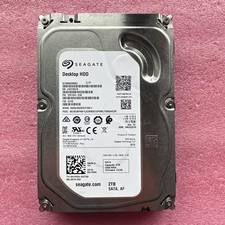
2TB Seagate Barracuda ST2000DM001 7200RPM SATA 6Gbps 64MB Cache 3.5" HDD
$39.95

Dell ST6000NM0034 1HT27Z-150 NWCCG 6TB SAS 3.5 7.2K ENTERPRISE SERVER DRIVE
$68.99

HGST HUS724040ALA640 HDD 4TB SATA 6Gb/s 7.5K 3.5" 0F19459 512 b/s
$78.00
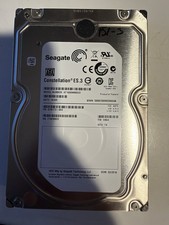
Seagate Constellation ES.3 3.5 in Enterprise HDD | ST2000NM0033
$40.00

Seagate ST12000NM0127 12TB 256MB 7200RPM 3.5" SATA 6.0Gb/s Enterprise Hard Drive
$318.99

 Reply With Quote