


 Reply With Quote
There is nothing we can do about this. Just ignore this SUSE warning and continue, it will work OK. The no-space warning is invalid, because .cmg images are read-only. Check with SUSE team how-to disable this warning.


I installed Thunderbird 1.5beta from the klik site (by clicking on the download button). It seemed to install ok, and it runs fine. But when I checked in YaST later on to look into a package, I noticed an 'out of disk space' error message for /tmp/app/1. I took a look in there and there was the thunderbird clik install. How can I fix this disk space error? Here's a look at my /etc/fstab if that helps. There's around 15GB of free space on my root partition.
Code:linux:~ # cat /etc/fstab /dev/hda5 / reiserfs acl,user_xattr 1 1 /dev/hda6 /home reiserfs acl,user_xattr 1 2 /dev/hda1 swap swap defaults 0 0 proc /proc proc defaults 0 0 sysfs /sys sysfs noauto 0 0 usbfs /proc/bus/usb usbfs noauto 0 0 devpts /dev/pts devpts mode=0620,gid=5 0 0 /dev/hda2 /data1 auto noauto,user 0 0 /dev/hda3 /data2 auto noauto,user 0 0 /dev/cdrecorder /media/cdrecorder subfs noauto,fs=cdfss,ro,procuid,nosuid,nodev,exec,iocharset=utf8 0 0 /dev/dvdrecorder /media/dvdrecorder subfs noauto,fs=cdfss,ro,procuid,nosuid,nodev,exec,iocharset=utf8 0 0 /dev/fd0 /media/floppy subfs noauto,fs=floppyfss,procuid,nodev,nosuid,sync 0 0 /tmp/app/1/image /tmp/app/1 cramfs,iso9660 user,noauto,ro,loop,exec 0 0 /tmp/app/2/image /tmp/app/2 cramfs,iso9660 user,noauto,ro,loop,exec 0 0 /tmp/app/3/image /tmp/app/3 cramfs,iso9660 user,noauto,ro,loop,exec 0 0 /tmp/app/4/image /tmp/app/4 cramfs,iso9660 user,noauto,ro,loop,exec 0 0 /tmp/app/5/image /tmp/app/5 cramfs,iso9660 user,noauto,ro,loop,exec 0 0 /tmp/app/6/image /tmp/app/6 cramfs,iso9660 user,noauto,ro,loop,exec 0 0 /tmp/app/7/image /tmp/app/7 cramfs,iso9660 user,noauto,ro,loop,exec 0 0
There is nothing we can do about this. Just ignore this SUSE warning and continue, it will work OK. The no-space warning is invalid, because .cmg images are read-only. Check with SUSE team how-to disable this warning.
Thanks for the quick reply. I appreciate it.
/tmp/app/... are just Disk Images that are only as big as they need to be in order to contain the resprective application. So this is normal and intended. SUSE thinks the disk is "running out of space", but in fact the "disk" is _designed_ to be no larger than the application it contains.
This has nothing to do with your real hard disk...
Greetings,
probono
 Posting Permissions


IBM System X3850-X5 Server w/4x Intel Xeon E7-4870 CPU , 512 GB DDR3 RAM,NO HDD
$1299.99

Unused IBM 09P0037 MAINBOARD For RS/6000 7044-170 P-Series
$375.00

IBM QRadar xx29 2x Xeon E5-2650v4 2x 900W PSU M5120 12x 3.5" Bay Server No RAM
$179.99

IBM ADP Server Type 7870 AC1 NO HDD | 128GB RAM PC3L | 2 x Xeon E5620
$199.99

IBM SYSTEM X3500 M3 SERVER 7380AC1 TOWER Server XEON E5620 8GB RAID SEE NOTES
$108.92

IBM Power S824 12Bay 4U Server - 2x Power8 CPU, 512GB DDR4, MT: 8286-42A
$1731.00

IBM 02YC027 Seagate ST2400MM0129 2.4TB 10K SAS 12Gb/s 2.5" Server Hard Drive
$200.00

IBM Power 8 S822L Server 8247-22L POWER8 Enterprise 256GB RAM 2x 00KV626 CPU
$999.99

Rare Vintage IBM 93ZZ PowerPC Server Board - MCM Ceramic CPU - 40N1844 - 1.1 lbs
$49.99
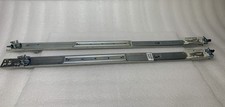
IBM Server Rackmount Sliding Rail Kit ( Part Numbers: 00D9375 / 00D9374 )
$24.99