

 Reply With Quote
Have you tried using Windows Disk Manager? Just Right-Click on the "My Computer" icon and select manage. From there go to the disks and select you USB pen and try to format it from there. Hopefully it'll work.


Hello again,
I finally got my hands on a USB Drive, and figured I'd create a persistent homedir for knoppix. So, I loaded knoppix, got it working, and started up the persistent homedir wizard. I got to the point where it began to make the homedir... It went up to about 96%, then froze. I waited for about half an hour, then decided to take out the drive. When I rebooted, I couldn't load from the USB drive, so I loaded from knoppix. However, I couldn't mount the drive. When I tried, it said: "error: I could not determine the filesystem type, and none was specified). So, I tried booting into Windows and reformatting the drive. Got an error there, too... It said something to the extent of: "Could not format the drive, error in ioctl call", nor could I access the drive with windows...
So, now I have an inaccessable USB Drive, and am trying to format it or change it so that I am able to access it in some way. From what I understand, it was formatted into a RAW partition, which is why I can't access it now. Is there something in Knoppix or a program in Windows I could use to fix this?
Thanks,
illu45
EDIT: Tried making a new partition table on the USB Drive with Qtparted... It says: "It Was Not Possible To Make a New Partition Table"
Have you tried using Windows Disk Manager? Just Right-Click on the "My Computer" icon and select manage. From there go to the disks and select you USB pen and try to format it from there. Hopefully it'll work.
These drives can be strange beasts as there are several _standards_ (oxymoron!) to the information contained in the boot sector.
I find it best to just clean and repartition any drive I purchase before use. This of course can be a problem, as you have learned, as some partition editors will just not understand what they are dealing with. Don't forget that you need to be _root_ in order to save any changes from a GNU/Linux system and just keep trying different editors (from any os) until you find one that works with your drive.
 Posting Permissions


Lenovo ThinkStation P520c Intel Xeon W-2133 6-Core 3.60GHz -NO RAM/ HDD/ GPU/ OS
$127.54

Dell EMC PowerEdge R440 Xeon silver 4215 2.5GHz 16 GB ram 2x 550W PSU No HDD
$275.00
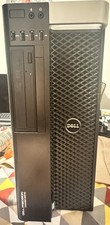
Dell Precision T5810 Xeon E5-2690 v4 64GB DDR4 512GB SSD 1TB Quadro K2200 WiFi
$799.00

Intel Xeon Phi 5110P 60-Core 1.053GHz Coprocessor
$50.00

Intel Xeon E5-2699 V4 2.20GHz 55M 22-CORES LGA2011-3 Server Processor 145W SR2JS
$84.49

Intel Xeon E5-2680 V2 2.8GHz 10-Core 25MB 8GT/s SR1A6 LGA2011 B Grade Server CPU
$7.95

Dell Precision T5820 Workstation 3.70GHz W-2135 No RAM/ GPU/ HDD/ OS
$179.98

Dell Precision T7820 2x Xeon Gold 6130 2.10GHz 950W No RAM GPU HDD 4x SATA
$374.48

Dell Precision Tower 7810 Xeon E5-2630 v3 @ 2.40GHz , 32GB Ram, NO HDD, NO OS
$239.99
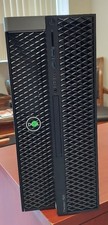
Dell Precision T7820 Dual Xeon 4214R 48GB RAM 512GB + 1TB Quadro P400 Win 11
$699.00