

 Reply With Quote
Looks interesting


This is a tutorial on how to upgrade your just-installed KNOPPIX to debian unstable. I personally belive that using the sid repositories is better than using unofficial repositories so you can get the latest software.
The first step is to install knoppix. Boot from the CD, change things to your liking, and run the hdinstall script. Restart your computer.
Now that you've restarted, you should see the KDM login manager come on screen. Select the "console login" option. You will no be in a console with a login prompt. It should say something like this: "yourhostname login:" Log in as root. You will now have a root (#) prompt.
Type "vim /etc/apt/apt.conf" to edit your apt configuration file. Change the line APT:efault-Release "testing"; to APT:
Now edit your /etc/apt/sources.list file so it looks something like this:
Good, now that that is set up, quit vim and get ready to do some apt-ing. Enter the following commands:Code:#/etc/apt/sources.list # OFFICIAL-Security deb http://security.debian.org/ stable/updates main contrib non-free deb http://security.debian.org/ testing/updates main contrib non-free # OFFICIAL-Stable deb http://ftp.debian.org/debian/ stable main contrib non-free deb http://non-us.debian.org/debian-non-US/ stable/non-US main contrib non-free # OFFICIAL-Testing deb http://ftp.debian.org/debian/ testing main contrib non-free deb http://non-us.debian.org/debian-non-US/ testing/non-US main contrib non-free # OFFICIAL-Unstable deb http://ftp.debian.org/debian/ unstable main contrib non-free deb http://non-us.debian.org/debian-non-US/ unstable/non-US main contrib non-free
The dist-upgrade command will probably prompt your to remove many large packages. When I did it, the dist-upgrade command told me it had to remove all of KDE, for instance. Don't worry, you can install it later.Code:# apt-get update # apt-get dist-upgrade
When you are upgrading, you will probably encounter an error in which one package cannot overwrite another packages files. your apt-get process will end with an error like "error processing package: /var/cache/apt/archives/blahblah-2.3.deb". You can fix that like this.
Eventually, the long process will end. You will probably want to reinstall KDE, GNOME, CUPS, etc. (if they weren't already removed) with their GCC-3.3 (or whatever unstable is currently at; it's GCC-3.3 at the time of this writing):Code:# dpkg --force overwrite -i /var/cache/apt/archives/blahblah-2.3.deb # apt-get install -f # apt-get dist-upgrade
The KDE and GNOME metapackages for unstable are (at the time of this writing), version 3.1.1 and 2.2.1, respectively. When you have reinstalled all the necessary packages, restart your computer enjoy your new Debian-SID computer. It should now function identically to any other regularly installed SID system.Code:#apt-get remove kdelibs #apt-get install kde #apt-get install gnome #apt-get install mozilla mozilla-xft
Looks interesting
BTW, I tried out this tutorial and it should work with both 3.1 and 3.2.
Does this remove all the Knoppix related stuff in the process?
For example "dpkg -l | grep -i knoppix" currently gives me a list of about 20 packages that seem to be knoppix custom packages. I'm not in the mood to find out whether removing them is going ot break anything cos I haven't got the time to fix it at the minute!
Thanks!
If you want, you can remove the knoppix-* packages with dpkg --remove packagename or apt-get remove packagename, whichever suits you. The knoppix packages don't hurt anything being there unless dpkg asks you to remove them during a dist-upgrade.
would this work to get woody if you replaced the line with "stable" where apropriate?
It would work to some extent, but you would not have all of the versions of woody packages because some packages on woody are actually lower versions than the packages that come with Knoppix.
This may be a dumb question, but hey i am a relative newbie, so it's expected of me. If I have the debian cd roms can I use them to install some missing programs I need?
You can use them but you will need to use apt-cdrom to add them to your sources list you can not enter them manually. Look at man apt-cdrom for more information.Originally Posted by Rono64
Sorry, it's unclear to me why you would want to do this - why not simply install Debian?
 Posting Permissions


GIGABYTE A520M DS3H AC AMD AM4 Motherboard mATX
$59.99

Intel H310 LGA1151 8-9th Gen DDR4 M.2 NVMe mATX Motherboard IO Shield Battery
$54.99
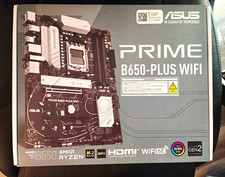
ASUS PRIME B650-PLUS WIFI ATX AMD AM5 Motherboard
$120.00

Intel H81 Motherboard M.2 NVMe LGA 1150 mATX w/ IO Shield (Random Slot Color)
$29.90

ASUS PRIME B360M-C MicroATX Intel LGA1151 DDR4 HDMI VGA USB RJ-45 Audio
$34.99

GIGABYTE B365 HD3 LGA1151 Intel 9th Gen motherboard
$59.99

ASRock B550M PRO4 AM4 AMD B550 SATA 6Gb/s Micro ATX AMD Motherboard
$76.49

ASRock B650M Pro RS WiFi AM5 AMD B650 SATA 6Gb/s Micro ATX Motherboard
$101.99
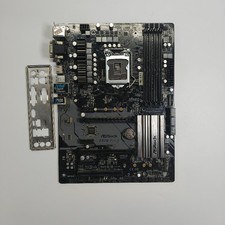
ASRock Z370 Pro4 LGA 1151 Z370 HDMI USB 3.1 2 Ultra M.2 DDR4 ATX Motherboard
$75.00

ASUS B85M-G / B85M-G PLUS LGA1150 DDR3 Micro ATX Motherboard HDMI Support 4thCPU
$45.00