

 Reply With Quote
could some one give me some kind of idea of how much net time and what speed they are on.
so that I could decide if this is possible for me to do
thanks


This was a fantastic way for me to transition to a full debian install. Thanks so much!
update:
I used this approach 4 times; on the 4th, a week after the other three, apt-get dist-upgrade downloaded everything, but then failed because of perl problems, spitting out stuff like along the lines of
debconf: Perl may be unconfigured [...]
Googling stuff suggested that perl was essential to the apt-get process, but that it also got hosed during the apt-get process, probably because stuff at Debian.org had changed some dependencies...
I am not sure what exactly fixed it (an hour of messing around, basically), but in the end I know it had to do with my manually installing perl from the
http://packages.debian.org/unstable/perl/
site -- at least enough to really break it by running dkpg -i on anything that had "perl" it (!), then running dkpg -f install to finally wake up and fix it! (initially, dkpg -f install would fail like everything else).
I know that's not a lot of detail, but if someone else gets in that position, it will be better than anything I found on the net. Moral of the story seems to be that you can get in to a catch-22 situation when updating perl, and that by manually installing at deb or two, you can get dkpg -f install working enough again to actually fix it for you.
could some one give me some kind of idea of how much net time and what speed they are on.
so that I could decide if this is possible for me to do
thanks
I have DSL -- at around 170kps, downloading took about an hour, I guess. I can't imagine doing it with a dial-up connection.Originally Posted by spottyrover
Hi i've tried to follow your upgrade to unstable but I do not seem to be getting anywhere
I hope someone can help
I am using a clean install of knoppix 3.6
installed to hard drive by sudo knoppix-installer
I cahanged the source list to
# /etc/apt/sources.list for Knoppix
# If you want to do a "full upgrade", you should first
# upgrade the Packages from Debian/unstable (KDE & Co.)
# before doing a (dist-)upgrade for Debian/testing.
#
# See sources.list(5) for more information, especialy
# Remember that you can only use http, ftp or file URIs
# CDROMs are managed through the apt-cdrom tool.
# Security updates for "stable"
deb http://security.debian.org stable/updates main contrib non-free
deb http://security.debian.org testing/updates main contrib non-free
## Stable
#deb http://ftp.de.debian.org/pub/debian stable main contrib non-free
#deb http://ftp.de.debian.org/pub/debian-non-US stable/non-US main contrib non-free
# Stable Sources
#deb-src http://ftp.de.debian.org/pub/debian stable main contrib non-free
#deb-src http://ftp.de.debian.org/pub/debian-non-US stable/non-US main contrib non-free
# Testing
#deb http://ftp.de.debian.org/pub/debian testing main contrib non-free
#deb http://ftp.de.debian.org/pub/debian-non-US testing/non-US main contrib non-free
# Testing Sources
#deb-src http://ftp.de.debian.org/pub/debian testing main contrib non-free
#deb-src http://ftp.de.debian.org/pub/debian-non-US testing/non-US main contrib non-free
# Unstable
#deb http://ftp.de.debian.org/debian unstable main contrib non-free
#deb http://ftp.de.debian.org/debian-non-US unstable/non-US main contrib non-free
# Unstable Sources
#deb-src http://ftp.de.debian.org/debian unstable main contrib non-free
#deb-src http://ftp.de.debian.org/debian-non-US unstable/non-US main contrib non-free
# Experimental
#deb http://ftp.de.debian.org/debian ../project/experimental main contrib non-free
# Experimental Sources
#deb-src http://ftp.de.debian.org/debian ../project/experimental main contrib non-free
# Java
#deb ftp://ftp.gwdg.de/pub/languages/java/linux/debian woody main non-free
#deb-src ftp://ftp.gwdg.de/pub/languages/java/linux/debian woody main non-free
#deb ftp://ftp.gwdg.de/pub/languages/java/linux/debian unstable main non-free
#deb-src ftp://ftp.gwdg.de/pub/languages/java/linux/debian unstable main non-free
## More wireless stuff
# deb http://debian.isg.ee.ethz.ch/public woody madwifi
# deb-src http://debian.isg.ee.ethz.ch/public woody madwifi
# deb http://debian.isg.ee.ethz.ch/public woody airo-mpi
# deb-src http://debian.isg.ee.ethz.ch/public woody airo-mpi
# deb ftp://ftp.tcweb.org/pub/debian unstable main
# deb-src ftp://ftp.tcweb.org/pub/debian unstable main
## NX stuff
# deb http://www.kalyxo.org/debian/ experimental main
# ndiswrapper
# deb http://rigtorp.se/debian unstable/
# deb-src http://rigtorp.se/debian unstable/
## Blades Repository (pppoeconf & co)
# deb http://people.debian.org/~blade/testing ./
# deb-src http://people.debian.org/~blade/testing ./
## deb cdrom:[Debian GNU/Linux 2.2 r3 _Potato_ - Official i386 Binary-1 (20010427)]/ unstable contrib main non-US/contrib non-US/main
## Knoppix special packages resource at LinuxTag HQ
# deb http://developer.linuxtag.net/knoppix ./
# deb-src http://developer.linuxtag.net/knoppix ./
# deb http://snapshot.debian.net/archive pool gcc
# deb-src http://snapshot.debian.net/archive pool gcc
#steve
#Official-Stable
deb http://ftp.debian.org/debian/ stable main contrib non-free
deb http://non-us.debian.org/debian-non-US/ stable/non-US main contrib non-free
#Official-testing
deb http://ftp.debian.org/debian/ testing main contrib non-free
deb http://non-us.debian.org/debian-non-US/ testing/non-US main contrib non-free
#Official-UnStable
deb http://ftp.debian.org/debian/ unstable main contrib non-free
deb http://non-us.debian.org/debian-non-US/ unstable/non-US main contrib non-free
and the apt.conf to:
APT:efault-Release "unstable";
APT::Cache-Limit 10000000;
Apt::Get::Purge;
then I did a apt-get update
with the result of
root@box:~# apt-get update
Err http://security.debian.org stable/updates/main Packages
Could not connect to security.debian.org:80 (1.0.0.0), connection timed out
etc
could some one tell me what I am dooing wrong
by the way I can surf the net ok with adsl via a lan so I assume that my connection is ok
thanks
sorry.... i am a newbie.... how do i change the line APT:
 Posting Permissions


Dell EMC PowerEdge R740 8 Bay Server w/ 32GB RAM 2x GOLD 6132 2x 1600W PSU H730p
$499.88

Dell PowerEdge R740xd Dual Intel Silver 4116 @2.1GHz 32GB HBA330 24Bay Server
$525.00

Dell EMC PowerEdge R440 Xeon silver 4215 2.5GHz 16 GB ram 2x 550W PSU No HDD
$275.00

Dell Intel X710-DA2 5N7Y5 Dual-Port 10GbE SFP+ PCIe 3.0 x8 Network Adapter
$27.50

Dell PowerEdge R640 1U 8SFF Server Barebones 2x Gold 5120 64GB H330 2x 750w
$538.88

Dell Poweredge R630 2x Xeon E5-2680 v3 2.5ghz 24-Cores / 64gb / Raid / 2x 1Tb
$374.99

Dell PowerEdge R640 1U 8SFF Server Barebones 2x Gold 6150 64GB 2x 750w
$218.88
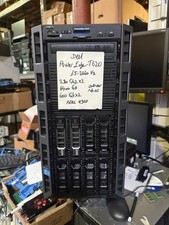
Dell PowerEdge T620 2x E5-2620 v2 @ 2.20GHz, 64GB 2X600GB HDD DVDRW H310 NO OS
$449.99

Dell EMC VxRail E560F 10-SFF 2*Gold 6230R 2.1GHz No RAM HBA330 iDrac Ent Server
$349.99

Dell Poweredge R630 2x Xeon E5-2680 v3 2.5ghz 24-Cores | 32gb | HBA330 | 2x 1...
$324.99