-
swap file configuration
I have knoppix 4.02 installed on my laptop (packard bell 800mhz 128ram) and it's working correctly, but kind of slow. I wanted to configure my swap file behaviour, but when I try this in knoppix-configure-config swap file it says: no usable swap file. QTparted and KDE system guard say it's there and working. I created it with cfdisk (1GB) during installation on harddisk.
Can anyone explain how this is possible and maybe what I should do??
-
Senior Member
registered user
Swap file configuration
Any _full featured_ desktop OS is going to be a little sluggish on an 800mhz machine with only 128mb ram.
If possible, add another 128mb chip. You will see an instant improvement.
As to your swap space. The large size may actually slow your system down further as there is now more to manage.
The rule of thumb is 1 to 2 times your physical memory, unless of course you are doing disk intensive tasks such as video editing or manipulating large iso's.
At a command prompt, issue the command: mkswap /dev/your_swap_device and check /etc/fstab to make certain that it is listed.
-
thanx 4 the help.
knoppix is running slow even considering my specs. It's running slower than my other desktop that has 96mb's ram. I checked fstab but it doesn't see a swap and I'm afraid to edit. I'm quite new to linux so...
thanx anyway
-
Senior Member
registered user
swap file configuration
Don't be afraid to edit anything in a Gnu/Linux operating system.
The worst case scenario is your operating system not starting, in which case you would simply boot from a liveCD (knoppix?) and redit your config file to its' last good state. Usually, you would make a backup copy of any config file that you customize and then edit the original. To revert, simply copy the backup over the edited file. To learn (more than presently need to know) about the fstab file, in a terminal window enter the command: man fstab . About the mkswap command: man mkswap . The manual (help) pages are there for everyones use and enjoyment ;-)
This is one of the benefits of an easily (and highly) configurable operating system. Learn to experiment to you hearts content. Nothing is written in stone.
Similar Threads
-
By fr3dt3ch in forum Hardware & Booting
Replies: 1
Last Post: 06-05-2006, 11:30 PM
-
By ddrex in forum Hardware & Booting
Replies: 1
Last Post: 04-07-2005, 04:35 PM
-
By herbyweed in forum Hdd Install / Debian / Apt
Replies: 2
Last Post: 02-07-2005, 06:31 PM
-
By lothario in forum Hdd Install / Debian / Apt
Replies: 2
Last Post: 08-17-2004, 08:46 AM
-
By fjon13 in forum Hdd Install / Debian / Apt
Replies: 2
Last Post: 04-29-2003, 06:13 AM
 Posting Permissions
- You may not post new threads
- You may not post replies
- You may not post attachments
- You may not edit your posts
-
Forum Rules


Commodore 64 Serial Cable 6PIN DIN 1541 1571 C64 128 C128 Disk Drive Printer USA
$10.49

TeensyROM+ TR+ v0.4 Cartridge for C64/128 - w/ Case & 32GB SD Preloaded
$89.50

Commodore VIC-20 Diagnostic Cartridge & Test Harness Set - USA seller
$39.99

Commodore 64 Dead Test & Diagnostic Cartridge & Test Harness Set - USA seller
$39.99
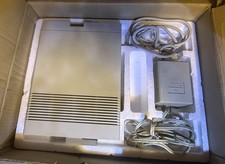
Vtg 128 / 64 Commodore 1541-II Computer Disk Drive in Box 5.25 Floppy (Working)
$89.99

Commodore 128 C128 Computer FOR PARTS / REPAIR Untested Missing Key No Cords
$149.99
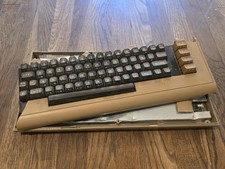
Commodore 64 Vintage Computer System *PARTS/AS IS*
$70.00
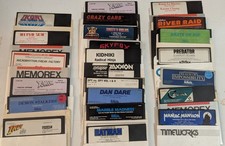
Commodore 64/C64 23 Original Games (Untested /As Is ,no returns )Maniac Mansion
$105.00
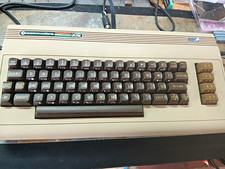
COMMODORE 250466 REPLICA BUILD | NTSC | VIC-II KAWARI | NEW CHIPS
$379.99
Commodore 128 Diagnostic Cartridge & Test Harness Set - USA seller
$39.99



 Reply With Quote