

Ok I've searched till my head spun to find the info so PLEASE excuse me if it has been posted.
I want to accomplish a few things and I need all of your expertise. I understand from searching around that it is problematic or impossible to write to an NTFS partition. With that said, I have a 512MB USB Flash Drive (SanDisk Micro Cruzer). Can someone give me simple directions to be able to allow me to save my custom settings (wallpaper, settings, bookmarks, etc) to the USB drive. Also I downloaded the CD ISO of 4.0.2 and ran it for a little bit and I was unable to do a few things because it kept asking for my username and password. How can I set up an admin account for myself and save it to the thumbdrive?
Simple detailed instructions. I don't really no nothing at all about Linux and the root. I am an expert Windows user and can do anything on a PC. I want to be more versatile and learn Linux.
I GREATLY appreciate everyones help!!!
 Posting Permissions


(New) AMD Ryzen 7 5700X 8 Core 16 Thread AM4 Unlocked 3.4 GHz CPU OEM Tray
$169.99

AMD Ryzen 7 7800X3D 8-Core 16-Thread 4.2GHz/5.0GHz Socket AM5
$275.00

Apple MacBook Air 13.6” M2 8GB 256GB SSD 2022 MLY33LL/A 8‑Core CPU 8‑Core GPU
$529.95
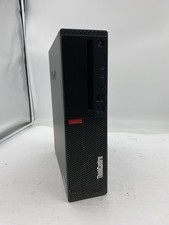
Lenovo ThinkCentre M920S Sff Intel Core i5 8600 8GB 256GB SSD Windows 11 Pro
$94.99

AMD Ryzen 7 9800X3D 8-Core AM5 CPU 4.7GHz 96MB L3 8MB L2 100MHz
$389.99
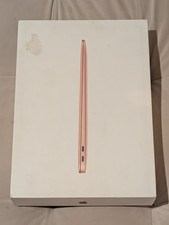
MacBook Air 13 2020 M1 8-Core CPU 7-Core GPU 8GB RAM 256GB Storage Gold
$399.00

Intel Core i9-9900K Coffee Lake 8-Core, 16-Thread, 3.6 GHz (LGA 1151)
$189.99

Lenovo LOQ 15 15.6" FHD 144Hz 8-Core i5-12450HX 16GB 512GB SSD GeForce RTX 4050
$799.00

8-core 10-core GPU baseboard 8654 to PCIE 5.0x16 GPU expansion baseboard
$377.77

CHUWI 15.6'' Laptop Computer Intel Core 8GB RAM 512GB SSD WiFi Windows 11
$269.99


 Reply With Quote