

Hello all,
I decided to dive head first into the Linux universe so far I like it but have come across a few issues with the wireless on my acer aspire: My regular ethernet connects fine to the internet after doing a DHCP discovery e0.
What I did to get my broadcom wireless card turned on I used the wrapper untility with the xp wireless driver for my laptop
then I used the wireless utility to configure my settings I entered my ESID my 128 bit crptokey and set it to managed
when I try to connect to my network it does nothing it says in the utility that no access point is available and ESID is any
when I select the network discovery button my network shows up and when I select it nothing happens?
I have green bars so I know the thing is turned on but it seems to not be getting DHCP from my Dlink router. I'm at school now so I can't provide screen shots as yet but I will post them later to this thread any help of suggestions of things to try would be much appreciated also is there a link to the linux equivalent commands such as ipconfig and ping? I think one is iwconfig?
Thanks,
-Eric
Ok here is destop snap of my current network situation:
Any help provided would be much appreciated!
 Posting Permissions


Dell 6P85J 4TB ST4000NM0063 7.2k 6Gb/s 3.5” SAS SED Hard Drive with Tray
$39.99

Western Digital HUS726T4TAL5204 4TB 7.2K SAS 12Gb/s 3.5" 512e HDD NetApp X375A
$64.00
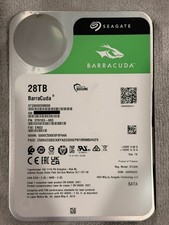
Seagate BarraCuda 28TB 7.2K SATA 6Gb/s 3.5in Internal HDD ST28000DM000 - Tested
$670.00

Seagate ST12000NM0127 12TB 256MB 7200RPM 3.5" SATA 6.0Gb/s Enterprise Hard Drive
$318.99

Seagate ST4000NM0034 Enterprise 4TB 7200RPM SAS 12Gb/s HDD v4
$39.00

Seagate ST500DM009 BarraCuda 500 GB 3.5" SATA III Desktop Hard Drive
$14.99

Dell ST6000NM0034 1HT27Z-150 NWCCG 6TB SAS 3.5 7.2K ENTERPRISE SERVER DRIVE
$68.99

HGST HUS724040ALA640 HDD 4TB SATA 6Gb/s 7.5K 3.5" 0F19459 512 b/s
$78.00

DELL 2TB Enterprise HDD (7200RPM, 3.5", SATA III, 128MB Cache) HUS722T2TALA600
$49.95

(ST8000NM0045) SEAGATE ENTERPRISE 8TB 7200RPM 4Kn SATA 6Gb/s 3.5" HARD DRIVE
$199.99



 Reply With Quote