

 Reply With Quote
Under Windows, where were the pictures located?


i am certian this is some where else allready but i cant find it. any how, the windows XP os on my PC has decided to aquire a "unmountable boot volume".
so i am going to try and back up the files on the HD by using linux. i mainly want the pictures, i can access some of the files that are on the HD but i can not find any folders/files that have any think to do with the pictures i so very much desire. (no they are not porn they are family)
any how my question is does any one know how to access thoes files? i am new to linux/knoppix (3.6) so i will screw with it, but if any one can help i will really apreacieate it.
PS: can i get msn working on linux?
Under Windows, where were the pictures located?
usually under C:\Documents and Settings\%username%\My Documents\My Pictures which is translated several ways under Knoppix. These ways depend upon what architecture connects your hard drive. If you are using an EIDE/UATA hard drive it'll likely be /mnt/hda1 where as if it's SATA it'll be /mnt/sda1. Now this is not hard and fast as per the naming of your drive (I can't see what you have and you've not expounded on your system setup) but you should be able to reason out what it is when you see its link on the desktop. You can navigate there using the command line if you want. It's like the old DOS days where you use cd /mnt/hda1/Documents\ and\ Settings/My\ Documents/My\ Pictures/ and then use ls (equates to dir in DOS) to see the contents. This is again assuming your hard drive is on a PATA interface and is the first drive/first (only) partition on that drive. Extrapolate as needed for your system.
'Goon
I couldn't believe the amount of great software you got with KNOPPIX 5.0! I found the xp ntfs support on my home computer worked great, even write access. But, On my friends computer with an xp ntfs drive, I could read the files fine, it even automounted the drive. But when I try to right click the drive and click enable read/write access. It give me an error that it could not do it, saying perhaps the drive is in use by another process. Why did the write access work on my computer and not on my friends? Any ideas on this error or what I need to do to enable the write access? Thanks!
 Posting Permissions


Dell 6P85J 4TB ST4000NM0063 7.2k 6Gb/s 3.5” SAS SED Hard Drive with Tray
$39.99

Western Digital HUS726T4TAL5204 4TB 7.2K SAS 12Gb/s 3.5" 512e HDD NetApp X375A
$64.00

HGST Ultrastar HUS726040AL5210 4TB 7200RPM SAS 12Gb/s Enterprise HDD
$41.00

20TB 7200 RPM SATA III Internal 3.5" White Label Hard drive
$349.99

Seagate Barracuda ST1000DM003 1 TB SATA III 3.5 in Desktop Hard Drive
$23.99

Toshiba DT01ACA100 1 TB 3.5" SATA III 3.5 in Desktop Hard Drive
$24.99

Dell ST6000NM0034 1HT27Z-150 NWCCG 6TB SAS 3.5 7.2K ENTERPRISE SERVER DRIVE
$68.99

Seagate Exos ST2000NX0253 HDD 2TB SATA 7.2K 2.5" 512b/s
$58.00
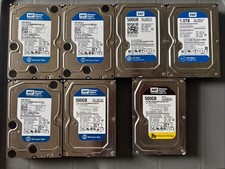
7 Western Digital 3.5" SATA Hard Drives - 5.0TB Total (4x 1TB, 3x 500GB) 7200RPM
$115.00

DELL 2TB Enterprise HDD (7200RPM, 3.5", SATA III, 128MB Cache) HUS722T2TALA600
$49.95