

 Reply With Quote
does anybody have any ideas? i know that you can change the session type when you log in, so do you think there is a way that i could change my kde settings in a different type of session? all of the sessions work fine except defauly and kde


ok well there was this one progress window and i wanted to resize it to be bigger but have it be that same size every time it opend up so i right-clicked on the window bar and went to advanced and clicked on special window settings and then i changed it so that it would automatically resize the window to the size i had it at at the time but when i hit ok t resized all the windows on all of my desktops to the size of the close button, minimize button, and help button and i cant change it back because if i rickt click on the window bar again and go to advanced and special window settings it just opens the window really small so i cant see/do anything just like anything else. the only thing that i have gotten to work so far is the kmenu which is normal but if you click on anything it just opens up in super small size, and i can get konquer to go to fullscreen mode by pushing ctrl shift f....is there anything i can do?????( PLEASE HELP ME!!!!!!!!!!!
does anybody have any ideas? i know that you can change the session type when you log in, so do you think there is a way that i could change my kde settings in a different type of session? all of the sessions work fine except defauly and kde
Posting the same message (or slight variations on the same message) in multiple forums is considered bad form and a form of spam. The topic organization here would rapidly break down if everyone who thought their problem was more important than everyone else's decided to post their problem in many forums to get more exposure. Please pick an appropriate forum and post your problem in only one place within the knoppix.net website.
---
Verifying of md5 checksum and burning a CD at slow speed are important.
is there any commands i could type into the konsole to get it to resize a window ot diable session restore? is there anything that i could do in a different type of session like fluxbox to change the kde settings?
oh ok sorry i didnt mean to spam my problem i just wanted some help...ill just keep my problem posted here and try to refrain from making that mistake again
ok well this time when i turned my comp on even the desktop was resized to the size of about a close button, minimize button, and maximize button. so now im wondering if i could just reinstall KDE so i dont have to reinstall the whole os and lose all of my stuff?
One thing that you could try is to locate where this invalid information about window-sizes is saved, and delete those files.
That just might restore the default settings.
I'd guess it's saved somewhere below hidden .kde directory in your home-directory.
Deleting that directory might also help, but is a bit dangerous. That would likely reset all settings for all KDE-applications. You would also lose things like saved emails (if you use KMail), saved alarm-settings (if you use KAlarm), saved contact-information (if you use KAddressBook) etc...
But if you are confident enough that you don't have any important information saved in any KDE-application, or that you have backups, deleting the .kde directory could help.
ok thank you i will try that...deletnig the .kde directory might be a small sacrifice but if it saves me from having to resintall the os i would be gratefull
lol ok thank you so much! i deleted the .kde folder from a window maker session and then i logged into a kde session and it ran through the desktop settings wizard and stuff and now it is as default as kde gets...more default than fresh off the knoppix cd but at least i have my desktop backthank you for your help, input, research, and most of all...caring
 Posting Permissions


Dell PowerEdge FC430 Blade Server 2x Xeon E5-2630v4 20 Cores FX2 FX2s No RAM/HDD
$119.99

Dell PowerEdge FX2s + 8x FC430 Blades 16x E5-2630v4 160 Cores Rails No PSU/RAM
$699.00

Dell PowerEdge M630 Blade Server 2x Xeon E5-2680 v4, 2F3MP , 4GDP5 ,R10KJ ,JVFVR
$96.60

AS IS READ DESCRIP. Supermicro SuperServer 6026TT-HIBQRF 12-Bay 4x X8DTT-HIBQF
$215.00

NETAPP HCI NAF-1701 SuperMicro Server 4X BLADE H410C 8X GOLD 5120 - 4X S25G NICs
$1999.97

Dell PowerEdge VRTX Rackmount Chassis w/4x PSUs 2x CMC Modules
$399.98
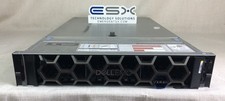
Dell R740XD VxRail P570 24x 2.5” 2U CTO Server– 2x Gold 6240, H740p, 2x 1600W
$699.00

Cisco B200 M3 2x E5-2670V2 10 Core 8x 16GB-128GB Ram Blade Server VIC1240 14900R
$399.00

Dell Poweredge VRTX 25Bay 2.5" 2x PERC 8, 2xCMC, I/O 1GB Pass Through, 4x PS
$578.08

Lot of 3 Dell PowerEdge Blade Server HHB005 x2 HHB006 x1
$256.49