-
Senior Member
registered user
can you set-up a cluster at school with cd's?
johnb
-
Senior Member
registered user
Yes, I had a cluster running with several QUANTAIN CDs. I'd like to have a more permanent hdinstall, however.
What I'd really like is to have 24 clients PXE boot off one server. This server I can access via ssh from anywhere in the school and from home (static ip). It'd really be something to be able to access a cluster from home! I can't get PXE working either....
TIA,
AJG
-
Senior Member
registered user
Please check your other post
johnb
-
Senior Member
registered user
OK, finally I had a chance to play with this! I knoppix-installered 4 PCs on my LAN with QUANTIAN. After fixing lilo and netcardconfig like any ordinary knoppix hdinstall, I took the following steps (thanx to johnb) w/o PXE.
mkdir /mfs
kate /etc/fstab
(added: mfs /mfs mfs dfsa=1 0 0)
kate /etc/mtab
(added: /mfs /mfs mfs rw,dfsa=1 0 0)
/etc/init.d/openmosix restart
All went well when I tried stressing this little cluster with kandel (using openmosixview to see what was going on). The only problem is that I have to issue the commandline /etc/init.d/openmosix restart from a root shell anytime I reboot. Is there a way to have this all start-up at boot up?
TIA,
AJG
-

Originally Posted by
johnb
Does this happen running live or from hard drive install?
johnb
This happens after the hard drive installation and during the openmosix terminalserver configuration.
I tried the steps you described using just regular Knoppix and didn't get any of the errors I encountered with clusterKnoppix.
The only complaint I have is the instructions on coping the CD contents to the seperate partition could be a bit more clear. I wasn't able to do it with the GUI, so I ended up rsyncing the contents of the CD on to the seperate directory.
I also wasn't asked by the terminalserver setup process to configure exporting the filesystem that the CDROM contents were copied to. I manually configured this without much problems. The script defaults to /cdrom. I mounted my that partition as /knoppix. I had to modify the /usr/sbin/knoppix-terminalserver script and the /etc/fstab and /etc/exports accordingly.
-
so...
is ltsp also installed in cluster knoppix?
is there a stripped down version so it can run smoothly on older computer?
-
Hi js290.
I have been fighting with LSTP these last weeks, and I succeded to get terminal server running only copying KNOPPIX image into /cdrom 
My target is to copy there only the contents (so that I could remaster it chrooting onto /cdrom) and then get the terminal server running as well as in image case.
Could you please post your changes to "configure exporting the filesystem that the CDROM contents were copied to".
I understood they should be:
- /usr/sbin/knoppix-terminalserver script
- /etc/fstab;
- /etc/exports.
Better could be a mini how-to.
Thanks in advance for any possible help.
-
-
Error: openmosix not started
Hil,
I hope someone can help with this...
I am testing clusterknoppix 3.4 (5/10) on vmware v4.5.1.
I have created one "master" and one "slave" vm nodes and installed clusterknoppix to the virtual HDD on the master.
I have set this pair up according to the excellent help posted here by johnb.
This seems to work, but sometimes when I execute openmosixview, it gives the error;
openmosix not started
Even though I just started it and the openmosix term server with
/etc/init.d/openmosix restart
/etc/init.d/knoppix-terminalopenmosixserver restart
Also, is there a way to save the setting for knoppix-terminalopenmosixserver script so I don't have to go thru the setup everytime. I have clusterKnoppix installed to the HDD of the virtual machine.
Any help or suggestions appreciated!!
Cheers!
-
Senior Member
registered user
I put /etc/init.d/openmosix restart in /etc/init.d/bootmisc.sh and it works fine!
Good Luck,
AJG
Similar Threads
-
By eris_pluvia in forum Hdd Install / Debian / Apt
Replies: 0
Last Post: 10-19-2004, 03:15 PM
-
By YannLeMerle in forum General Support
Replies: 0
Last Post: 03-07-2004, 04:33 PM
-
By MeSo in forum Networking
Replies: 1
Last Post: 02-17-2004, 02:30 PM
-
By law_student in forum Customising & Remastering
Replies: 12
Last Post: 06-16-2003, 11:52 PM
-
By anibal in forum Hdd Install / Debian / Apt
Replies: 5
Last Post: 06-06-2003, 05:35 PM
 Posting Permissions
- You may not post new threads
- You may not post replies
- You may not post attachments
- You may not edit your posts
-
Forum Rules


Commodore 128 C128 Computer FOR PARTS / REPAIR Untested Missing Key No Cords
$149.99

TeensyROM+ TR+ v0.4 Cartridge for C64/128 - w/ Case & 32GB SD Preloaded
$89.50
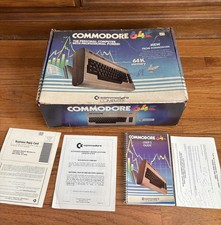
Commodore 64 Computer In Original Box w Cord & User Manual 💥
$149.99

Commodore VIC-20 Diagnostic Cartridge & Test Harness Set - USA seller
$39.99
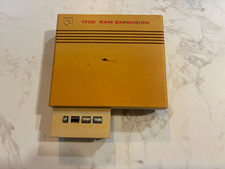
Commodore 1750 512K RAM Expansion REU for C128 / C64 – Tested & Working
$110.00

Commodore 64 Serial Cable 6PIN DIN 1541 1571 C64 128 C128 Disk Drive Printer USA
$10.49

Commodore 1541 Emulator PI1541 HAT with ROTARY, OLED screen, USA Seller
$29.99
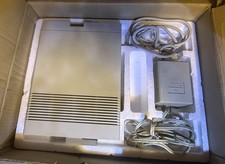
Vtg 128 / 64 Commodore 1541-II Computer Disk Drive in Box 5.25 Floppy (Working)
$89.99
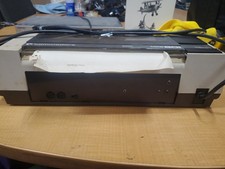
RARE Commodore MPS801 Printer - 1st printer for the 64 - powers on
$70.00

Commodore 64 Dead Test & Diagnostic Cartridge & Test Harness Set - USA seller
$39.99



 Reply With Quote