

 Reply With Quote
Open shell and enter:Choose network adapter from list, select "No=Manually" and enter your data.Code:sudo netcardconfig


I 've tried the Knoppix5.0.1 live linux CD,but I still can not figure out how to get access to the Internet . I've got the following information from my Internet service provider:
No.1 Static IP address
No.2 Subnet mask
No.3 preferred gateway n alternate gateway
No.4 DNS address
However , I have no idea where should these information go so as to configure the network n the Internet . I visit the Control Centre and then the Network configuration part , but I still can not find the fields that the information referred above fits. So can anybody show me the steps in detail on how to configure the network using a static IP address so that I can configure my connection to the network.
Thanks a million
Open shell and enter:Choose network adapter from list, select "No=Manually" and enter your data.Code:sudo netcardconfig
 Posting Permissions


Dell Precision T5820 Workstation 3.70GHz W-2135 No RAM/ GPU/ HDD/ OS
$179.98

Dell Precision Tower 7810 Xeon E5-2630 v3 @ 2.40GHz , 32GB Ram, NO HDD, NO OS
$239.99

Dell EMC PowerEdge R440 Xeon silver 4215 2.5GHz 16 GB ram 2x 550W PSU No HDD
$275.00
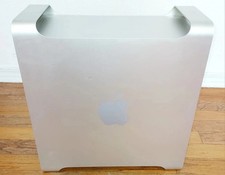
Apple Mac Pro 5,1 • 8‑Core 2.26GHz • 14GB RAM • 128GB SSD + 1TB HDD Dual NVIDIA
$325.00

Intel Xeon E5-2699 V4 2.20GHz 55M 22-CORES LGA2011-3 Server Processor 145W SR2JS
$84.49

Dell Precision T7820 2x Xeon Silver 4114 2.20GHz 950W No RAM GPU HDD 4x SATA
$350.48

Intel Xeon W-2255 SRGV8 3.7GHz 10-Core LGA2066 Server CPU Processor
$249.99

Genuine Intel Xeon W-2145 3.70Ghz 8 Cores LGA2066 CPU SR3LQ Tested USA SELLER
$94.94

Dell PowerEdge FX2s + 8x FC430 Blades 16x E5-2630v4 160 Cores Rails No PSU/RAM
$699.00

DELL Precision T3420 | Xeon 1240v6 | 525GB SSD |16GB RAM |Nvidia GPU |Win11
$149.00