

 Reply With Quote
Boot off the Knoppix cd and launch a shell:Code:su mkdir /media/hdb6 mount -o rw /dev/hdb6 /media/hdb6 mcedit /media/hdb6/etc/fstab umount /media/hdb6


I was tweaking my Ubuntu fstab and I messed up.
I am using Knoppix 4.0.2 CD, in a terminal I entered this: Sudo mcedit /dev/hdb6/ect/fstab
I was able to edit my fstab but when I tried to save it I could not using F2 or the drop down menu.
What am I missing, does anyone know what I may be doing wrong ? This is my work computer and I would be forever grateful if someone could help me please......
sarah
Boot off the Knoppix cd and launch a shell:Code:su mkdir /media/hdb6 mount -o rw /dev/hdb6 /media/hdb6 mcedit /media/hdb6/etc/fstab umount /media/hdb6
I get this: can not create directory /media/hdb6, no such file or directoryCode:mkdir /media/hdb6
mount point /media/hdb6 does not existCode:mount -o rw /dev/hdb6 /media/hdb6
mount /dev/hdb6 already mounted or busyCode:mount /dev/hdb6
Did you boot off the Knoppix cd without clicking on any of the hard drive icons on the desktop?
Did you enter "su" as first command?
Is your existing Ubuntu install located on hdb6 = 6th partition on the secondary hard drive?
More precisely, the second logical drive on the extended partition. Even with 1 primary partition and one exteded partition containing as few as 2 logical drives, the first logical drive on the second (slave) disk on the first IDE controler would be hdb5 and the second logical drive would be hdb6.Originally Posted by ockham23
Now you have a good question there, I do not remember if I did or did not open up the hdb6 icon. Is this important ?
I can answer yes to thisDid you enter "su" as first command?
yes again....Is your existing Ubuntu install located on hdb6 = 6th partition on the secondary hard drive?
I assumed you were somewhat familiar with linux commands. Here's an explanation:
su # become root
mkdir /media/hdb6 # create mount point "hdb6" inside directory "media"; assuming mount point doesn't exist already
mount -o rw /dev/hdb6 /media/hdb6 # mount hdb6 and make it writable; clicking on the desktop icon will mount the drive "read only"
mcedit /media/hdb6/etc/fstab # launch editor
umount /media/hdb6 # unmount partition when you're done
here is what I have, with Ubuntu on hdb6:
/dev/hdb1 reiserfs 13.97 GB
/dev/hdb2 extended 19.75 GB
/dev/hdb5 linux swap 1.12 GB
/dev/hdb6 boot 18.63 GB
/dev/hdb3 reiserfs 19.53 GB
/dev/hdb4 reiserfs 21.27 GB
ok, let me try booting Knoppix CD again and I will make sure I have not clicked on the hdb6 icon, I'll be back.......
regards,
sarah
ockham23,
thank you for the commands explaination, I am under average using linux commands, I have a personal file that I have saved my most important commands, I do a lot of copy and pasting. I wasted about a year with Linspire, (no commands needed) and have been using Ubuntu for about a year and love it.
But anyway, I booted Knoppix up again, made sure I did not open the hdb6 icon, then opened a terminal and tried your commands again but had the same results again as before.
 Posting Permissions

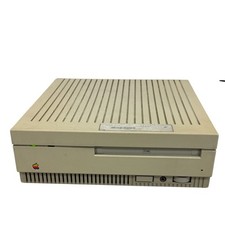
Vintage AppleCD SC Plus External SCSI CD-ROM Drive M3021 (powers on)
$175.00
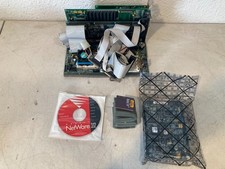
Vintage 486 PC Motherboard IBM CPU ISA Cards RAM Novell NetWare 3.12 Computer
$249.99
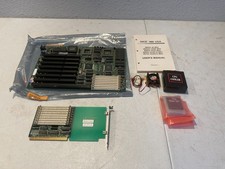
Vintage NICE Plus 486 USA Motherboard Intel i486 DX2 CPU Manual Expansion Card
$224.99
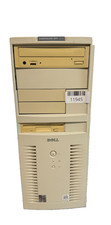
VINTAGE Dell Dimension XPS D233-Pentium II-128MB Ram 13.5GB HDD Matrix GFx W98SE
$229.99
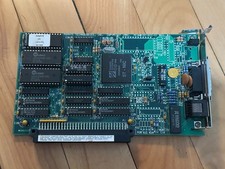
Vintage Macintosh Asante MC3NB (ST-NIC-V) Rev B1 Network Card
$99.00
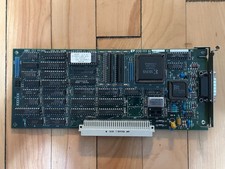
Vintage Radius Pivot II Display NuBus Video Card 632-0030
$149.00
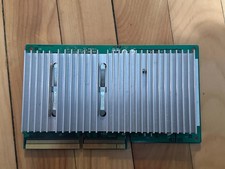
Vintage Macintosh 820-0780-A Processor Card PowerPC 604 for 8500 9500
$49.00
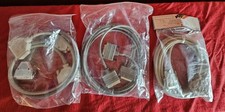
Vintage Computer Cable Lot RS-232 DB25 Serial Parallel Printer Cables NEW & USED
$39.99
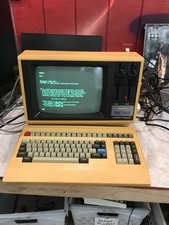
Rare Vintage Sanyo MBC-1150 Terminal With Keyboard CPM2.2 — Boots - DW
$1000.00
Vintage Samsonite Exec Briefcase Classic 70's Style Combo Lock. OMEGA
$34.99