

 Reply With Quote
Question #2: Does it make a difference when you use Konqueror instead of Firefox?


I've been experiencing Knoppix 5.0.1 live Linux-on CD lately .I find the more I explore Knoppix , the more issues
I encounter. My primary issues are as follows:
No.1 I find Knoppix does not support Chinese charaters ,therefore documents as well as net pages written in Chinese
are not readable (unrecognizable code like #@$%&*! instead of Chinese characters).
No.2 I 've configured my networking card correctly n now I can surf the net , but the problem is that the speed
some net pages are loaded n opened on my PC is extremely slow ,sometimes even occuring a load failure .While
this problem will disappear if I surf the Internet under Windows XP OS.
I list my networking hardware n related information below so as to u can help me address my issues accordingly :
My network adapter n MAC address are as follows:
Realtek RTL8139/810X Family PCI Fast Ethernet NIC
MAC address-- 00-0d-87-6d-81-05 (0 as zero not the letter O)
I 've got my static IP address n other essential information like subnet mask , gateway , n DNS. My ethernet adapter
is connected to a Local Area Network in a school apartment which is part of the whole school network that is connected to
the Internet.
Thanks in advance
Question #2: Does it make a difference when you use Konqueror instead of Firefox?
It does not make any difference . It is the same using Konqueror or Firefox.
Maybe there's a problem with DNS resolution. Try this:Add the following line:Code:su mcedit /etc/resolv.confPress F2 to save changes, F10 to quit.Code:nameserver 217.115.138.24
More public name servers: http://www.opennic.unrated.net/public_servers.html
Test new settings withCode:nslookup www.google.com 217.115.138.24
I tried the way u told me , but it does not work,either.
The results are as follows:
Maybe there's a problem with DNS resolution. Try this:
Code:
su
mcedit /etc/resolv.conf
unknown id: mcedit/etc/resolv.conf
Add the following line:
Code:
Nameserver 217.115.138.24
bash: nameserver : command not found
Press F2 to save changes, F10 to quit.
More public name servers: http://www.opennic.unrated.net/public_servers.html
Test new settings with
Code:
nslookup www.google.com 217.115.138.24
Server: 217.115.138.24
Address: 217.115.138.24#53
Non-authoritative answer:
www.google.com canonical name = www.l.google.com
Name : www.l.google.com
Address: 66.249.85.104
Name: www.l.google.com
I know the first message the root shell provided --unknown id: mcedit/etc/resolv.conf--means there is no such a path to such a tool, n the second message--bash: nameserver : command not found--means there is no such a command , but what does the 3rd group of information means is beyond me. So can u tell me sth about it ? N still the issue I topiced is not addressed , using ur way . Perhaps the problem has nothing to do with DNS, but thanks anyway. Can u think about anything esle relating to this issue? Thanx.
The second command is "mcedit[SPACE]/etc/resolv.conf"
I send an e-mail to my friend Kip who inroduced Linux to me , telling him my slow speed problem n he told me:
" It's not the internet connection. The problem is that the software is
running from the CD instead of the hard drive. The CD is slower than
the hard drive. I think Knoppix is best used as a rescue or testing
CD. "
Do u think it ture ???
Yes running a "live" distro is slower, no it's not better to just use it as rescue cd.
Install it to your harddrive and you will see different results. This goes for any "live" distro.
What awful advice.Originally Posted by Rich_Es
1) not all live CD are intended to be installed to hard disk, and Knoppix is known to have problems when installed.
2) while a Live CD is slower on things like loading programs because loading a program from an optical disk is generally slower than running it from hard disk, actually running the program once loaded shouldn't be slower at all. In some cases, like a browser, it may actually be faster since any temporary files (cookies, flash and other cached items) are saved to ram disk, not to hard disk.
---
Verifying of md5 checksum and burning a CD at slow speed are important.
[quote="Harry Kuhman"]I beg your pardon ?What awful advice.
All linux distro's have problems when installed on the hardrive. It just depends on the experience of the user to solve those problems. Many factors need to be taken into account depending on hardware, amount of RAM, processor speed, bandwidth etc.1) not all live CD are intended to be installed to hard disk, and Knoppix is known to have problems when installed.
SHOULDN'T be slower depending on the previously stated factors. The OP's friend told him to use his knoppix solely as a rescue disk, THAT is awful advice. As a modertaor, your tone is awful.2) while a Live CD is slower on things like loading programs because loading a program from an optical disk is generally slower than running it from hard disk, actually running the program once loaded shouldn't be slower at all. In some cases, like a browser, it may actually be faster since any temporary files (cookies, flash and other cached items) are saved to ram disk, not to hard disk.
I have experience installing, testing, and configuring, upwards of 30 different distros, both Linux and Unix, including live distros. My first in 1994 (Suse). An installed distro will ALWAYS run better than a live distro. I'm sorry but that's a fact. Maybe you could enlighten me with your experience.
So your advice is don't install knoppix as it is known to have problems once installed. That is GOOD advice then?
 Posting Permissions


Dell 6P85J 4TB ST4000NM0063 7.2k 6Gb/s 3.5” SAS SED Hard Drive with Tray
$39.99

Western Digital HUS726T4TAL5204 4TB 7.2K SAS 12Gb/s 3.5" 512e HDD NetApp X375A
$64.00

DELL 2TB Enterprise HDD (7200RPM, 3.5", SATA III, 128MB Cache) HUS722T2TALA600
$49.95
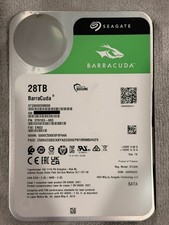
Seagate BarraCuda 28TB 7.2K SATA 6Gb/s 3.5in Internal HDD ST28000DM000 - Tested
$670.00

Seagate ST4000NM0034 Enterprise 4TB 7200RPM SAS 12Gb/s HDD v4
$39.00

Seagate ST500DM009 BarraCuda 500 GB 3.5" SATA III Desktop Hard Drive
$14.99

Dell ST6000NM0034 1HT27Z-150 NWCCG 6TB SAS 3.5 7.2K ENTERPRISE SERVER DRIVE
$68.99

HGST HUS724040ALA640 HDD 4TB SATA 6Gb/s 7.5K 3.5" 0F19459 512 b/s
$78.00

Seagate ST12000NM0127 12TB 256MB 7200RPM 3.5" SATA 6.0Gb/s Enterprise Hard Drive
$318.99

Seagate ST8000NM0075 Enterprise Capacity 3.5 HDD 8TB SAS Hard Drive 8TB EXOS
$184.99