

 Reply With Quote
I would guess that it's 2, a lot of the bioses when 1.1 was still the default hardware couldn't properly boot from usb, even if they had an option that claimed they could. But that's purely a guess.


Please advise the USB mode usually encountered in mobos with USB boot capability.....is it USB1.1 or USB 2.0 ???
I would guess that it's 2, a lot of the bioses when 1.1 was still the default hardware couldn't properly boot from usb, even if they had an option that claimed they could. But that's purely a guess.
---
Verifying of md5 checksum and burning a CD at slow speed are important.
Kuhman; FWIW
Running an .iso of 700MB into a folder on desktop with USB 2.0 secure digital card interface provides 10MB/sec transfer rate on my computer.
Well, that's well under the 2.0 spec, but the supposed 480 number for usb 2 is pretty bogus. For example. almost everyone knows that a 400 frewire disk interface is much faster than a 480 usb2. UBS just wastes too much with overhead. So overall I would think your number is about where I would expect it to be. But this is getting away for the subject of the original post. I'm not sure why you asked it in the first place, my thinking would be use a 2.0 device if you hope to boot from UBS at all, and if you happen across an older system that can boot from usb and has a 1.1 interface it should degrade gracefully (but painfully slowly). But I tried a number of older systems that claimed they could boot from USB in the BIOSes without luck, the same device finally booted in a new notebook.
---
Verifying of md5 checksum and burning a CD at slow speed are important.
My experience with firewire is it is similar to USB in speed, no great difference. It is primarily the interface device performance first and overhead second.
I was hoping you might try your .iso from USB stick to desktop folder to see your transfer speed. That should determine the USB mode of your mobo for comparison.
Sorry, my largest flash usb device isn't large enough for Knoppix, the tests I did were with DSL. But as long as I couldn't get DSL to boot (on my HP with 1.1, an IBM (not sure but I think it had 2.0) and a Gateway with 2.0), I saw no reason to buy a larger one to see Knoppin not boot either. Now have a newer HP notebook that boots the same DSL configured flash device just fine. I have not bought a larger flash device yet, and honestly I don't really care about doing it any longer (can use the DSL one if I think booting from flash is a good idea, but it really doesn't seem to be, at least for me). So I really don't care about the transfer rate issues, but I'm sure it wasn't usb 2 on my old Hp, it only has 1.1, and the new HP notebook is usb 2, as is the flash drive, and it booted faster than I would expect from usb 1.1. Too many other projects at the moment to worry about actual transfer speeds.Originally Posted by lilsirecho
---
Verifying of md5 checksum and burning a CD at slow speed are important.
Got dvd version of knoppix on external usb hard drive [80gb] no problem had to change mkdiskimage to 0 255 63 would not work with 1 [32!]
boots fine ....
I'm not sure. In most cases, you're lucky just to be able to boot USB at all, let alone get any good speed out of it.
On my motherboards I have tested, I've found that it is very slow trying to get past the first screen of Knoppix, the cheatcode screen. I'm guessing, but am not sure, that it's USB 1.1 or even 1.0. This is when Knoppix is trying to load the Linux kernel and initramfs from the BIOS.
However, after Linux gets started and Knoppix autodetects all of the USB devices, then it all-of-a-sudden gets much faster! I think this is because Linux can properly set up the USB ports in USB 2.0 mode, unlike the BIOS.
Wow, that's interesting. Was mkdiskimage 0 255 63 able to see and format up your entire 80GB drive? I had failures when trying to go beyond just 8GB.
The idea behind doing mkdiskimage 1 255 63 first, was to give you a small throwaway partition, that you could then clear away and then make it again manually, in case mkdiskimage couldn't automatically deal with the full size of your drive. You wouldn't keep the small partition at all for any length of time, you'd be deleting it immediately, so it's laughably small size (8MB or so) wouldn't matter.
Well I kept getting errors when using 1 ... so tried 0 and it worked had to reboot to make sure partition was seen [sda4!] but after that I created mkdosfs then went and ahead with syslinux -s
Code:/dev/sdc4 vfat 77G 4.1G 73G 6% /mnt
 Posting Permissions


OPNsense pfSense 8-Core Atom C3758 2.2GHz 8GB DDR4 64GB SSD 8x NIC QAT AES VPN
$145.00

KTN-STL3 EMC VNX 15-slot Disk Array Expansion, full 15 x 2tb drives 100% health
$360.00

Ubuntu Server 26.04.1 LTS Bootable USB Flash Drive – Latest September 2026
$12.99

Start9 Server Pure 32GB 4TB Intel i7 Node StartOS — Box + PSU
$599.00
ULTIMATE ARCH LINUX BOOTABLE USB/DVD INSTALLER 64-BIT - CHOOSE BUILD - PC/MAC
$4.49

Ubuntu 26.04 LTS – 3 DVD Set Desktop - Server - Studio Edition - Grade AAA+
$13.99

Microsoft SQL Server 2025 Standard 32 Core Unlimited CAL Retail License Package
$299.00
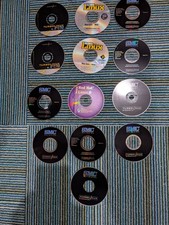
Turbolinux Server and Workstation, Red Hat, Maximum Linux LOT 13 CDs
$40.00

Microsoft SQL Server 2025 Standard 16-Core Perpetual License | Factory Sealed
$724.63

HP ProLiant DL360P G8 Server 2.60Ghz 16-Core 96GB 2X 300GB Enterprise (Renewed)
$140.00