

 Reply With Quote
that sounds WEIRD. never heard of anything like that.
hmm, is there enough room in C:\ to start win properly?


I am new to Linux and a ham radio operator. I recently purchased a copy of Knoppix HamShack ver 0.06a that will run from my cd. When I quit Knoppix, I allowed the program to store a file that will let Knoppix to start faster. Now I have no cd (Memorex 52-32-52) when I try to run my win98se. It does show up on the startup screen before getting to windows, and it will work under knoppix. It does not show up under "system" in control panel. Trying "find new hardware" does not find it. I think I need to remove the original file that Knoppix stored, but I cant find it. Thanks in advance.
Loaderman
that sounds WEIRD. never heard of anything like that.
hmm, is there enough room in C:\ to start win properly?
Yep, I can start and run Win 98se, all of it works, except I cant access the cd. I did try another cd player, and it couldnt be recognized either. Knoppix does start from the cd, so I know it works. The problem only became evident after running the Knoppix and letting it install the file.
extremly odd. where did you install that file?
device manager ?
make sure some weird controller hasn't been added to the mix manually, which would mask the cd
has it been de-activated
does it show in safe mode ?
and in safe mode .... what other non-present items are there that could be removed
I went into device manager in safe mode, and all looks ok. The correctly identified cd is there, along with the proper (windows supplied) driver. I checked each device, and all the rest ar ok. I did delete an old device that has been swapped out. I am figuring that the Knoppix made a change in the MBR or maybe the registry. There are nothing that I can find that would block the cd from running.
Knoppic wont fiddle with the registry, not like that. you can do that but it requires YOUR input and knowing what to write where in a console.
that file was likely just a /home/username image, start that knoppix again and check what output of the command mount in a console say. perhapsand post that textfile that gets created here (save it on a floppy or something if you have no internet under knoppix)Code:mount >mount.txt
I finally figured out how to get mount.txt to the screen:
/dev/root on / type ext2 (rw)
/dev/hdc on /cdrom type iso9660 (ro)
/dev/cloop on /KNOPPIX type iso9660 (ro)
/ramdisk on /ramdisk type tmpfs (rw,size=401520k)
/UNIONFS on /UNIONFS type unionfs (rw,noatime,dirs=/ramdisk=rw:/KNOPPIX=ro)
/dev/pts on /dev/pts type devpts (rw)
/proc/bus/usb on /proc/bus/usb type usbfs (rw,devmode=0666)
automount(pid195on /mnt/auto type autofs (rw,fd=4pgrp=1958,minproto=2,maxproto=4)
mount.txt (END)
I think I have all the caps and spaces in the proper order. Like I said, I am new to Linux and dont know how to print, copy, transfer, ect.
how to copy/paste is easier in linux than windows.
just mark text (same)
now the diference, just switch to where you want text and click middle button (normally = mousewheel) lacking that, both right and left at same time.
no need to copy first no need to rightclick and choose paste no need for keyboar...
just be sure to have marker placed right and text you have marked will pop in place where you click (only once or you have pasted twice)
as to what is wrong, not anythign as far as I can see from this.
this is not easy to answer.
hmm, my thought is that if it is found when you run win in failsafe but not running plain, it is something in win, not from knoppix most likely.
hmm, was it to save config you where asked?
knoppix can save a configfile and a permanent home, but those are just files.
about like saving a file to floppy, that should not change cd.
EDIT
I am no HAM (yet) but a DX'er and study to get my code up to speed for test.
I am currently building my set in small steps (no superhet, just a 3 tube regen with x-tal for freq).
I plan on getting license before next winter
/EDIT
 Posting Permissions


Crucial MX500 1TB 2.5" SATA III Internal SSD CT1000MX500SSD1
$102.99

Samsung 2.5" 870 EVO SSD SATA III 250GB 500GB 1TB Internet Solid State Drive Lot
$90.00

Samsung 860 EVO 250GB SSD MZ-76E250 2.5" SATA III Solid State Drive
$39.99

Samsung New SSD 970 EVO Plus 2TB 1TB 500GB 250GB NVMe M2 Internal Hard Drive Lot
$79.99

Western Digital PC SN740 256GB M.2 2280 NVMe Internal SSD (SDDPNQD-256G)
$34.99

Netac 2TB 1TB 512GB 256GB Internal SSD 2.5inch SATAIII Solid State Drive lot
$549.00
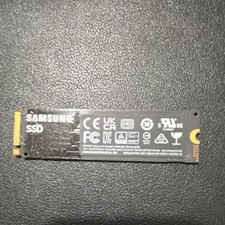
Samsung 980 500GB NVMe M.2 2280 SSD MZ-V8V500 - Tested Working.
$50.00
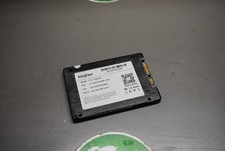
KingFast F10 256GB 2.5” SATA III SSD Tested Working 2710DCS23BF-256
$22.89
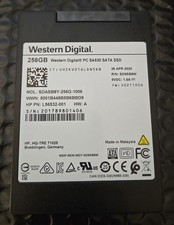
Western Digital SA530 256GB 2.5" SSD SDASB8Y-256G-1006
$29.99

SSD 2.5" SATA Hard Drive for Laptop Desktop Windows 10 pro 64 Pro Pre-installed
$42.00