

This will make you apply HeadOn to your forehead.
When making a connection with mysql and php4 one of the configurations is to uncomment
the extension in the php4.ini file.
However, the php extension has a typo in this file.
/etc/php4/apache2/php.ini
Under the Dynamic Extensions section it reads:
The first extension for UNIX reads:Code:;;;;;;;;;;;;;;;;;;;;;; ; Dynamic Extensions ; ;;;;;;;;;;;;;;;;;;;;;; ; ; If you wish to have an extension loaded automatically, use the following ; syntax: ; ; extension=modulename.extension ; ; For example, on Windows: ; ; extension=msql.dll ; ; ... or under UNIX: ; ; extension=msql.so ; ; Note that it should be the name of the module only; no directory information ; needs to go here. Specify the location of the extension with the ; extension_dir directive above. ; ; Example lines: ; ;extension=mysql.so ;extension=gd.so
; extension=msql.so
It should read
; extension=mysql.so [ It's missing a y ]
The second one is ok
;extension=mysql.so
Either uncomment the second one or correct and uncomment the first for mysql connection to php.
So far I've found this typo also in other Knoppix versions and other php.ini's.
The Windows geekers ironically have it worse they have to deal with msql.
note: Don't make any white space between the equals sign. Also PHP code has something similar too.
The other config is to uncomment the 'extension_dir ='
then add '/usr/lib/php4/extensions'
Save and exit and make a extensions directory
# mkdir /usr/lib/php4/extensions
locate mysql.so then copy the path of mysql.so to /usr/lib/php4/extensions/
restart apache2
# apache2 -k restart or apache2ctl restart
# /etc/init.d/mysql start
<Enter>
# mysql -u root
---
Addendum:
The extension msql.so is from mini SQL(mSQL).
However, use mysql.so and MySQL
---
Addendum2:
Since Oracle is gobbling up things and CD versions after 501 don't have Mysql-server it might be wise to download it and save it somewhere.
 Posting Permissions


Dell 6P85J 4TB ST4000NM0063 7.2k 6Gb/s 3.5” SAS SED Hard Drive with Tray
$39.99

Western Digital HUS726T4TAL5204 4TB 7.2K SAS 12Gb/s 3.5" 512e HDD NetApp X375A
$64.00

DELL 2TB Enterprise HDD (7200RPM, 3.5", SATA III, 128MB Cache) HUS722T2TALA600
$49.95
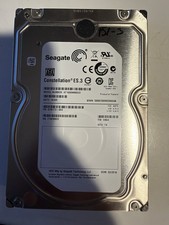
Seagate Constellation ES.3 3.5 in Enterprise HDD | ST2000NM0033
$40.00

Seagate ST500DM009 BarraCuda 500 GB 3.5" SATA III Desktop Hard Drive
$14.99

HGST HUA723030ALA640 3TB SATA 7200 RPM 3.5 in Enterprise HDD | 0F14044 (100%)
$45.00
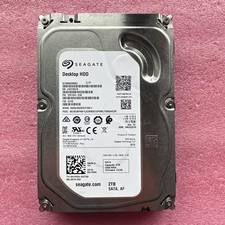
2TB Seagate Barracuda ST2000DM001 7200RPM SATA 6Gbps 64MB Cache 3.5" HDD
$39.95

Dell ST6000NM0034 1HT27Z-150 NWCCG 6TB SAS 3.5 7.2K ENTERPRISE SERVER DRIVE
$68.99

Seagate ST8000DM004 8TB 3.5" 6Gb/s 256MB SATA HDD P/N: 2CX188-300 Tested
$149.99

Seagate ST12000NM0127 12TB 256MB 7200RPM 3.5" SATA 6.0Gb/s Enterprise Hard Drive
$318.99


 Reply With Quote