

looks like you typed: fdisk /dev/hdb1
try using: fdisk /dev/hdb without a number
And : p, once fdisk is running, see if the partition table makes sense
http://www.knoppix.net/forum/viewtop...ghlight=ungoof might be worth a read as well
Why can i transfer HDB1 to HDB5? Is it because they are both NFTS or Both the same harddrive?Both quote's above are from different posts and leads to some confusion. Some times you list the same hdd as HDBx while other times HDAx , and you state you can transfer files then you say you can not. The inconsistent statements makes us having to guess and that will lead to bad advice.I set both HDa1 and HDa5 as read and right, clicked device select write or whatever and i still can't transfer files between them, even tho they are on the same Hard Drive and are both NFTS
While I'm at it "select write or whatever" from 2nd quote above, the use of "whatever" does not help trying to figure out your problem. The information needs to be correct and complete.
If you have removed the spare hdd (from first post FDSIK -l, HDA) let us know.
Just how is the hdd with XP installed connected ie: IDE channel and Master/Slave/cable select ?
Have you changed it from when XP was working ?
What all other devices and what IDE are connected ?
Okay, i got it now HDB1 has a * by it. When i boot up my computer it just says INVALID PARTITION. So, i got tired of it and put the Windows XP CD in and i still get BSOD. When i started getting the BSOD nothing had changed on my computer at all. Also, because i was able to set HDB1 as active, I was able to transfer some of my files ,but then it knoppix froze while transferring, so i just restarted. I Noticed it actually copied many of my files even though it froze ,but it is almost like a lost permission to copy the rest of my files. I've even tried swapping master between HDB1 and HDB2 ,but no luck. After i lost permission i checked to make sure both HDB1 and HDB3 have * them and they do. Also, if i type HDA1 OR HDB1, they are the same partition, just confusion.
That is why you get "INVALID PARTITION", due to me never having use FDISK to toggle the boot flag, I assumed when making one partition bootable it would remove any other boot flags. I was apparently wrong, you need to rerun FDISK and use A to toggle HDB3 boot flag off, exit and save. Recheck and be sure only HDB1 has the * boot flag. Very likely also the reason the XP cd has a bsod. Only 1 partition per hdd can have a boot flag and it must be a primary partition. Some third party boot manager's will make an extended volume bootable.i checked to make sure both HDB1 and HDB3 have * them and they do
Also, if i type HDA1 OR HDB1, they are the same partition, just confusion. explain ? be concise, it confuses me to.
If i boot up windows it still gives me the BSOD. I did transfer enough of my files though, but how should i format my main parition HDB1? If i start up windows BSOD. If i Put windows XP CD in BSOD. If i put windows 98 CD in it doesn't even detect the partitions. I consider HDA1 and HDB1 the same partition because when i post the picture it showed HDB1, but now it just shows HDA1.
but now it just shows HDA1If when you run FDSIK-L if it does not list both hdds , reboot and enter BIOS and be sure both hdd's are listed. If both are not listed one hdd likely has a loose IDE or power cable.
If a hdd cable is loose it might cause XP or the CD to be able to know you have 2 hdd's but can not read it and give a bosd.
Do you have a MS XP cd or a Recovery cd ?
I would suspect a hardware problem if the XP cd gives a bosd.
Try removing the non XP hdd and see what happens when booting into XP and the cd.
Win98 can not see NTFS partitions with out a third party program , it should see the hdd with the FAT partition.
Before this problem came up did you add or remove any hardware or have any other problems ?
I got fed up and started googleing around and after awhile i discovered a page on the 00000024x error. I was able to use the steps listed and boot my computer up without a problem. The page i found support at, http://support.microsoft.com/?kbid=228888&sd=RMVP ,Thanks
 Posting Permissions


USB 3.0 Flash Drive 32GB 64GB 128GB Memory Stick Thumb Stick Lot Pack
$826.09

TF/SD Card Adapter Camera Reader Android Type-c For iPhone17 Pro Max Plusm lot
$573.98

Lot Of 8 Micron 8GB 2Rx8 PC4-2666V-RE2-11 ECC REG Server Ram MTA18ASF1G72PDZ-2G6
$210.00

1/ 10/ 100pcs USB 2.0 2GB, 4GB ,8GB ,16GB ,32GB ,64GB 128GB USB Flash Drives Lot
$202.50

Kingston 32GB 64GB 128GB 256GB USB 3.0 Flash Drive Thumb Memory Stick Pen lot
$285.90
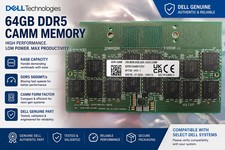
Dell Memory Module - 64GB - DDR5 - CAMM RAM - 5600MHz 16GX8
$599.98

USB 3.0 Micro SD SDHC TF Card Reader Memory Adapter for PC Laptop Camera lot
$3.75
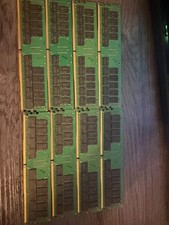
Crucial MTA36ASF4G72PZ-2G6E1SG 32GB 2RX4 PC4-2666V ECC LRDIMM Server Memory
$150.00

5 in 1 Memory Card Reader USB 3.0 OTG Adapter SD Card Reader For iPhone/iPad LOT
$9.99

Windows 11 Pro Install/Recovery/Repair USB Flash Drive
$35.00



 Reply With Quote