

 Reply With Quote
apt-get remove kde-i18n-whatever
There are also spellchecker dictionaries and internationalization packages for openoffice, etc. Just apt-get remove the ones you don't want.


Hi,
I want to create spaces so I have to delete some packages I do not need. The first target is the foreign languages I do not speak. Can someone tell me how to remove those packages?
thanks
Frank
apt-get remove kde-i18n-whatever
There are also spellchecker dictionaries and internationalization packages for openoffice, etc. Just apt-get remove the ones you don't want.
http://ubuntuforums.org/showthread.php?t=140920
Getting rid of unnecessary locale data - For this tip, you need to download the "localepurge" package found in Synaptic Package Manager. "localepurge" is just a simple script to recover diskspace wasted for unneeded locale files and localized man pages. It will automagically be invoked upon completion of any apt installation run.
To open Synaptic Package Manager, follow the instructions in Tip #1. After opening up Synaptic Package Manager, click the Sections button on the bottom left hand corner of the window, if it is not already clicked. Next, at the top of the Synaptic Package Manager window, click the Search button. In the search window, key in the following text :
Quote:
Did the "localepurge" package popup in the package window? It probably did, unless you do not have the correct Repositories. Now, click on the box next to the "localepurge" package name. Click on Mark for Installation. Now click the Apply button at the top of the window and wait for the downloading and installing of the "localepurge" package to finish. Once it is done, a new window should popup that has a bunch of abbreviations on it. for example:localepurge
Quote:
You want to select the abbreviation of the language that you speak, or use with Ubuntu, ignoring the capitalized ones. For example, I speak english, so I would select the "en" abbreviation. A french speaker would select the "fr" abbreviation. So on and so forth... Then click next. All done!en
fr
po
sp
ka
etc...
 Posting Permissions


Apple Computer cards VTG 670-8020-B 607-0103-C 607-0291-C AST -Orange Micro ++
$169.00

Vintage Apple iMac G4 15" Lamp 700MHz 512MB Mac OS X 10.4.6 W/ Pro Speakers
$300.00
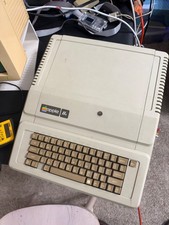
Apple IIe Vintage Computer A2S2064 Powers On Apple II Untested For Parts/repair
$149.99

Rare Vintage Macintosh Apple Wooden Disk Storage Box Dovetailed
$69.95

Vintage Apple II Avant-Garde Creations Super Shape Draw And Animate 1981
$295.00

LARGE LOT Vintage Apple Macintosh Mouse Cables Accessories SCSI etc - UNTESTED
$80.00

Vintage Apple PowerBook 15” G4 “Aluminum” (1.25GHz/2gb/150gb/Tiger) 2
$109.99

Vintage Apple Extended Keyboard- M0115 - no cord
$49.99

Vintage Apple Color RGB Color Monitor A2M6014. Used.
$199.99

Vintage Apple Multiple Scan 15av Display Monitor M4681
$299.99