

 Reply With Quote
Did you also confirm the md5 checksum of the ISO file?Originally Posted by candid357
If so, try knoppix nodma at boot. Posting system specs may help also.


I have read, and went back and re burned my knoppix from 8x to 4x, I'm still getting this when I try to boot from the cd:
(in red text) ERROR: CANNOT UNITE READ-ONLY MEDIA AND INITIAL RAMDISK! (in gray text) Shutdown: hda system halted
(in green text) >>read-only CD system successfully merged with read-write/ramdisk
(in gray text) /linuxrc:cannot create /var/run/utmp:directory nonexistent No filesystem could mount root, tried reiserfs
ext3 ext2 msdos vfat iso9660 fuseblk
kernel panic - not syncing : VFS:Unable to mount root fs on unknown block (1,3)
I don't really know what that means but I thought it would be helpful to have the whole thing.
Did you also confirm the md5 checksum of the ISO file?
If so, try knoppix nodma at boot. Posting system specs may help also.
I did confirm the md5 and everythign was right, I will try knoppix nodma.
As for system specs, I ahve 2 gigs of ram, at 2.79 Ghz, and a 250gig hd, Processor is intel pentium D
sadly it is running vista (upgrading from xp was the worst decision ever...)
I'm pretty sure that Vista is not an upgrade. Cute that they retired your XP serial number so that you can't officially go back, isn't it?
As far as specs, I was thinking more like the exact make and model of the motherboard, type of drives and other information that mught help someone spot a particular known problem. But at this point give the suggested cheat code a try.
Hi,
I had the same problem - but the solution was simple:
cleaning the knoppix-disc
cu
Darkblue
I have a problem booting from CDR (burned at home):
I hit return to start the boot process (or enter lang=us)
The boot process gets as far as the following error message:
Kernel panic: VFS: unable to mount root fs on 01:03
and everything stops. I have to reboot (Windows or Knoppix)
Can anybody help? (I should clarify that I am not terribly geeky).
kittybriton: Have you tried the CD in different computers? If it won't boot anywhere, it's probably the CD. I assume you use 5.1.1 - otherwise I would suggest you try upgrading to that version.
Thanks for the suggestion, Capricorny.
The computer I most need this to work with is an HP Pavilion with 20GB hard disk and 63MB RAM, but am also trying it on a Compaq Presario with 80GB hard disk and 512MB RAM.
After creating another disk, and running the options suggested in the FAQs, these are the results.
I hope these will be meaningful to somebody:
boot: Knoppix vga=0
System hangs, caps lock and scroll lock lights flash.Kernel panic: VFS: unable to mount root fs on 01:03
boot: Knoppix acpi=off pnpbios=off noapic noapm
System hangs, caps lock and scroll lock lights flash.You passed an undefined node number. Press <RETURN> to see video modes available, <SPACE> to continue or wait 30 seconds.
Kernel panic: VFS: unable to mount root fs on 01:03
boot: Knoppix vga=0 debug -b 3
-- Quite a screenful of info. Most of which seems to be identifying various components of the systems used, hopefully, the following part is the most meaningful:
System hangs, caps lock and scroll lock lights flash.libata version 1.02 loaded
kmod: failed to exec /sbin/modprobe -s -k scsi_hostadapter, errno=2
kmod: failed to exec /sbin/modprobe -s -k scsi_hostadapter, errno=2
initializing crytographic api
NET4: Linux TCP/IP 1.0 for NET4.0
IP protocols: ICMP, UDP, TCP, IGMP
IP: routing cache hash table of 512 buckets, 4 Kbytes
TCP: hash tables configured (established 4096 bind 4096)
NET4: Unix domain sockets 1.0/SMP for Linux NET4.0
RAMDISK: Couldn't find valid RAM disk image starting at 0
Freeing init rd memory: 781K freed
FAT: bogus logical sector size 24234
Kernel panic: VFS: unable to mount root fs on 01:03
boot: failsafe debug -b 3
System hangs, caps lock and scroll lock lights flash.libata version 1.02 loaded
kmod: failed to exec /sbin/modprobe -s -k scsi_hostadapter, errno=2
kmod: failed to exec /sbin/modprobe -s -k scsi_hostadapter, errno=2
initializing crytographic api
NET4: Linux TCP/IP 1.0 for NET4.0
IP protocols: ICMP, UDP, TCP, IGMP
IP: routing cache hash table of 512 buckets, 4 Kbytes
TCP: hash tables configured (established 4096 bind 4096)
NET4: Unix domain sockets 1.0/SMP for Linux NET4.0
RAMDISK: Couldn't find valid RAM disk image starting at 0
Freeing init rd memory: 781K freed
FAT: bogus logical sector size 24234
Kernel panic: VFS: unable to mount root fs on 01:03
kittybriton,
63MB RAM? Might want to start looking there. You might have some trouble getting most live disks to run a GUI on that little. You can try other boot options (cheat codes) to boot into a command line interface. Bad media could also be a concern as well as burning the diak at too fast a speed. Some older optical drives also have issues reading some writable media. You might have received more replies if you had started a new thread of your own on your concern, rather than tack it onto an ongoing thread.
Try booting with
where "512" is the amount of memory in your computer. Make sure that the "mem" is lowercase and the "M" at the end is an uppercase letter.Code:failsafe mem=512M
 Posting Permissions


Dell EMC PowerEdge R740 8 Bay Server w/ 32GB RAM 2x GOLD 6132 2x 1600W PSU H730p
$499.88

HPE DL360 G10 CTO Server W/ 2x800W 1x LP PCIE RISER 1xFLEXROM 2XHIGH PERF FANS
$200.00

VMware vCenter Server 8 STANDARD Perpetual License Key VC-STD-C (Legacy Pack)
$1599.95

Windows Server 2025 Standard Edition - 24 Core License
$238.00

Dell PowerEdge R640 1U 8SFF Server Barebones 2x Gold 5120 64GB H330 2x 750w
$538.88

Dell PowerEdge C4130 1U AI GPU Server | 2x E5-2680 v3 | 32gb Ram | 2x 1600W
$484.99

Dell Poweredge R630 2x Xeon E5-2680 v3 2.5ghz 24-Cores / 64gb / Raid / 2x 1Tb
$374.99

Dell PowerEdge R640 1U 8SFF Server Barebones 2x Gold 6150 64GB 2x 750w
$499.88
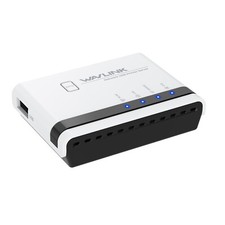
USB 2.0 Network Print Server LAN Print Share Server USB Wireless Print Server
$31.49

Dell EMC VxRail E560F 10-SFF 2*Gold 6230R 2.1GHz No RAM HBA330 iDrac Ent Server
$349.99