

 Reply With Quote
Generally Knoppix is best used as a live cd. If your looking for a hard drive installation of a user friendly, hardware aware linux http://www.ubuntu.com/ is about as good as it gets these days.
Cheers.


Can someone give me general advice on the problems below?
I have a generic Thinkpad T60. I downloaded knoppix 4.0.2 with the idea of ultimately making it my main OS, booting it from an external HD. From what I read I thought that all my key hardware would be detected and I could easily move my harddrive from one computer to another w/o having to worry about drivers etc...
Well, I'm not a big fan of Microsoft but I must say that getting windows to work on my system was much more straightforward and user friendly than trying to get Knoppix to do what I want. Of course this is likely related to my being such a Knoppix newbie, but now I understand why not more people shift to Linux.
I have basically 2 groups of problems:
1) setting up Knoppix on my external HD. I followed the instructions at http://www.bellevuelinux.org/knoppixinstall.html and keep getting a Kernel Panic. I've read the last part and carefully partitioned my disk, but it just won't work. On top of that it even screwed up my windows installation, which I thought it was not supposed to do... I have been careful not to go anywhere near the windows partition, so I don't understand how that happened. Basically it replaced the GNURL (or whatever it's called) and now I need to have my external HD (the one with my Knoppix install) plugged in to be given the choice to start Windows. Otherwise it just says there is some error with the GNURL (or whatever it's called)
2) I managed to get Knoppix to load into a higher resolution, but it won't detect my wireless card (Intel Pro Wireless 3945ABG) and soundcard (standard one) automatically... What a pain and does that mean i need to load drivers for each computer I'd be using Knoppix on??? I found a Linux driver for the wireless card but I have to 'compile' it and just completing that process is a pain and seems to require a few years of spare time... I used the utilities in Knoppix but it says there is no wireless card, and just doesn't detect my sound card either... Any idea of what I'm doing wrong here?
In short, I'm thinking of dropping Knoppix till it does what it says, i.e. be much more hardware independent, and provide a full-fledged OS not just a repair environment. I admire the effort that went into this but it's just not there yet for novices like me.
Still, I'd like to try harder and educate myself, so if anyone could help me with the specific issues above I'd be very thankful.
Also I realise this may sound a little harsh, so let me clarify this is not intended to start an argument. No need to tell me that I'm stupid or anything like that. Yes, when it comes to Linux i am fully aware I don't know much and all the arguments above are highly related to my ignorance. I'd just like to hear from users how difficult it would be with the current Knoppix to implement my vision above i.e. is there a reason Knoppix does not detect and install most generic hardware?
And one more thing, is there any way I can tell Knoppix to automatically load my own settings rather than having to remember and type the long complex command for this every time it boots?
Generally Knoppix is best used as a live cd. If your looking for a hard drive installation of a user friendly, hardware aware linux http://www.ubuntu.com/ is about as good as it gets these days.
Cheers.
Ok, thanks for the pointer, Rusty. I've learned about Ubuntu and it seems it's possible to do an external HD install indeed through another long-winded process (see http://ubuntuforums.org/showthread.php?t=80811)
This said, tell me if I'm wrong, but it doesn't address my need of wanting an external OS I can boot on ANY standard computer. I'd have to install Ubuntu on any new computer I'm using, wouldn't I?
So it seems there isn't a current solution that fits my needs?
I'm back to trying it in Knoppix then, and I'm still interested in any guidance on the points I raised:
- what proportion of standard hardware is Knoppix capable of installing w/o any extra intervention
- any user-friendly driver site out there so I don't have to 'compile' my driver
- anyone knows a bulletproof way of installing Knoppix on an external HD
- anyone knows why the procedure in http://www.bellevuelinux.org/knoppixinstall.html screwed up my XP install whereas it says it wouldn't? And how to repair that?
- any other experience on making Knoppix your primary OS?
Thanks for any helpful posting
Ok......wireless support with KNoppix 4.02 is going to be crap - too old
'm back to trying it in Knoppix then, and I'm still interested in any guidance on the points I raised:
- what proportion of standard hardware is Knoppix capable of installing w/o any extra intervention
- any user-friendly driver site out there so I don't have to 'compile' my driver
- anyone knows a bulletproof way of installing Knoppix on an external HD
- anyone knows why the procedure in http://www.bellevuelinux.org/knoppixinstall.html screwed up my XP install whereas it says it wouldn't? And how to repair that?
- any other experience on making Knoppix your primary OS?
Hardware detection is a fragil thing ---- there are never any promises
compiling a driver is not a big deal - It just seems alittle overwhelming at first after a lifetime of M$ products..... ...its actually a good thing - A driver that YOU compile is streamlined for YOUR computer.... this means less memory usage and faster code.. Just think of it as part of the Software Installation Process
Download knoppix 5.11 and use 0wn or knoppix-installer....lot of things have changed since 4.0.2..
".....anyone knows why the procedure in http://www.bellevuelinux.org/knoppixinstall.html screwed up my XP install whereas it says it wouldn't? And how to repair that? ....."
Easy fix
".....I managed to get Knoppix to load into a higher resolution, but it won't detect my wireless card (Intel Pro Wireless 3945ABG) and soundcard (standard one) automatically... What a pain and does that mean i need to load drivers for each computer I'd be using Knoppix on???....."
Soundcards and wireless cards is the 2 peices of hardware that youll have the most problems with. Linux wireless support in general is pretty young and sound detection is a tricky issue sometimes..... But for a travel OS sound will probably be optional for you anyway.....most hotels that I stay at do not have speakers on their computers for instance. Now that being said I think my scripts (refering to other thread) do a pretty fair job of setting up sound on the fly.
As for your kernel panic: The stock knoppix kernel and initrd does not include support for booting from USB.... youll need the patch minirt from giles thread: http://knoppix.net/forum/viewtopic.p...3e4be4d04b40c6
Here is the direct link for the patched minirt for KNoppix 5.11: http://s94002264.onlinehome.us/grub/minirt_511a.gz
extract it to /boot/.
and edit your /boot/grub/menu.lst to use it instead of the stock version.
look for this line (or one like it)
Change to:Code:initrd /boot/initrd.img
Code:initrd /boot/<extracted file name>
Hope this helps,
-Justin
One Mynds Eye
This is a great help, thanks again Justin
I've fixed my grub just with fdisk /fixmbr command as the Xp disk wouldn't repair it
I've downloaded latest DVD version of Knoppix, but it still does not recognize the drivers for wireless card and soundcard. Those are not optional for me if I use knoppix as main OS, as I need my music and internet. Guess I'll just have to compile them then
Tried to install on ext HD using knoppix-installer but get same panic again. Strange that support for that is not included. I suppose booting from ext hd is going to replace dvd progressively
I couldn't download the patch from the link you gave me though. Could you send correct one if you get a chance?
Going to buy new HP laptop today, I wish I could get them to deduct the cost of a Vista OS I don't need...
I just tried that Link.... It works
Its the same as one of the *.img files in /boot/
Does knoppix announce your soundcard at boot? I.e. : " Soundcard: ICH4 - Intel ICH5 driver=snd_intel8x0 "'ve downloaded latest DVD version of Knoppix, but it still does not recognize the drivers for wireless card and soundcard. Those are not optional for me if I use knoppix as main OS, as I need my music and internet. Guess I'll just have to compile them then
If so there is hope
THEN start KDE with " init 5" and your sound might be working
Also check to make sure sound is enabled in KDE by going to the Control Center ===>> Sound & Multimedia ====>> Sound System
Going to buy new HP laptop today, I wish I could get them to deduct the cost of a Vista OS I don't need...
Sometimes over the internet you can ....DELL used to allow this..... DELL irratates me on this subject anyway as they dont provide a master copy of the OS that you purchased. If you need a OS disc one must be shipped to you to use.... and shipped back when your done. PAIN IN THE ASS!
You may be surprised to find that KNOPPIX works 100% on your new laptop
Take Care,
-Justin
One Mynds Eye
Ok, will actually get the new laptop (toshiba, so I hope it comes with the OS disk!) next week
will try all that then
Bundle of thanks to you!
Wish you all luck. Yesterday I tried Knoppix 5.1.1 on a Toshiba Satellite M40 (2006) - never had so many problems with Knoppix before, and USB-pendrive booting: No way! To be fair to Knoppix, Mandriva 2006 Live didn't boot at all on that machine...Originally Posted by Greg Neatwork
 Posting Permissions


🔀 Juniper Networks EX2300-C-12P 12× Gigabit PoE+ • 2× 10G SFP+ Compact Switch ⚡
$119.00

Juniper EX2300 12-Port Gigabit PoE+ Managed Network Switch P/N: EX2300-C-12P
$149.99

Juniper Networks EX2300-48P 48-Port Gigabit PoE Managed Ethernet Switch
$79.99

Juniper Networks EX3400-24T 24-Port Ethernet Switch w/Power Cord
$174.99

Juniper MX304-PREM / 96 ports of 10/25GbE SFP28 and 12 ports of 400GbE QSFP-DD
$39995.00

Juniper MX304-BASE / MX304 Series Modular Edge Router
$34995.00

Juniper SRX320 8-Port Security Services Gateway Appliance w/ AC Adapter
$59.99
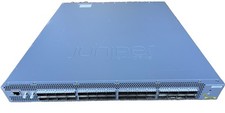
Juniper QFX5200-32C-AFO 32x100 Gigabit QSFP28 Switch
$2250.00
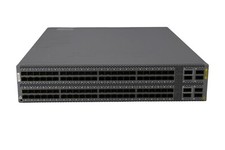
Juniper QFX5100-96S-AFI FP+/SFP PORTS 8QSFP+ PORTS REDUNDANT FANS 2x PS
$249.95
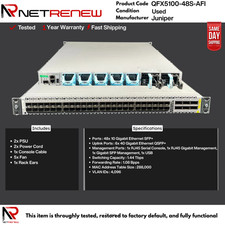
QFX5100-48S-AFI Juniper Switch 48 Port SFP+ 6x QSFP
$498.99