-
Wireless network with BT voyager 1055
Hi there!
I am trying to get my wireless adaptor working using the 5.1.1 CD. It is a BT Voyager 1055 USB adaptor. I am (more or less) following the instructions in the network FAQ. Here is what I am doing:
# ndiswrapper -i /media/hda2/drivers/btvr1055/bcmrndis.inf
# cp /media/hda2/drivers/btvr1055/*.sys /etc/ndiswrapper/bcmrndis
- for some reason it fails to copy the sys files. I found this out on another forum and copy them by hand
# ndiswrapper -l
bcmrndis: driver installed
device (XXXX:XXXX) present
- sorry, forgot to note down these numbers!
# depmod -a
- recommended by the ndiswrapper homepage
# modprobe ndiswrapper
And this is where I get stuck. The light remains resolutely off on the adaptor and dmesg | grep ndis only tells me that ndiswrapper has been loaded - nothing about loading the actual driver for the adaptor, so no wlan0 appears.
These are the exact same driver files it uses under XP - I copied them to my drivers/btvr1055 directory to make it easy to remember where they are located.
(PS I can't use KDE as I don't have enough RAM)
-
Senior Member
registered user
Re: Wireless network with BT voyager 1055

Originally Posted by
quorlia
# ndiswrapper -i /media/hda2/drivers/btvr1055/bcmrndis.inf
So you already copied the .sys file in the /media/hda2/drivers/btvr1055 directory. Right?
Originally Posted by
quorlia
# cp /media/hda2/drivers/btvr1055/*.sys /etc/ndiswrapper/bcmrndis
- for some reason it fails to copy the sys files. I found this out on another forum and copy them by hand
You should not need to do this. By the time you run
Code:
ndiswrapper -i bcmrndis.inf
The related .sys file specified in your bcmrndis.inf will be copied by the ndiswrapper. If it is not copied, something is wrong.
Originally Posted by
quorlia
# ndiswrapper -l
bcmrndis: driver installed
device (XXXX:XXXX) present
- sorry, forgot to note down these numbers!
Looks like it wraps the driver already. Can you show us the exact output?
Originally Posted by
quorlia
# depmod -a
- recommended by the ndiswrapper homepage
I don't need to do this, but it should not be harmful to run this.
Originally Posted by
quorlia
# modprobe ndiswrapper
And this is where I get stuck. The light remains resolutely off on the adaptor and dmesg | grep ndis only tells me that ndiswrapper has been loaded - nothing about loading the actual driver for the adaptor, so no wlan0 appears.
These are the exact same driver files it uses under XP - I copied them to my drivers/btvr1055 directory to make it easy to remember where they are located.
(PS I can't use KDE as I don't have enough RAM)
Here is what I got when I run "dmesg | grep ndis" from my machine
Code:
ndiswrapper version 1.32 loaded (preempt=yes,smp=yes)
ndiswrapper: driver oem0 (Broadcom,11/27/2004, 3.100.35.0) loaded
ndiswrapper: using IRQ 18
usbcore: registered new interface driver ndiswrapper
ndiswrapper: changing interface name from 'wlan0' to 'eth1'
Can you show us your output?
PS. Using which x-window manager should not be a problem to setup the wireless hardware. I tried to run knoppix in console mode also can activate the wireless card (i.e. boot: knoppix 3)
Rgds,
Chip
-
Re: Wireless network with BT voyager 1055
Originally Posted by
chip.ling
Originally Posted by
quorlia
# ndiswrapper -i /media/hda2/drivers/btvr1055/bcmrndis.inf
So you already copied the .sys file in the /media/hda2/drivers/btvr1055 directory. Right?
Yes. The contents of this directory are as follows:
bcmrndis.inf
rndismp.sys
usb8023.sys
rndismpk.sys
usb8023k.sys
Originally Posted by
chip.ling
Originally Posted by
quorlia
# cp /media/hda2/drivers/btvr1055/*.sys /etc/ndiswrapper/bcmrndis
- for some reason it fails to copy the sys files. I found this out on another forum and copy them by hand
You should not need to do this. By the time you run
Code:
ndiswrapper -i bcmrndis.inf
The related .sys file specified in your bcmrndis.inf will be copied by the ndiswrapper. If it is not copied, something is wrong.
I realise that something is wrong! I don't know how to find out any more diagnostics. I can't locate the post in all my "millions" of bookmarks on the subject but I definately recall seeing a post that said the only problem the poster had had was copying these files.
Originally Posted by
chip.ling
Originally Posted by
quorlia
# ndiswrapper -l
bcmrndis: driver installed
device (XXXX:XXXX) present
- sorry, forgot to note down these numbers!
Looks like it wraps the driver already. Can you show us the exact output?
The numbers are 1690:0715.
Originally Posted by
chip.ling
Originally Posted by
quorlia
# depmod -a
- recommended by the ndiswrapper homepage
I don't need to do this, but it should not be harmful to run this.
Ok. As I said the ndiswrapper page suggests this. I thought maybe some module ndiswrapper needed might not have loaded otherwise.
Originally Posted by
chip.ling
Originally Posted by
quorlia
# modprobe ndiswrapper
And this is where I get stuck. The light remains resolutely off on the adaptor and dmesg | grep ndis only tells me that ndiswrapper has been loaded - nothing about loading the actual driver for the adaptor, so no wlan0 appears.
These are the exact same driver files it uses under XP - I copied them to my drivers/btvr1055 directory to make it easy to remember where they are located.
(PS I can't use KDE as I don't have enough RAM)
Here is what I got when I run "dmesg | grep ndis" from my machine
Code:
ndiswrapper version 1.32 loaded (preempt=yes,smp=yes)
ndiswrapper: driver oem0 (Broadcom,11/27/2004, 3.100.35.0) loaded
ndiswrapper: using IRQ 18
usbcore: registered new interface driver ndiswrapper
ndiswrapper: changing interface name from 'wlan0' to 'eth1'
Can you show us your output?
Code:
ndiswrapper version 1.32 loaded (preempt=yes,smp=yes)
usbcore: registered new interface driver ndiswrapper
I've tried looking at the last 20 lines of dmesg too and there is nothing relevant (I can post the whole dmesg to you if you want..... 
Originally Posted by
chip.ling
PS. Using which x-window manager should not be a problem to setup the wireless hardware. I tried to run knoppix in console mode also can activate the wireless card (i.e. boot: knoppix 3)
Rgds,
Chip
I know that but I've had replies where the poster is using WM specific tools which I don't have available because I can't (or in the past won't) run that WM. I'm not a newbie - just a little out of date![/code]
-
Senior Member
registered user
Re: Wireless network with BT voyager 1055
Originally Posted by
quorlia
Yes. The contents of this directory are as follows:
bcmrndis.inf
rndismp.sys
usb8023.sys
rndismpk.sys
usb8023k.sys
How can you find out these files at the first place? I ask the question because they looks like some generic windows drivers but not specific to your wireless hardware. (I maybe wrong)
I suspect you are not loading the right .inf and .sys file pair.
Usually, I only need one .inf file and one .sys file to do the trick.
You mentioned that files are not copied to the /etc/ndiswrapper/??? directory, so the step 'ndiswrapper -i /xxx/yyy/driver.inf' is not working properly.
If this step works, when you do the 'ndiswrapper -l'
You will see something like below (here is my usb wireless card info)
Code:
knoppix@Knoppix:~$ ndiswrapper -l
sis163u : driver installed
        device (0457:0163) present
Then at the /etc/ndiswrapper/sis163u directory, you will see
Code:
knoppix@Knoppix:/etc/ndiswrapper/sis163u$ ls -l
total 192
-rw-r--r-- 1 root root    866 Aug 29 02:27 0457:0163.F.conf
-rw-r--r-- 1 root root  14202 Aug 29 02:27 sis163u.inf
-rw-r--r-- 1 root root 167424 Aug 29 02:27 sis163u.sys
The .inf file and .sys file are copied to this directory during execution of the ndiswrapper command. And at the same time a file called 0457:0163.?????.conf is created. Sometimes it is more than one file with the same prefix 0457:0163.
Note that 0457:0163 is the number you get from the ndiswrapper -l.
Rgds
Chip
-
The top of the bcmrndis.inf file is:
;;
;; bcmrndis.inf
;;
;; Copyright 1998-2004, BT Voyager 1055 Corporation.
;; All Rights Reserved.
;;
;;
So I'm pretty sure that I've got the right file. The usb8023.sys and rndismp.sys files are both mentioned in the inf file in the following sections (my colours naturally!)
[RNDIS_ServiceInst_51]
DisplayName = %USBServiceDisplayName%
ServiceType = 1
StartType = 3
ErrorControl = 1
ServiceBinary =
%12%\usb8023.sys
LoadOrderGroup = NDIS
AddReg = RNDIS_WMI_AddReg_51
[RNDIS_WMI_AddReg_51]
HKR, , MofImagePath, 0x00020000,
"System32\drivers\rndismp.sys"
If I look at the device manager in XP and do properties then driver details for the adaptor it tells me it is using c:\windows\system32\usb8023.sys. The file in the c:\drivers\btvr1055\ directory is a direct copy of this file (I wanted the sys file and inf files in the same place).
I believe (from other forums, including a post where the poster took one apart!) that it has the Broadcom 4320 chipset.
Thanks for holding my hand on this!
-
Senior Member
registered user
Originally Posted by
quorlia
So I'm pretty sure that I've got the right file. The usb8023.sys and rndismp.sys files are both mentioned in the inf file in the following sections (my colours naturally!)
If I look at the device manager in XP and do properties then driver details for the adaptor it tells me it is using c:\windows\system32\usb8023.sys. The file in the c:\drivers\btvr1055\ directory is a direct copy of this file (I wanted the sys file and inf files in the same place).
Yes, it looks like usb8023.sys is the right file and you grouped the .sys and .inf file together is the correct step.
Originally Posted by
quorlia
I believe (from other forums, including a post where the poster took one apart!) that it has the Broadcom 4320 chipset.
Last resort, can you run the following commands and let me know the results please
Code:
ifconfig
iwconfig
lsmod | grep bcm43
Since you mentioned the chipset is Broadcom 43xx series, try to see if knoppix already loaded the bcm43xx driver when at the bootup autoconfig step. (the chance is not so big, but let's give it a try anyway)
Rgds,
Chip
Similar Threads
-
By Lex-Man in forum Hardware & Booting
Replies: 7
Last Post: 02-09-2006, 11:18 PM
-
By rpk073 in forum Networking
Replies: 0
Last Post: 10-14-2005, 12:09 PM
-
By MatDJ in forum Networking
Replies: 0
Last Post: 06-13-2005, 04:34 PM
-
By largeagain in forum General Support
Replies: 1
Last Post: 03-23-2005, 05:43 PM
-
By spreadthecream in forum General Support
Replies: 0
Last Post: 12-31-2002, 12:25 AM
 Posting Permissions
- You may not post new threads
- You may not post replies
- You may not post attachments
- You may not edit your posts
-
Forum Rules


Kingston 32GB 64GB 128GB 256GB USB 3.0 Flash Drive Thumb Memory Stick Pen lot
$285.90

Lot Of 8 Micron 8GB 2Rx8 PC4-2666V-RE2-11 ECC REG Server Ram MTA18ASF1G72PDZ-2G6
$210.00
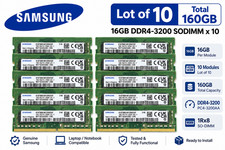
Lot of 10 Samsung 16GB 1Rx8 PC4-3200AA DDR4 SODIMM M471A2G43AB2-CWE 160GB
$1319.99

TF/SD Card Adapter Camera Reader Android Type-c For iPhone17 Pro Max Plusm lot
$573.98

USB 3.0 Flash Drive 32GB 64GB 128GB Memory Stick Thumb Stick Lot Pack
$826.09
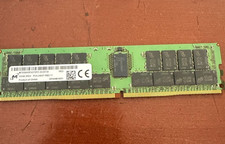
MTA36ASF4G72PZ-2G3B1 Micron 32GB (1x32GB) 2RX4 PC4-2400T DDR4 Server Memory
$220.00
Micron 16GB DDR5-4800 PC5-38400R EC8 RDIMM Server Memory RAM MTC10F1084S1RC48BA1
$560.00
32GB DDR5 PC5-38400R RDIMM Micron MTC18F1045S1PC48BA2 Memory RAM
$1099.00
Micron MTA18ASF2G72XF1Z-2G9WP1ABVGD 16GB 1Rx4 NN4-2933Y DDR4 ECC NVDIMM
$74.50
Lot of 2 Samsung 16GB 1Rx8 PC4-3200AA DDR4 SODIMM M471A2G43AB2-CWE 32GB
$138.99



 Reply With Quote