

 Reply With Quote
Your problem is one very often associated with a marginal high speed burn. The first thing that I would advise based on this limited information would be go back and try a CD that was burnt at low speed.Originally Posted by gurustered


Hi all, I am new to Knoppix. I have tried this CD before on another system and it worked. But now on this new system (i am trying to resize Windows partition) I get the following messages
I am using the KNOPPIX CD v 5.1 and during boot up it is
Scanning for USB/Firewire devices... Done.
Can't find KNOPPIX filesystem. sorry
Dropping you to a (very limited) shell.
Press restart button to quit
I am using a USB Keyboard (only option available) for this system.
what can I do to boot up into KNOPPIX?
Thanks
Your problem is one very often associated with a marginal high speed burn. The first thing that I would advise based on this limited information would be go back and try a CD that was burnt at low speed.
---
Verifying of md5 checksum and burning a CD at slow speed are important.
I have burned the CD (different downloads) as low as 12x, and I still am getting the same error.
I'm having the same problem, with a cd burnt at 4x! On another computer the cd worked really fine!
When I tried another distribution, an other error message was shown at startup: failed to mount cd-rom...
Is this possibly just a problem with my dvd-drive? Can anyone please help me?
IMHO could be a 'cd-drive_related_issue' but even a 'cpu_related_issue'.
With regard a this last assumption consider that I work with 10 pcs with the same hardware. It was happened that 2 of this pcs have had a motherboard crash after 3 years from buyng. So I've replaced the old motherboard with a brand new one, most recent and more powerful with a more powerful cpu, while the cd-drive have remained the same. So I've discovered that some linux-live-cds (not knoppix) and even install-cd (slackware) doesn't load on old pcs with old motherboard (with errors messages in loading stage and even not recognized as boot device at all) but load painlessly on new motherboards with the same old cd-drives!!
Well, actually my computer is brandnew!
I've also tried the 'nodma' option and all that (there are a lot of similar discussion out there!) but that doesn't work for me...
 Posting Permissions


Lenovo ThinkStation P520c Intel Xeon W-2133 6-Core 3.60GHz -NO RAM/ HDD/ GPU/ OS
$127.54

Intel Xeon Phi 5110P 60-Core 1.053GHz Coprocessor
$50.00

Dell Precision Tower 7810 Xeon E5-2630 v3 @ 2.40GHz , 32GB Ram, NO HDD, NO OS
$239.99

Dell EMC PowerEdge R440 Xeon silver 4215 2.5GHz 16 GB ram 2x 550W PSU No HDD
$275.00

Intel Xeon E5-2699 V4 2.20GHz 55M 22-CORES LGA2011-3 Server Processor 145W SR2JS
$84.49

Intel Xeon E5-2680 V2 2.8GHz 10-Core 25MB 8GT/s SR1A6 LGA2011 B Grade Server CPU
$7.95

Dell Precision T5820 Workstation 3.70GHz W-2135 No RAM/ GPU/ HDD/ OS
$179.98

Dell Precision T7820 2x Xeon Gold 6130 2.10GHz 950W No RAM GPU HDD 4x SATA
$374.48

Dell Precision T1700 Workstation Intel Xeon 16G Ram 256GG SSD Nvidia 600 Win 10
$109.99
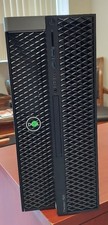
Dell Precision T7820 Dual Xeon 4214R 48GB RAM 512GB + 1TB Quadro P400 Win 11
$699.00