-
Administrator
Site Admin-

Originally Posted by
Kman
I finally got time to try netcardconfig, but to no avail. Still no internet. Any other thoughts?
Thoughts:
Set up your D-link. It will make things a lot simpler.
Give us something to work with. In a previous post you said I believe I am using DHCP settings, but you don't seem sure (with the d-Link you will be). What are you seeing? What errors are present? (see the two threads I started for several commands that will give useful information; these were what led me to find that my auto-negoiation setting had been changed and was no longer working correctly. We need some additional information to make progress in your case.
-
I have been trying over and over to get the router set up. D-links site says to not use their setup wizard for PPPoE. So I have tried to use the step by step instructions on the site several times , but nothing. So as I stand now, I can't get the router to function. So I guess I'm going with the single computer connection right now. I did try a morphix disk today, that worked great but also would no connect to the net. I ran the ifconfig etho command and got back TX errors. I'll try the other options and see what I get.
Kman
-
Administrator
Site Admin-
Originally Posted by
Kman
I have been trying over and over to get the router set up. D-links site says to not use their setup wizard for PPPoE. So I have tried to use the step by step instructions on the site several times , but nothing.
I don't have a d-link or the docs right in fromt of me, but I have set up one for a friend on PPPoE and then later on cable with mac address cloning and both times the device was very easy to set up. For PPPoE you just go to the web page interface and give it your username and password. For cable and MAC cloning the thing is even easier to configure than a Linksys - rather than have to write down your mac address and then type it in, you just click a button and it clones the address of the computer it got the clone command from (slick, although there seems to be no way to type in a MAC address, so it does mean you have to have a working MAC address to clone it. I don't see this as a problem for any legitimate use.) Tell us what happens when you try to set the device up, as well as any additional confiiguration options that I might not remember or didn't have to deal with but you might. Also, saying who your ISP is might help if someone else has them and also has a d-link.
The TX errors you got back sound similar to what I saw when I got hit with the problem after a Windows "security update". But there are a lot of potential factors that could also be an issue if you have to do a PPPoE connection right from the Knoppix CD. Getting the d-link in place and working will make things much easier, the d-link takes care of PPPoE and your Knoppix system doesn't have to deal with it; should just work on the network after booting (as long as you don't have the NIC eeprom configuration problem I've been reporting). You'll also be able to ping or talk to any other device on your local network; even before you add any more computers you'll have the d-link to talk to and know if networking on your system is working without worrying about the PPPoE connection. A nice side effect is that Windows will not need the PPPoE stuff your ISP provider either - you can scrap it; your system should boot faster, and it will be one less thing you have in Windows to take up memory or to crash at the wrong moment.
In fact, even if you don't take the time to get the d-link working with your ISP, I would suggest this and a second alternative: Power up the d-link and even though you don't hook it up to your DSL modem, cable it over to your Knoppix system. You can then use Knoppix to see if you can talk to the d-link (ping it or connect to the web interface) without worrying about PPPoE at all. Of course, this doesn't get you access to the Internet, but it does help you troubleshoot your networking problems and minimize the factors that could be going wrong. If Knoppix comes up and can connect to the d-link this way then you do not have the NIC problems I do. IF it still can't talk to the d-link, then you don't have to worry about PPPoE under Knoppix yet - you have other things to resolve first.
Similar Threads
-
By justin in forum Networking
Replies: 7
Last Post: 06-08-2005, 01:26 PM
-
By wmlabChuck in forum Hardware & Booting
Replies: 0
Last Post: 05-17-2005, 04:37 PM
-
By sebke in forum Customising & Remastering
Replies: 2
Last Post: 02-03-2004, 04:11 PM
-
By Paradox in forum Hdd Install / Debian / Apt
Replies: 1
Last Post: 01-19-2004, 07:34 PM
-
By mizator in forum Laptops
Replies: 2
Last Post: 05-30-2003, 07:15 PM
 Posting Permissions
- You may not post new threads
- You may not post replies
- You may not post attachments
- You may not edit your posts
-
Forum Rules


🔀 Juniper Networks EX2300-C-12P 12× Gigabit PoE+ • 2× 10G SFP+ Compact Switch ⚡
$109.99

Juniper EX2300 12-Port Gigabit PoE+ Managed Network Switch P/N: EX2300-C-12P
$149.99

Juniper Networks EX2300-48P 48-Port PoE Gigabit Switch (Renewed)
$361.91

Juniper QFX5100-48S-3AFI 48-Port SFP+ 6 QSFP+ 2x SFP/RJ-45 Management
$249.97

Juniper MX204 +JUNOS and Dual Power Supply
$7299.99

Juniper QFX5120-48Y-AFO 48 x 1/10/25GB SFP28 + 8 x 40/100GB Switch w/Dual AC
$10499.99

Juniper EX2300-C 12 Port Compact Gigabit Switch EX2300-C-12p Discounted Cosmetic
$79.86

Juniper EX2300-C-12P 12 Port Gigabit PoE+ 2x10G SFP+ Managed Compact Switch
$179.99
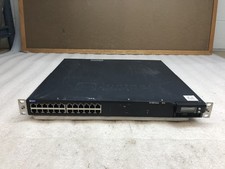
Juniper EX4300-32F 32-Port SFP Gigabit Switch EX 4300 w/ Rack Ears
$89.99

Juniper Networks Mist Wireless Access Points, Model AP45
$59.99



 Reply With Quote