

 Reply With Quote
Then why are you fooling around with Knoppix rather than Debian or some other intended for installing to hard disk distro that you can install cleanly?


Hello,
I'm just starting with knoppix (5.1) and was wandering what is down limit for
installed packages in order to run stable? I would like to remove all packages
and than try to install just few apps for my self. I don’t even need kde or any gui.
Thanks
Then why are you fooling around with Knoppix rather than Debian or some other intended for installing to hard disk distro that you can install cleanly?
---
Verifying of md5 checksum and burning a CD at slow speed are important.
Thanks for your reply, but if you look carefully, my question was not why I am fooling around but what is required minimum for installed packages on knoppix?
OK, lets look at this again. Knoppix is a Live CD (or now a Live DVD since no current CD version seems to be available). It offers a new user a chance to test out a lot of different free Linux software. But it's known to be plagued with problems if you try to install it, since it's made of a carefully balanced and tested mix of different Debian versions that work well together when nothing is changed or updated, but very frequently break when anything new is installed or anything is updated. And quite frankly, the install scripts have never been very good, even the new 0wn one. Still, some users seem to insist on installing Knoppix rather than installing a stable Debian system and then using the apt-get system to install exactly the packages that they want. I've come to understand that many of them do this because they see Knoppix as having all this nice add-on software (although a lot of it is stuff that they will never use) and they just don't understand how simple it is to install what they want with the apt-get system. But in your case you don't want all of the bloat of Knoppix. You want a small system. You even mention that you don't need a GUI. But you do seem to want it to be stable, and want to not remove something that might be needed. So why are you trying to do this the hard way, and in a way that will still give you a system that the Debian developers consider unsupportable, when rather than hacking apart the Debian based Knoppix, you could just do a simple Debian install and have a working, stable, supportable system?Originally Posted by akademik
To put it differently, there is no official "required minimum for installed packages on knoppix" because Knoppix is intended to be a Live disc and used as a Live disc. Those who want to rip it apart and use it differently do so at their own risk. But this question strikes me as being similar to someone saying that they have this nice big monkey wrench and asking how to drive some small nails into the wall with it. Someone else may tell them that the proper tool would be to use a small hammer, but they don't seem to want to listen or discuss this, and just keep asking how to drive nails with their monkey wrench, even when offered a free assortment of hammers of varying sizes. With no ill will, I wish you luck, but I believe that you are using the wrong tool and the right one is freely available and would easily do exactly what you want.
Hi,
No ill will at all
What I basically want is to boot knoppix live cd an auto start only apache, mysql, ftp and php, nothing else. So I would remove any other independent package and make very small iso which I would burn and use it as live cd again. That’s all.
Well, I did move this to the hdd install forum thinking that you were trying to do an "install", since you clearly can't do what you were describing from the normal Live CD. I'll re-move it to the remastering forum based on your last response. I don't know enough about remastering to assist, but someone there may be able to help. I would think, however, that you may be much happier starting with one of the much smaller Live CD choices such as Puppy Linux or Damn Small Linux rather than Knoppix. Depending on what you perceive your needs to be, they may already be small enough for you, and if not there will be far less stuff to remove.
---
Verifying of md5 checksum and burning a CD at slow speed are important.
FYI,
I think someone makes a small livecd to do your tasks.
I think it was called LAMMPIX or LAMPIX or LAMPPIX or something like that.
 Posting Permissions


🔀 Juniper Networks EX2300-C-12P 12× Gigabit PoE+ • 2× 10G SFP+ Compact Switch ⚡
$109.99

Juniper EX2300 12-Port Gigabit PoE+ Managed Network Switch P/N: EX2300-C-12P
$149.99

Juniper EX3400-24P 24-Port PoE+ GbE + 4-Port 1/10Gb SFP Switch
$245.00

Juniper Networks Mist Wireless Access Points, Model AP45
$59.99

Juniper MX204 +JUNOS and Dual Power Supply
$7299.99
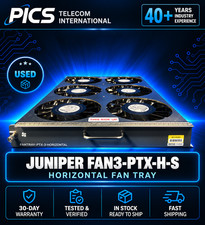
Juniper FAN3-PTX-H-S Fan II price incl VAT 3 yr warranty* B2B
$2500.00

Juniper Networks MX204-HW-BASE *BRAND NEW FACTORY SEALED* READ DETAILS
$8199.99

Juniper QFX5120-48Y-AFO 48 x 1/10/25GB SFP28 + 8 x 40/100GB Switch w/Dual AC
$10499.99
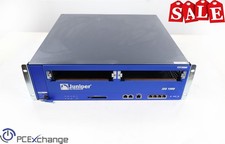
Juniper NS-ISG-1000 ISG-1000 Integrated Security Gateway Baseline Chassis 4PORT
$129.99

Juniper Networks EX3400-24T 24-Port Ethernet Switch w/Power Cord
$174.99
