

I'm running 5.3.1 live and found that with my lcd monitor, I got much better looking fonts by forcing the system to use anti-aliasing. In the KDE Control Center > Appearances & Themes > Fonts, I changed the default for anti-aliasing from "System Settings" to "Enabled". I didn't do any further configuring there.
The other thing I do as a first step on any Debian-based system is to just say NO to bitmapped fonts.
I accept the defaults presented about hinting, but at the last question, I say NO to Bitmapped font support.Code:sudo dpkg-reconfigure fontconfig-config
Ah, much nicer. Even at non-native resolutions, this helps out quite a bit - at least for me.
 Posting Permissions


(New) AMD Ryzen 7 5700X 8 Core 16 Thread AM4 Unlocked 3.4 GHz CPU OEM Tray
$169.99

Intel Core i9-9900K SRG19 3.60GHz 16MB 8-Core LGA1151 B Grade CPU Processor
$175.00
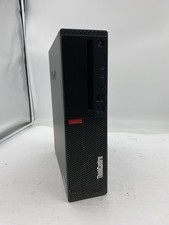
Lenovo ThinkCentre M920S Sff Intel Core i5 8600 8GB 256GB SSD Windows 11 Pro
$94.99

8-core 10-core GPU baseboard 8654 to PCIE 5.0x16 GPU expansion baseboard
$377.77

AMD Ryzen 7 7800X3D 8-Core 16-Thread 4.2GHz/5.0GHz Socket AM5
$275.00

AMD Ryzen 7 9800X3D 8-Core AM5 CPU 4.7GHz 96MB L3 8MB L2 100MHz
$389.99

AMD Ryzen 7 9800X3D - (Zen 5, 8-Core 5.2 GHz, Socket AM5) NEW IN BOX
$380.00

Intel Core i9-9900K Coffee Lake 8-Core, 16-Thread, 3.6 GHz (LGA 1151)
$189.99

Apple MacBook Air 13.6” M2 8GB 256GB SSD 2022 MLY33LL/A 8‑Core CPU 8‑Core GPU
$529.95

CHUWI 15.6'' Laptop Computer Intel Core 8GB RAM 512GB SSD WiFi Windows 11
$269.99


 Reply With Quote