
Knoppix 6.01 defaults to mount everything read/WRITE IIRC.Originally Posted by Harry Kuhman
To mount read-only, I had to open terminal and use mount -o ro


Knoppix 6.01 defaults to mount everything read/WRITE IIRC.
To mount read-only, I had to open terminal and use mount -o ro
 Posting Permissions


Netac DDR4 32GB 16GB DDR4 3200MHz UDIMM C16 Desktop Internal Memory RAM Kit
$99.99

A-Tech 8GB DDR3 1600 PC3-12800 Laptop SODIMM 204-Pin Memory RAM PC3L DDR3L 1x 8G
$21.68

Major Brand 16GB (2x8GB) PC3-12800U DDR3-1600MHz DDR3-12800 DESKTOP RAM NON-ECC
$29.99

DDR4 Laptop RAM 4GB 8GB 16GB 32GB 2400 2666 3200 Samsung Hynix
$66.00

NEW IN BOX - Corsair Vengeance RGB 32gb (2x16gb) DDR6200 CL36 CMH32GX5M2B6200C3
$550.00
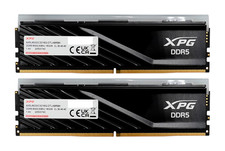
ADATA XPG Lancer Blade RGB 32GB (2x16GB) DDR5-6000 CL30 Desktop RAM Black
$429.94

Samsung 16GB LPCAMM2 PC5 7500 DDR5 LPDDR5X CAMM2 M561K1LC4DM0-CCTGM RAM Memory
$189.00

RAMAXEL Lenovo 32GB LPDDR5X CAMM2 7500MHz Laptop RAM | UNTESTED
$445.00

LOT OF 4 Samsung 16GB DDR4-2666 ECC UDIMM 2Rx8 PC4-21300 M391A2K43BB1-CTDQ
$469.95

Micron 32GB 1x32GB DDR5 5600 CL46 ECC Unbuffered SO-DIMM MTC20C2085S1TC56BD1
$399.00

 Reply With Quote