

 Reply With Quote
I'm pretty sure there's a cheatcode that will use the Gnome desktop, that's what you mean; try knoppic desktop=gnome and see what it does.Originally Posted by exzhou
Krishna


I am new to both linux and unix. I just installed Gnome to the hard drive on a very old laptop. According to the documentation on this website, "To install Gnome, you have to comment all the lines in /etc/apt/sources.list except the unstable ones." This must happen before typing:
apt-get update
apt-get install gnome
Is there anyone who knows how to do the first step (commenting /etc/apt/sources.list)? I think I generally understand how the apt-get function works, but why do I need to comment all the lines in /etc/apt/sources.list?
I'm pretty sure there's a cheatcode that will use the Gnome desktop, that's what you mean; try knoppic desktop=gnome and see what it does.
Krishna
 Posting Permissions


Apple Computer cards VTG 670-8020-B 607-0103-C 607-0291-C AST -Orange Micro ++
$169.00

Vintage Apple iMac G4 15" Lamp 700MHz 512MB Mac OS X 10.4.6 W/ Pro Speakers
$300.00
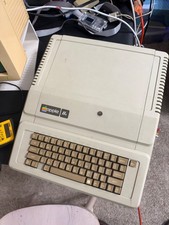
Apple IIe Vintage Computer A2S2064 Powers On Apple II Untested For Parts/repair
$149.99

Vintage Apple II Avant-Garde Creations Super Shape Draw And Animate 1981
$295.00

Vintage Apple Desktop Bus Mouse Beige G5431 AS IS NOT tested
$29.99

Rare Vintage Macintosh Apple Wooden Disk Storage Box Dovetailed
$69.95

LARGE LOT Vintage Apple Macintosh Mouse Cables Accessories SCSI etc - UNTESTED
$80.00

Lot of 3 VIntage Apple Computer Rainbow Logo Sticker Decal Macintosh 1980s NOS
$7.00

Vintage Apple Multiple Scan 15av Display Monitor M4681
$299.99

Vintage Apple PowerBook 15” G4 “Aluminum” (1.25GHz/2gb/150gb/Tiger) 2
$109.99