

 Reply With Quote
Go here


There must be some specific Debian way of doing this, but I suspect that the TrueType Fonts in Debian mini-HOWTO is out of date (last updated in January 2000), for the life of me I can't understand the defoma man pages (and I don't think Gimp or OOo can use defoma anyway).
Using dfontmgr seems to just result in fonts not being loaded into Abiword properly (or abiword crashing on selecting some ttf fonts).
Am I alone in feeling despirited that fonts in Linux are still such a pain?
Any help, ideas, pointers to up to date documentation, etc., welcome! I see someone on the Debian list says to use the Anti Aliasing HOWTO........

Go here
Thanks: I'll give it a go!
Hello !
There is a simple way to install windows truetype fonts in knoppix ...
1. create a directory /usr/share/fonts/truetype/win
2. copy your windows truetype fonts into this directory.
3. install ttmkfdir (apt-get install ttmkfdir)
4. go to /usr/share/fonts/truetype/win (being root)
5. type the following line : ttmkfdir > fonts.dir
6. then type : ttmkfdir > fonts.scale
7. Add in your XF86config-4 :
FontPath "/usr/share/fonts/truetype/win"
8. Restart X
9. et Voila !

Well, that's been partially sucessful: I now have all my ttfs in Open Office org, but I can't get them in Gimp.
Is there anything peculiar about the way XF86 - 4 serves fonts to Gimp? Or Debian? I ask because in the past, just doing xset fp+ [path_to_fonts] and xset fp rehash worked just fine. Also because my /etc/X11/XF86Config-4 contains a cryptic reference to Gimp which I've never seen before (all the fonts stuff here just in case I've messed up elsewhere):
Section "Files"
RgbPath "/usr/X11R6/lib/X11/rgb"
ModulePath "/usr/X11R6/lib/modules"
FontPath "/usr/share/fonts/truetype"
FontPath "/usr/share/fonts/ttf/western"
FontPath "/usr/share/fonts/ttf/decoratives"
FontPath "/usr/X11R6/lib/X11/fonts/100dpi:unscaled"
FontPath "/usr/X11R6/lib/X11/fonts/100dpi"
FontPath "/usr/X11R6/lib/X11/fonts/misc:unscaled"
FontPath "unix/:7100"
FontPath "/usr/X11R6/lib/X11/fonts/misc"
FontPath "/usr/X11R6/lib/X11/fonts/75dpi:unscaled"
FontPath "/usr/X11R6/lib/X11/fonts/75dpi"
#FontPath "/usr/X11R6/lib/X11/fonts/100dpi:unscaled"
#FontPath "/usr/X11R6/lib/X11/fonts/100dpi"
FontPath "/usr/X11R6/lib/X11/fonts/Speedo"
FontPath "/usr/X11R6/lib/X11/fonts/PEX"
# Additional fonts: Locale, Gimp, TTF...
FontPath "/usr/X11R6/lib/X11/fonts/cyrillic"
# FontPath "/usr/X11R6/lib/X11/fonts/latin2/75dpi"
# FontPath "/usr/X11R6/lib/X11/fonts/latin2/100dpi"
# True type and type1 fonts are also handled via xftlib, see /etc/X11/XftConfig!
FontPath "/usr/X11R6/lib/X11/fonts/Type1"
FontPath "/usr/share/fonts/ttf/western"
FontPath "/usr/share/fonts/ttf/decoratives"
FontPath "/usr/share/fonts/truetype"
FontPath "/usr/share/fonts/truetype/openoffice"
FontPath "/usr/X11R6/lib/X11/fonts/defoma/CID"
FontPath "/usr/X11R6/lib/X11/fonts/defoma/TrueType"
I'd add that the ttfs I want in Gimp are stuff like Harquil, not the plain Jane M$ stuff (I have the "free" "net" ttfs anyway).
Update:
got it
ttmkfdir [path]
update-fonts-dir [path] (complains about absolute path, but WTH)
xset fp+ [path]
xset fp rehash
That only took about 6 hours!
Dontcha love ttf in Linux?
Try this next time.
Go to the KDE Control Center, System Administration, Font Installer, Administrator Mode.
You should then be able to simply select your fonts and they will be autmatically configured and installed.
I might try that later! But doesn't it only work for Kde applications?
BTW, your penguin looks much wiser than mine!
No it should install system wide. I've used it before and I did a test again last night and installed a new font. I was then sucessfully able to bring it up in Abiword and Open Office. I've got Gome 2.2 installed and fonts FINALLY look good in the Gnome abiword. The key to systemwide instalation is making sure you install it in "adminstrator mode". BTW, the control center always seems to crash at the end of this process, but it doesn't seem to affect the font instalation - it still works despite the crash.
For those new to linux this seems to be a much easier way to install fonts than via the command line. The only problem is that the Font Installer is kind of tucked away in the KDE control center and not many people seem to be aware of it. The only reason I found it is cause some wise penguin told me
Wow! Works fine for me (and the control centre -- I logged in as root and used it from there -- didn't crash)
 Posting Permissions


Vintage cross Apple computer branded pen rainbow logo In original box
$100.00

Vintage Computer - PC Innovation Intel 486DX2 - Dos Ver 6.2 Windows 3.1
$250.00

Vintage Jetway J-620BF Socket 370 Celeron AT Motherboard SiS 620 Brand New
$75.00

Vintage HP Hewlett Packard 2112A 21MX 1000 M-Series 16-Bit Minicomputer
$419.99

Vintage Cherry W. Germany G80-0486H/05 Mechanical 25-Pin D-Sub Keyboard M8
$170.99
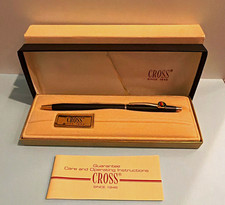
Vintage Apple computer Cross Metal Ballpoint Pen Black Ink Gold Trim
$125.00
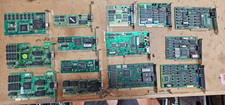
Lot 14 Vintage ISA VGA Video Cards Trident CHIPS UMC 8-Bit 16-Bit 286 386 486
$199.95

Vintage RARE 1980s Apple Computer Logo Frisbee. Great shape, w/ the usual nicks
$220.00
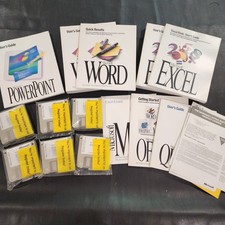
Vintage Microsoft Office 4.2 for Windows Original Floppy Disks & Manuals 1994
$119.99
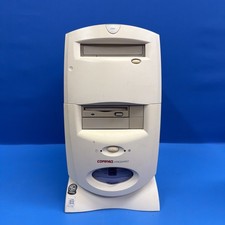
Compaq Presario 7594 Vintage Desktop PC Windows 98 SE 64MB Floppy CD-ROM
$129.00