
I've got a wireless keyboard/mouse combo that I've used under both MacOS and Windows, and the keyboard doesn't work for me, though the mouse is fine. Anybody know what I need to do?
Krishna


 Wireless keyboard issue
I've got a wireless keyboard/mouse combo that I've used under both MacOS and Windows, and the keyboard doesn't work for me, though the mouse is fine. Anybody know what I need to do?
Krishna
Its in such a despair after working in Window$... Im using a Logitech kbd/mouse on USB port (Knoppix), had trouble with Knoppix recognizing either. Seems as it wanted to startup without either Kbd, mouse and external monitor, then have them plugged in afterwards. Now that its up and running, the mouse connects much more quickly than in Window$. Check the cells in the keyboard, they may be weak reducing the transmit range. I use rechargeable Ni-Mh cells, since the mouse drains them quickly. The trick to the mouse is to leave the cell cover off and pop one out when not in use, so the LED doesnt drain them overnite. I just had the keyboard fail to send a "zero" from the keypad, the "zero" on the Kbd worked. Odd. It wont set Numlock on boot either, but thats not a big problem.Originally Posted by krishna.murphy

Sounds like numlock is off.I just had the keyboard fail to send a "zero" from the keypad, the "zero" on the Kbd worked.
My mouse shuts off after a while, so it's okay to leave it on overnight, etc. Numlock-on-boot seems to be hard for Linux generally, not just Knoppix, but as you said - it's not such a big deal (unless you forget to turn it on.) It seems to me that, it being a catch-up game for non-Windows OSs, there'd be some effort put in to make the easy, surface-only stuff the same so people won't be put off. How hard can it be to make the "Super" key (^ on the left side of the space bar) open the main menu? When I have some spare time to fool with such...
Cheers!
Krishna
 Posting Permissions


Dell PowerEdge VRTX 2.5"x25 Bay Blade Enclosure 4x1600W + 4X M640 (4X Blades)
$1599.99

Dell PowerEdge M640 Blade Barebone Server Dell P/N: HHB006 Tested Working
$149.99

Dell PowerEdge M630 Blade Server 2x Xeon E5-2680 v4, 2F3MP , 4GDP5 ,R10KJ ,JVFVR
$140.00

NETAPP HCI NAF-1701 SuperMicro Server 4X BLADE H410C 8X GOLD 5120 4 NODE SERVER
$1499.97

Datto S4P10 1U Blade Rack Server Intel Xeon D-2143IT 2.20GHz 48GB DDR4 4-Bay PSU
$197.76

Dell Poweredge C6400 24x 2.5’’ 2x 2400W 4x C6420 Nodes H330 | 2x SFP | 8x Trays
$799.99
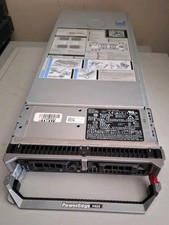
Dell M620 Blade Server Intel Xeon 2x E5-2665 @2.40GHz No HDD and No Ram QTY
$99.95
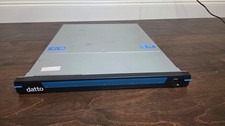
Datto S3P6000 4x 3.5" 1U Blade Rack Server Intel Xeon D-1541 @2.10GHz 48GB DDR4
$154.76

Dell PowerEdge M620 Blade Server 2x Xeon E5-2680v2 256GB DDR3 RAM NO HDD
$349.99

Dell Poweredge VRTX 25Bay 2.5" 2x PERC 8, 2xCMC, I/O 1GB Pass Through, 4x PS
$578.08

 Reply With Quote