-

Originally Posted by
Tattered Phoenix

Hi,
How would I mount windows disk, do I select something off the list menu and it will lead to a place to type the command code.....I am sorry to sound so dumb...but I've never used Knoppix and I am a bit confused, but a have a vague idea of what your saying, but I don't know when or where someone would type the command code. Thanks so much for your help.
Knoppix features the PCman file manager, prominent on the toolbar as a file folder icon. You can also find it on the "System Tools" menu. Note that Windows is often installed using the NTFS filesystem, which can be risky to write with Knoppix.
Once the file manager is running, you'll have some icons for various things that it recognizes, hopefully including your Windows hard drive partition. It's a click-to-mount interface, but again, it's best to be very cautious when dealing with Windows. If you run the GParted program on the Preferences menu it will enable you to determine the type of filesystem before mounting.
Cheers!
Krishna 
 Posting Permissions
- You may not post new threads
- You may not post replies
- You may not post attachments
- You may not edit your posts
-
Forum Rules


AMD Ryzen 5 5500 Processor ( read Description)
$59.00

INTEL CORE I9-10940X X-SERIES PROCESSOR | 3.30GHZ | SRGSH
$179.99

Intel Core i7-4770 3.40GHz Quad Core SR149 LGA 1150 CPU Processor tested
$35.00

(LOT OF 20) Intel Core i5-8400 CPU 2.80GHz Desktop Processor (SR3QT)
$700.00

Intel Core i7-9700 Octa-Core 3 GHz Desktop Processor LGA 1151
$79.99

Intel Core i5-12500T SRL5W 2GHz 18MB 6 Core Socket LGA1700 Desktop CPU Processor
$114.99

Intel Core i7-3770K 3.5 GHz Processor
$39.00
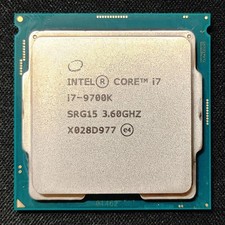
Intel Core i7-9700K Octa-Core 3.6 GHz Desktop CPU
$99.99

INTEL CORE I9-10980XE PROCESSOR | 3.00GHZ | SRGSG
$299.99

Lenovo ThinkCentre M920s SFF Barebones PC Motherboard PSU DVD No CPU RAM SSD
$27.99



 Reply With Quote