
6.7 is out? In English I hope. Thanks guys for all your help. I will start with that!Originally Posted by Capricorny


6.7 is out? In English I hope. Thanks guys for all your help. I will start with that!
6.7 turned out to be a big disappointment. Why can't I move a window??? Chrome still doesn't have
flash?? I know as a linux user, I have to do things manually, but this is too much. I may switch to
Ubuntu or Fedora.
I will say it is faster.
The default effects are really annoying.
Greetings fenzda.
You seem to have several problems. We can probably help.
I've got Chromium working with flash, but it may be because I've also got IceWeasel working as well.
With IceWeasel you need to install 'flash plug-in non-free' with syaptic or apt. You might try that.
There's also a little icon in Chromium's address line; if it has a red 'x' in it, then click it to see what it tells you.
If the default effects are the Compiz effects, I can sympathize with you. It was even worse in 6.4.
You can make these go away and speed up your browser by adding 'no3d' to your syslinux.cfg default line.
Lots of luck with Fedora and/or Ubuntu. You'll need it.
Glad to explain any of the above you don't understand.
Cheers
Last edited by utu; 08-10-2011 at 03:16 AM.
1. If you can't move windows, there's surely something wrong on the hardware side. Wrong burning for example, or very special driver problems. What makes you believe this is the distro's fault?
2. Starting Knoppix with cheat code no3d will keep Compiz out of the way. No special effects.
3. With Compiz enabled, it's fairly easy to make behavoir less fancy, CompizConfig settings manager on the preferences menu. You looked for and tried that, didn't you?
4. It should be rather easy to get Flash working, but you need to have persistent store in use to keep system changes. There are several alternatives for flashplayer packages now.
OK here's what I did - I booted from the 6.7 dvd to check it out. When I got in the windows didn't move unless I used the Alt key. I did like the general look of it(but was annoyed with Compiz). I did try to go to the Preferences, but couldn't exactly find how to remove it. Gave up. The cheatcode sounds like a good way for now.
I have an empy terabyte disk, so I copied everything from the dvd to the hd - just a copy/paste in windows(does that matter). Booted with: knoppix fromhd=/dev/sdb5. I got in and the windows moved! mnt-system was knoppix. It was not in its own partition, just plain
old data. Seemed to work. Then next time I tried to get in nothing worked and it said I was out
of disk space. My bookmarks were saved and I found the router. I have a 200M swap. Increase it? I got lots of space.
General question: do the directories /etc /proc/ and other reside on the hard drive at this time(so I can add directories for flash). I see softlinks to UNIONFS. I ass-u-me that means the
hard drive I used
I couldn't find syslinux.cfg, so would I have to make it? There is an isolunix.cfg. Is that the same?
I am going to stick with Knoppix. I gotta get flash. Linux mint 11 had it no problem(another
Debian). apt didn't seem to work either.
Preciate all the help guys. We linux people are nothing if not persistent.
 Posting Permissions


16GB KIT (2x8GB) DDR3 Gamer Desktop RAM PC3 MIXED BRANDS VIPER VENGEANCE FURY
$10.00

Netac DDR4 32GB 16GB DDR4 3200MHz UDIMM C16 Desktop Internal Memory RAM Kit
$99.99

Samsung 32GB DDR4-2666V-2Rx4-RB2-12 RAM M393A4K40CB2-CTD6Q
$169.00

DDR4 Laptop RAM 4GB 8GB 16GB 32GB 2400 2666 3200 Samsung Hynix
$66.00

RAMAXEL Lenovo 32GB LPDDR5X CAMM2 7500MHz Laptop RAM | UNTESTED
$445.00

Major Brand 16GB (2x8GB) PC3-12800U DDR3-1600MHz DDR3-12800 DESKTOP RAM NON-ECC
$29.99

A-Tech 8GB DDR3 1600 PC3-12800 Laptop SODIMM 204-Pin Memory RAM PC3L DDR3L 1x 8G
$21.68
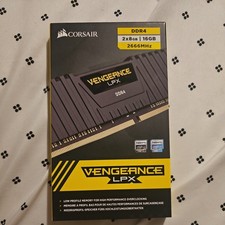
Corsair Vengeance 16GB DDR4 2666MHz (8 X 2) (Black) - 2 Sticks
$60.00

Corsair Vengeance DDR3 8GB 16GB 32GB 1866MHz PC3-14900 Desktop RAM Memory DIMM
$85.00
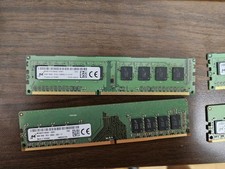
Micron and SK hynix RAM 56GB (4x8GB) (2x4GB) see description
$135.00

 Reply With Quote