-
 Arrgghh! It should be so easy but it is not
Let me start off by saying I have 15 years of UNIX (but stopped the continuous use 9 years ago). Now its mainly Windows.
Here is what I want:
- I want to make a CD based linux with just a browser and video player in it for the small mineral museum I volunteer at.
- I'd like to restrict the browser to certain URLs. The video player is to play downloaded youtube and/or other videos (possibly through the browser)
- The eventual screen would be a touchscreen but I haven't got one yet.
- The idea is that visitors can go to certain web site (only) to get info on minerals or play "pre-loaded" videos. Anything else would be locked out. I want the system to be CD-based so visitors (and unsophisticated volunteers) can't screw it up.
So where am I? Step 3 and lost.
I downloaded and burned 6.70 knoppix to CD. Booted it. Installed it "to flashdrive" using the hard disk as the flash drive (don't care if data gets wiped out. That worked but after booting, the browser is messed up (top is at bottom of screen. Rebooting the HD system makes it work fine. Not sure why but I can live with it for now. Note that running browser from CD-based original knoppix looks fine.
Since I want to make changes dynamically and test those changes - removing unwanted software like the office software and configuring to write protect config files from knoppix user as well as testing passworded knoppix and root users, I figured creating a HD knoppix would be best. I would then burn that back onto a CD.
So I tried "install knoppix to harddisk". "auto" "disk" and "gparted" do nothing on this once-windows XP disk. The only thing it says is "not enough swap space" and "no usable partition". Agghh!
I mounted the two old windows partitions. OK. Unmounted and create file system on one. cool. unmounted then created a huge swap with mkswap and swapon on one. Still the same problem.
Help an old geezer get past step 3?
Am I even going in the right direction?
I can't get past step 3
-
Additional info. (and by the way, I have been reading and searching for as much info as I can).
I brought up X then ran a root terminal then ran gparted and it came up. I then set up two primary partitions but still no way to do an install. In my old age, I must be missing something obvious.
-
Aha! I am beginning to see the light. I found I had to unallocate some of the disk space with gparted. Then when I specified "auto", it tried to work. Unfortunately it failed but it did create 2 partitions. So in rereading the "help", I understood it needed both a swap and a reiserfs partition (they didn't have them in my day). So using gparted, I made one of the partitions created by auto into swap and the other into reiserfs. Then the HD installer allowed me to select the partition and install. It is doing it right now.
Until I hit the next point of contention, any suggestions about my objective are truly appreciated.
 Posting Permissions
- You may not post new threads
- You may not post replies
- You may not post attachments
- You may not edit your posts
-
Forum Rules


Lenovo ThinkStation P520 Intel Xeon W-2123 3.6GHz 900W - NO RAM/ GPU/ HDD/ OS
$189.98

Dell EMC PowerEdge R440 Xeon silver 4215 2.5GHz 16 GB ram 2x 550W PSU No HDD
$275.00
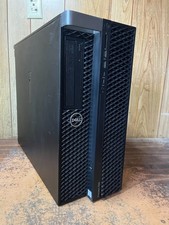
Dell Precision 7820 Win 11 Gaming Computer Xeon Silver 4112 16GB GTX 1080
$320.00

Intel Xeon E5-2697 V2 LGA2011 Server CPU Processor 2.7GHz 12 Core SR19H 130W
$35.00

Intel Xeon E5-2699 V4 2.20GHz 55M 22-CORES LGA2011-3 Server Processor 145W SR2JS
$84.49

Intel Xeon E5-2690v2 SR1A5 10-Core 3.00GHz 25MB 130W LGA2011 CPU *km
$11.99

Intel Xeon W-2255 SRGV8 3.7GHz 10-Core LGA2066 Server CPU Processor
$199.99

Intel Xeon E5-2698 V4 20CORE 2.2GHz 50M Processor SR2JW *km
$38.99
Dell Precision 7820 Win 11 Gaming Computer Xeon Silver 4112 32GB GTX 1080
$350.00

Dell Precision T5820 950W Workstation 4.00GHz W-2125 No RAM/ GPU/ HDD/ OS
$144.98



 Reply With Quote