-
Senior Member
registered user

Originally Posted by
Werner P. Schulz

If you boot Knoppix with cheatcode "noimage" you can only see persistent memory in the (compressed) file '/mnt-system/KNOPPIX/knoppix-data.img'. If you boot without this cheatcode you can also see the persistent memory in the (decompressed) directory '/KNOPPIX-DATA/'.
I would not have expected this to be the case.
I would expect the cheatcode noimage to suppress the un-compressed .img file which has both the errors and the new program material in it, leaving you with just the initially installed compressed KNOPPIX file.
The .img file is not compressed. That would take up too much time on shut-down, for one thing.
I can see that the cheatcode noimage may indeed serve a useful purpose, but I'd not describe it the way you have.
And, if the .img is ok, I don't want to change it.
Last edited by utu; 10-01-2011 at 07:00 PM.
-
The file 'knoppix-data.img' or in case of encryption 'knoppix-data.aes' is always compressed! Have a look at it with midnightcommander.
If you boot Knoppix, it is mounted (and decompressed) via '/dev/loop0' to '/KNOPPIX-DATA'. If you boot with cheatcode "noimage" nothing happens with '..img' or '..aes'
Greetings Werner * http://www.wp-schulz.de/knoppix/summary.html
Own Rescue-CD with Knoppix (Knoppix V6.7.1 remaster)
-
Senior Member
registered user
Originally Posted by
Werner P. Schulz
The file 'knoppix-data.img' or in case of encryption 'knoppix-data.aes' is always compressed! Have a look at it with midnightcommander.
If you boot Knoppix, it is mounted (and decompressed) via '/dev/loop0' to '/KNOPPIX-DATA'. If you boot with cheatcode "noimage" nothing happens with '..img' or '..aes'
Sorry to intrude into this discussion. All other things do not interest me, but knoppix-data.img or knoppix-data.aes is always ***UNCOMPRESSED***. I don't use midnightcommander, but if midnightcommander tells you that it is compressed, then throw midnightcommander away ! Knoppix-data.img is just a normal EXT2/3/4 file system, which can mount it yourself using /dev/loop0 and it is read-write. Again, a perfectly usual read/write EXT file system ! There is nothing unusual about knoppix-data.img.
If it is compressed, it is not so easily becoming writable !
-
Senior Member
registered user
since I can't just delete my prior post...
.
I've re-considered the exact terms of my comments, noting the following:
My KNOPPIX-DATA is about........ 385 Mb
My knoppix-data.img is about..... 943.7 Mb
My original CD's KNOPPIX is........ 722.4 Mb.
I think the CD's KNOPPIX is compressed; KNOPPIX-DATA is un-compressed; and
I expect that knoppix-data.img must be some combination of the two not requiring
any wholesale compression of the entire uncompressed UNION at shutdown.
-
The size of 'knoppix-data.img' remains always as big as the size of persistent memory you created once upon a time. The size of '/KNOPPIX-DATA' depends of all your work within your flash-disk Installation with persistent memory and changes with each action.
I think the CD's KNOPPIX is compressed; KNOPPIX-DATA is un-compressed;
If you boot Knoppix, the (compressed) file '/mnt-system/KNOPPIX/KNOPPIX' is mounted (and decompressed) via '/dev/cloop' to '/KNOPPIX' - readonly.
Now you have
a) '/KNOPPIX-DATA', the persistent memory - read- and writeable
b) '/KNOPPIX', the filesystem image - only readable.
UNIONFS lays this two parts one over the other and you think, you have only one filesystem. Because you can not write to '/KNOPPIX' all your changes are written to '/KNOPPIX-DATA'.
If you install a program, the files of this program are now in '/KNOPPIX-DATA/usr/'; if you purge a program you find a deletion item in '/KNOPPIX-DATA/usr/'. And all of '/KNOPPIX-DATA' is stored via '/dev/loop0' in 'knoppix-data.img'. In 'knoppix-data.img' is nothing of '/KNOPPIX'.
-
Senior Member
registered user
I am trying to put some distance between making a simple backup and
purging the persistent store. Most of the time, one can make a little backup
and not even think about re-doing persistence.
I'm glad to learn there are other ways to go about re-doing persistence, but
I don't have to do that very often. So here's my take on knoppix-data.img,
but I consider this somewhat a distraction from the thread itself.
To purge a failed knoppix-data.img, it must be un-mounted first, then deleted.
One way to achieve this is to launch another working linux system, such as your
LiveCD and to delete the knoppix-data.img on an inert LiveUSB.
The cheatcode 'noimage' used in launching a LiveUSB must keep its knoppix-data.img
from being mounted, allowing one to delete it by means of the LiveUSB, without
recourse to another linux system for this purpose. I've not used it, but I can
(now) appreciate its usefulness.
In either case, the purged LiveUSB should provide the opportunity to (re)establish
a persistent file at each boot, until such time as one has in fact been
established. However, re-establishing persistence in this way purges ALL
changes inherent in the purged knoppix-data.img, both personal material and
other material not contained in home/, root/, etc/ and syslinux.cfg.
The personal backup will re-instate only the personal material. Other material
must be additionally re-constituted. The original backup program cited earlier
backs up ALL of KNOPPIX-DATA, not just the personal material if that is desired.
The storage overhead for this is considerably more, and to my mind not as efficient
a use of resources as this later 'personal version'.
So long as the LiveUSB seems to be properly functioning, there is no need to
purge-and-replace knoppix-data.img. Personal backups may be performed over and over
without recourse to purging and re-establishing persistence so long as
the OS seems to be performing as it should.
-
Personal backups may be performed
over and over
without recourse to purging and re-establishing persistence so long as
the OS seems to be performing as it should.
Full acknowledge. Therefore my proposal to insert a date-item
update$(date +'%m%d%y').tar.gz
-
Senior Member
registered user
Hi, Werner
Not to belabor the point, but if the system sees a file is to be
saved with the same name as one already 'in situ' it asks if you
want to 'write over' the earlier file. I first became aware of
this when it seemed to spoil my status prompts.
Your idea allows making backups unique wrt DAYs. Making several
in a given day I still observe this phenomenon. I might prefer
to swap YEAR for HOUR, retaining the same brevity but allowing
for more changes per DAY of the medium.
-
... no problem
Code:
STOR=update$(date +'%m%d%H').tar.gz
or
STOR=update$(date +'%m%d-%H%M').tar.gz
-
Senior Member
registered user
Further refinements to the personal backup idea.
.
I've incorporated all of Werner's excellent suggestions, and since
I found I never referred to the tar listing, that's been omitted.
In examining the remaining contributors to the 'personal backup', I found
that not only is .mozilla the real space hog, but its caches are its
biggest contributors. It is possible to clear at least one of these caches
with a quick trip to the IceWeasel Edit>Preferences GUI before making
a backup, resulting in a great reduction in the size of the stored file.
A revised listing is as follows:
Code:
#!/bin/bash
#
# new.backup2: do 'chmod +x new.backup2' & 'chown root:root new.backup2'
# Before backup, Go to Edit>Prefs on IceWeasel & 'Clear Now' the Off-Line cache.
#
cd /; STOR=/mnt-system/update$(date +'%m%d%H').tar.gz
echo -e 'Compressing data; patience, this may take a little time..\c'
tar -czf $STOR KNOPPIX-DATA/home/  KNOPPIX-DATA/etc/ \
               KNOPPIX-DATA/root/  mnt-system/boot/syslinux/syslinux.cfg
echo '.Done.'; echo 'Restore using the command, tar -xzf '$STOR' -C /'
#
exit 0
Now if some clever person here will inform me of some appropriate API,
assuming there is one, we might automate that effort as well. This is
to say that I haven't been able to 'exclude' from the tar inclusion
the Cache & OfflineCache directories from ~/.mozilla/firefox/*.default/
which are the culprits I'd like to exclude.
 Posting Permissions
- You may not post new threads
- You may not post replies
- You may not post attachments
- You may not edit your posts
-
Forum Rules


Amiga 1000 Computer w/ Monitor Keyboard Mouse Disc Drive Sidecar Expansion Discs
$950.00

RGB2HDMI Amiga 500 UltraLong (Accelerator Friendly) HDMI Games, non-RTG A500
$50.00

Microbotics Starboard 2MB + SCSI Sidecar for Amiga 1000 Vintage Computer READ
$329.00

Amiga Emplant Emulator Card For Commodore Amiga 2000 4000 3000
$249.00

Commodore Amiga 4000 Motherboard Rev B - untested
$225.00
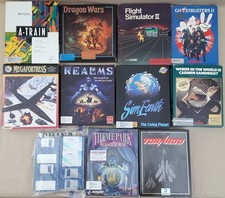
(10) BOXED Games for Commodore Amiga 500 600 1000 1200 2000 3000(T) 4000(T)
$329.98
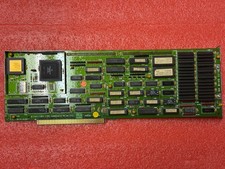
Amiga 2000 2630/CPU 68030 25Mhz
$300.00
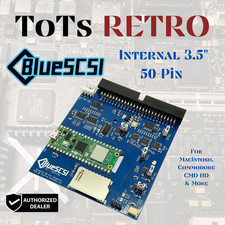
BlueSCSI v2 Internal 50-pin 3.5" SCSI Drive ,Wi-Fi,For Macintosh, Amiga, PC
$52.99
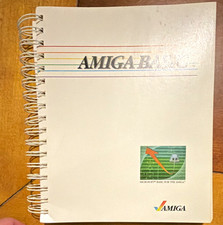
Amiga BASIC Spiral-Bound Manual Book, English, For Amiga Desktop Computer
$30.00

68000 CPU Amiga 2000 Slot Adapter
$25.00



 Reply With Quote