

 Reply With Quote
More Info:
The Volume Control is not displayed in the panel. although the applet is added ...see scrennshot


Re.:
HP Pavilion g6-1b67ca Laptop
Knoppix 6.7.1 USB Install
The terminal printout of 'lspci' clearly shows that there is an Audio device detected but there is probablyroot@Microknoppix:/home/knoppix# lspci
00:00.0 Host bridge: Advanced Micro Devices [AMD] Device 1705
00:01.0 VGA compatible controller: ATI Technologies Inc Device 9647
00:01.1 Audio device: ATI Technologies Inc Device 1714
00:04.0 PCI bridge: Advanced Micro Devices [AMD] Device 1709
no driver for it installed.
I can not play any mp3 files with GNOME MPlayer.
When I click on a song and open it with GNOME MPlayer the title is recognized but immediately after "play" it is "stopped".
What is missing?
More Info:
The Volume Control is not displayed in the panel. although the applet is added ...see scrennshot
Hi, As I'm still struggling with myissue, I wonder where I could get theNo Sound
lshw - list hardware tool or inxi - a Information retrieval script to extract more detailed information on the hardware and installed/used drivers configuration of my Laptop? BTW, it is, in my opinion, not a bad idea to have such tools installed by default on Knoppix!
Last edited by Werner P. Schulz; 03-14-2012 at 09:52 AM. Reason: formatted by moderator
Within Knoppix is hwinfo installed. To get an overview typeto get special information use the hw_items - in your caseCode:hwinfo --helpIf you like lshw, you can install it with aptitude (or Synaptic); to install inxi have a look at http://code.google.com/p/inxi/wiki/InstallationCode:hwinfo --sound
Hi Werner, I really appreciate your fast response....'hwinfo' works great! If you don't mind, please have a look on the info for sound ...I wonder why I get two, slightly different, results concerning the Vendor, SubVendor, Device? Thank you!
Now we know that your system has got two audio devices. What is the output of the commandCode:cat /proc/asound/cards
Do you have a soundcard and onboard-sound?
Actually, I don't know! I bought this Laptop (HP Pavilion g6-1b67ca) direct from HP! I never opened it and added a sound card!Originally Posted by Werner P. Schulz

This is what i says:I have absolutely no clue why there are two devices!Code:knoppix@Microknoppix:~$ cat /proc/asound/cards 0 [Generic]: HDA-Intel - HD-Audio Generic HD-Audio Generic at 0xf0544000 irq 43 1 [Generic_1]: HDA-Intel - HD-Audio Generic HD-Audio Generic at 0xf0540000 irq 16
--------------------
If you use the "Go Advanced" button, you have more abilities to format your posting and with the "Preview Post" button you'll see, how your posting looks like.
Greetings Werner
Last edited by Werner P. Schulz; 03-15-2012 at 05:41 PM. Reason: formatted by moderator
I would suggest that you create a configuration file .asoundrc in your home directory.
 Posting Permissions


GIGABYTE A520M DS3H AC AMD AM4 Motherboard mATX
$59.99

Corsair RMe RM850e 850W 80 Plus Gold Fully Modular Low Noise Certified Refurb
$58.99

Gigabyte GA-B85M-D3H Motherboard
$54.99

ASUS PRIME Z890-P WIFI Z890 LGA 1851 ATX motherboard, Intel® Core™ Ultra Series
$235.99

GIGABYTE B365 HD3 LGA1151 Intel 9th Gen motherboard
$59.99

Asus Prime B660M-A AC D4 Motherboard Intel LGA 1700 14th 13th 12th Gen DDR4
$79.99

Intel H81 Motherboard M.2 NVMe LGA 1150 mATX w/ IO Shield (Random Slot Color)
$29.90
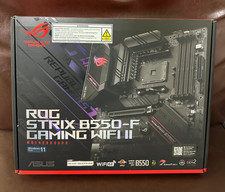
Asus ROG Strix B550-F Gaming WiFi II AMD AM4 PCIE 4.0 ATX Motherboard
$124.00
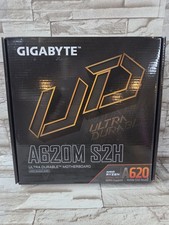
GIGABYTE - A620M S2H AM5 DDR5 M-ATX Motherboard
$65.00

Dell XPS 8940 Desktop Motherboard Intel H470 LGA1200 DDR4 K3CM7 KV3RP 427JK
$154.98