

I just tried to boot Knoppix on a pair of new Dell Optiplex 390 systems. I get:
Could not mount disk to /mnt-system. Starting debugging Shell...
?: can't access tty; job control turned off
(The ? falls of the edge of my cheap old LCD).
I got this error with Knoppix 6.4.4, so I burned a new 6.7.1 disc and got the same error. I have tried the following cheat codes:
knoppix vga=0
knoppix acpi=off pnpbios=off noapic noapm
knoppix vga=0 debug -b 3
failsafe debug -b 3
The system has a Pentium G630, on-processor video (HD Graphics 200), Intel H61 Express chipset, 4GB RAM, SATA hard drive and DVD drive.
Thanks!
 Posting Permissions


Apple Computer cards VTG 670-8020-B 607-0103-C 607-0291-C AST -Orange Micro ++
$169.00

Vintage Apple iMac G4 15" Lamp 700MHz 512MB Mac OS X 10.4.6 W/ Pro Speakers
$300.00
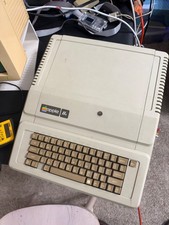
Apple IIe Vintage Computer A2S2064 Powers On Apple II Untested For Parts/repair
$149.99

Vintage Apple Extended Keyboard- M0115 - no cord
$49.99

Vintage Apple II Avant-Garde Creations Super Shape Draw And Animate 1981
$295.00

Rare Vintage Macintosh Apple Wooden Disk Storage Box Dovetailed
$69.95

LARGE LOT Vintage Apple Macintosh Mouse Cables Accessories SCSI etc - UNTESTED
$80.00

Vintage Apple PowerBook 15” G4 “Aluminum” (1.25GHz/2gb/150gb/Tiger) 2
$109.99

Vintage Apple Multiple Scan 15av Display Monitor M4681
$299.99

Vintage Apple Color RGB Color Monitor A2M6014. Used.
$199.99


 Reply With Quote