-
Senior Member
registered user
I think that the command "fdisk -l /dev/sdh" fails because the HP USB drive has no partition table. It seems there is only one large partition on the USB drive.
Maybe it is sufficient to overwrite the the first 512 bytes of /dev/sdh with zeroes and to use gparted for the creation of a partition table. When I create a virtual HDD for a virtual machine gparted always complains about a missing partition table and that program provides a menu entry to create a new partition table. Afterwards I am able to create new partitions.
Since you were able to install and boot Knoppix 7.0.2, I think that you have modified the USB drive before or during the install of Knoppix 7.0.3 in a way that the partition table was removed.
-
Senior Member

RE.: ....have modified the USB drive before or during the install of Knoppix....
If I start the 'Knoppix install KNOPPIX to flash disk' I'm asked to format or not. I always answer YES and let the installer prepare the USB flash.
GParted (running from Knoppix 7.0.3Live DVD) does not find the device. When started in Terminal with command 'sudo gparted' I got this:
knoppix@Microknoppix:~$ sudo gparted ====================== libparted : 2.3 ====================== Could not determine physical sector size for /dev/sdh. Using the logical sector size (512). Invalid argument during seek for read on /dev/sdh
PS.: with Linux Mint installation on my HDD I have none of these issues, with this same USB stick
-
Senior Member
 The Extra Mile...
To find out what the reason might be for this issue - either a defect USB flash disk or different behaviour of the USB Installer in the various Versions of Knoppix 7.xx I tried the following:
1) From V 7.0.2 Live DVD: "KNOPPIX to flash disk" to HP 32GB USB flash drive OK!
2) From V 7.0.3 Live CD: "KNOPPIX to flash disk" to HP 32GB USB flash drive FAILED!
3) From V 7.0.3 Live DVD: "KNOPPIX to flash disk" to HP 32GB USB flash drive FAILED!
4) From V 7.0.3 Live CD: "KNOPPIX to flash disk" to NN 16GB USB flash drive OK!
5) From V 7.0.3 Live DVD: "KNOPPIX to flash disk" to NN 16GB USB flash drive OK!
FAILED relates to the issue dicussed in this thread.
To me, interesting enough, it seems for V7.03 that there is a problem with the capacity of the flash disk, rather than the functioality of the USB device.
I have no idea how that could be, Klaus, and I don't know if this is of any relevance. I only thought it would be convenient for me to have a large USB disk so I could have another multi-purpose partition on it. Basically I can live with the 16GB flash disk but out of curiosity I would like to know how it comes to that limitation - in case it is so.
PS.:
In all cases I formatted the whole flash with one FAT 32 partition before starting the Knoppix installer.
-
Senior Member
registered user

Originally Posted by
Karibu

To find out what the reason might be for this issue - either a defect USB flash disk or different behaviour of the USB Installer in the various Versions of Knoppix 7.xx I tried the following:
1) From V 7.0.2 Live DVD: "KNOPPIX to flash disk" to HP 32GB USB flash drive OK!
2) From V 7.0.3 Live CD: "KNOPPIX to flash disk" to HP 32GB USB flash drive FAILED!
3) From V 7.0.3 Live DVD: "KNOPPIX to flash disk" to HP 32GB USB flash drive FAILED!
4) From V 7.0.3 Live CD: "KNOPPIX to flash disk" to NN 16GB USB flash drive OK!
5) From V 7.0.3 Live DVD: "KNOPPIX to flash disk" to NN 16GB USB flash drive OK!
FAILED relates to the issue dicussed in this thread.
To me, interesting enough, it seems for V7.03 that there is a problem with the capacity of the flash disk, rather than the functioality of the USB device.
I have no idea how that could be, Klaus, and I don't know if this is of any relevance. I only thought it would be convenient for me to have a large USB disk so I could have another multi-purpose partition on it. Basically I can live with the 16GB flash disk but out of curiosity I would like to know how it comes to that limitation - in case it is so.
PS.:
In all cases I formatted the whole flash with one FAT 32 partition before starting the Knoppix installer.
I don't think it's the size.
Have you tried with the old fart fdisk
sudo fdisk /dev/sdh
Then delete anything that exists there, create a new partition, set type to "c", write partition table to disk and then reformat?
Myself, I have hade some problems with large sticks, in particular USB3. Using them in a USB2 port may work better, for instance.
You can also check reading/writing to the disk before running flash-knoppix, and keave the formatting out.
-
Senior Member
I seldom give up...
Originally Posted by
Capricorny
I don't think it's the size.
Have you tried with the old fart fdisk
sudo fdisk /dev/sdh
Then delete anything that exists there, create a new partition, set type to "c", write partition table to disk and then reformat?
Myself, I have hade some problems with large sticks, in particular USB3. Using them in a USB2 port may work better, for instance.
You can also check reading/writing to the disk before running flash-knoppix, and keave the formatting out.
...but until now I spent hours and I got tired of chasing a phantom...
@Capricorny
I followed your advice but without success..
I'm not an expert in Software and I still think there is a difference in the 'flash knoppix' of the different versions, V7.03DVD/CD and V7.02!
I close the case for me and run 7.03 from 8GB or 16GB USB flash drives!

-
Senior Member
registered user
Originally Posted by
Karibu
...but until now I spent hours and I got tired of chasing a phantom...
@Capricorny
I followed your advice but without success..
I'm not an expert in Software and I still think there is a difference in the 'flash knoppix' of the different versions, V7.03DVD/CD and V7.02!
I close the case for me and run 7.03 from 8GB or 16GB USB flash drives!
Another alternative might be to downgrade some USB package(s) to 7.0.2 versions? I have used 64GB sticks with 7.0.3 myself, and regularly use 32GB, so it is surely not the size in itself. I think it may be a combination of brand and software versions. You might file this as a bug somewhere upstream - I don't think Klaus K's dispositions has got anything to do with this.
I'd also like to note that recent USB sticks are not at all created equal. I happened to buy some Corsair USB3 32 GB sticks I don't fully rely upon - online user reports indicate a very large error rate.
-
Senior Member
 OK, one more try
might be to downgrade some USB package(s) to 7.0.2 versions?
OK, one more try...it's probably worth it...But I don't know how to do that - Could you give me a hand and more details. please?

-
Senior Member
registered user
I'm no expert on such issues, so I can just give some general advice:
1. It may be something done with the kernel, and one way of getting some idea about that, is booting 7.0.2 with 7.0.3 kernel: Will your USB stick still work in 7.0.2 then?
If you boot from sticks, you may replace 7.0.2 linux with 7.0.3 linux on one stick. (Is it in /boot/syslinux?) I think I just accidentally tried that, and the system got up and running - but I haven't tried it out. IF this is the case, you might consider installing the 7.0.2 kernel. (Is it 3.3.7 vs 3.4.4?) The safest may be to replace 7.0.3 minirt.gz too, but I'm not sure if you have to.
2. If .deb package versions are identical, the content should be. So for a longshot, you might try
Code:
dpkg-query -W --showformat='${Section} ${Package} ${Version} \n' | grep "usb" > knx702-usb.txt
Then do the same with 7.0.3, and, for example, take the diff of the two listings. You could also take a complete package/version diff, just drop the grepping pipe in the command. (Strictly speaking, this should be done with unmodified systems.)
3. Klaus K's own packages might be a joker here. I suspect that some of the packages not installable by apt may be version-specific.
4. If you find downgrade candidates, I would think the best thing to do is downloading the old .deb version and install it "manually", with dpkg. But I'm not sure.
I would have checked out if there are error reports like the one you might file. And if any kind of fix is suggested. Remember to report make and model of the stick.
-
Senior Member
Partial succes...but
Originally Posted by
Capricorny
I'm no expert on such issues, so I can just give some general advice:
1. It may be something done with the kernel, and one way of getting some idea about that, is booting 7.0.2 with 7.0.3 kernel: Will your USB stick still work in 7.0.2 then?
If you boot from sticks, you may replace 7.0.2 linux with 7.0.3 linux on one stick. (Is it in /boot/syslinux?) I think I just accidentally tried that, and the system got up and running - but I haven't tried it out. IF this is the case, you might consider installing the 7.0.2 kernel. (Is it 3.3.7 vs 3.4.4?) The safest may be to replace 7.0.3 minirt.gz too, but I'm not sure if you have to.
Partial succes...
I installed to USB flash (a 32 GB USB stick identified in the BIOS Boot sequence as "hp v165 w") from V7.0.2 (with Kernel 3.3.7) Live DVD,
then I replaced /boot/syslinux of this installation with the whole folder /syslinux which I copied from V7.0.3 (with Kernel 3.4.4) Live DVD,
then I rebooted and the system found Knoppix on sdh1 and booted with no complains,
EXCEPT there is no Network connection possible any more, neither Wired nor Wireless, although, V7.0.3 (with Kernel 3.4.4) works on my 16GB USB!
2. If .deb package versions are identical, the content should be. So for a longshot, you might try
Code:
dpkg-query -W --showformat='${Section} ${Package} ${Version} \n' | grep "usb" > knx702-usb.txt
Then do the same with 7.0.3, and, for example, take the diff of the two listings. You could also take a complete package/version diff, just drop the grepping pipe in the command. (Strictly speaking, this should be done with unmodified systems.)
3. Klaus K's own packages might be a joker here. I suspect that some of the packages not installable by apt may be version-specific.
4. If you find downgrade candidates, I would think the best thing to do is downloading the old .deb version and install it "manually", with dpkg. But I'm not sure.
I would have checked out if there are error reports like the one you might file. And if any kind of fix is suggested. Remember to report make and model of the stick.
All of this by far exceeds my capabilities and knowledge of the command line usage. In my humble opinion, there must be an inconistancy between the two versions 7.0.2 and 7.0.3 which I'm not able to figure out.
So long and thanks for the support, maybe there is a solution someday...until then I either stick to V7.0.2 on 32GB USB or V7.0.3 on >=16GB ... not decided yet...
-
Senior Member
registered user
EXCEPT there is no Network connection possible any more, neither Wired nor Wireless
I think that you have to replace the large KNOPPIX file in the KNOPPIX folder with the one from Knoppix 7.0.3. In that file are kernel modules included for the network cards for the Linux kernel 3.4.4.
 Posting Permissions
- You may not post new threads
- You may not post replies
- You may not post attachments
- You may not edit your posts
-
Forum Rules


Vintage Apple Game TAXMAN I + TAXMAN II H.A.L. Labs
$1195.00
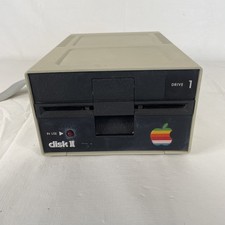
Apple II Floppy Disk Drive Vintage | Model A2M0003 | *Untested For Parts*
$60.00

Lot of 3 VIntage Apple Computer Rainbow Logo Sticker Decal Macintosh 1980s NOS
$7.00
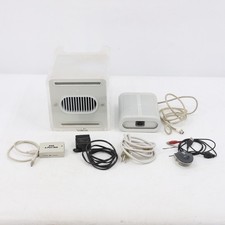
Vintage Apple Power Mac G4 Cube M7886 2000 450MHz 128MB RAM 20GB HD
$299.99
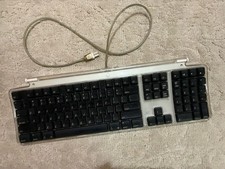
Vintage Apple Pro Keyboard M7803 USB Wired Mac Accessory -Clear w/Black Keys
$50.00
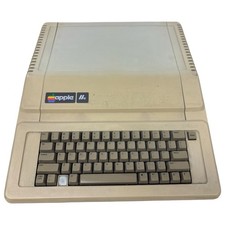
Vintage Apple IIe Computer A2S2064 (powers on)
$250.00
Vintage Apple iBook Clamshell Graphite 466MHz 60GB HD 128 Ram OS 9 & 10
$350.00
Vintage Apple PowerBook G4 Titanium Laptop 800 MHz 60 GB HD 15" LCD Screen A1001
$79.99
Apple II Floppy Disk Drive Vintage | Model A2M0003 | *Untested for parts*
$60.00

Vintage 1988 Apple Macintosh Plus 1MB M0001A Computer Keyboard WORKING See Video
$225.00



 Reply With Quote