-
Senior Member
registered user
Purging packages from the 7.0.5DVD, installing previous package selections
Most of this has been posted earlier, but here it is, checked for 7.0.5.
To make room for other programs in a remastering, purging is needed. Everything isn't equally safe to purge, but games, some documentation and some language support is usually safe. We can also always reinstall something should things go wrong.
To find out what takes the most space, we can issue a command like this:
Code:
dpkg-query -W --showformat='${Installed-Size} ${Section} ${Package}\n' | sort -n > knx705_DVDpack_size.txt
Looking at the end of the file created, we can check if the packages taking up the most space are really things we need to have installed. Just remember that nowadays, a program often comes as a set of packages, and every package of that set being small doesn't guarantee that the totality is.
This is my main list of purges. It can be put in a shell script and executed at once, but I prefer to run the lines one by one. Also, it may be a good idea to omit the "-y" command, to be able to stop a purging in process - aptitude tells what it has figured out to do, and gives you the choice to not accept it.
Code:
# Purging 7.0.5 DVD
sudo aptitude -y purge `dpkg-query -W --showformat='${Section} ${Package}\n' | grep ^games | cut -d' ' -f2`
sudo aptitude -y purge `dpkg-query -W --showformat='${Section} ${Package}\n' | grep bacula | cut -d' ' -f2`
sudo aptitude purge `dpkg-query -W --showformat='${Section} ${Package}\n' | grep ^editors | grep lyx | cut -d' ' -f2`
sudo aptitude purge `dpkg-query -W --showformat='${Section} ${Package}\n' | grep ^editors | grep abiword | cut -d' ' -f2`
sudo aptitude purge `dpkg-query -W --showformat='${Section} ${Package}\n' | grep ^gnome | grep gnucash | cut -d' ' -f2`
sudo aptitude purge `dpkg-query -W --showformat='${Section} ${Package}\n' | grep ^gnome | grep nautilus | cut -d' ' -f2`
sudo aptitude purge `dpkg-query -W --showformat='${Section} ${Package}\n' | grep ^mail | grep kmail | cut -d' ' -f2`
sudo aptitude purge `dpkg-query -W --showformat='${Section} ${Package}\n' | grep ^mail | grep icedove | cut -d' ' -f2`
sudo aptitude purge `dpkg-query -W --showformat='${Section} ${Package}\n' | grep ^utils | grep amanda | cut -d' ' -f2`
sudo aptitude purge `dpkg-query -W --showformat='${Section} ${Package}\n' | grep ^web | grep chromium | cut -d' ' -f2`
sudo aptitude -y purge `dpkg-query -W --showformat='${Section} ${Package}\n' | grep ^kde | grep l10n | cut -d' ' -f2`
sudo aptitude -y purge `dpkg-query -W --showformat='${Section} ${Package}\n' | grep ^graphics | grep inkscape | cut -d' ' -f2`
sudo aptitude -y purge `dpkg-query -W --showformat='${Section} ${Package}\n' | grep ^graphics | grep scribus-ng | cut -d' ' -f2`
sudo aptitude -y purge `dpkg-query -W --showformat='${Section} ${Package}\n' | grep ^doc | grep gimp-help-de | cut -d' ' -f2`
In addition, to make room for more Java servers etc, I do some extra purging, like:
Code:
sudo aptitude -y purge `dpkg-query -W --showformat='${Section} ${Package}\n' | grep openshot | cut -d' ' -f2`
sudo aptitude  purge `dpkg-query -W --showformat='${Section} ${Package}\n' | grep oxygencursors | cut -d' ' -f2`
sudo aptitude  purge `dpkg-query -W --showformat='${Section} ${Package}\n' | grep gnome-user-guide | cut -d' ' -f2`
sudo aptitude -y purge `dpkg-query -W --showformat='${Section} ${Package}\n' | grep qt4-demos | cut -d' ' -f2`
When it is all done, it's time for some install. This is a way to recover, as far as possible, an earlier selection of packages - in this case the extra R and math packages I installed with 6.4.4, the selection list was then written to disk with the command
Code:
dpkg-query -W --showformat='${Section} ${Package}\n' | sort -n > knx644_64_sqpack_sect1.txt
in the packlists subdirectory.
Now, I can recover parts of that selection by using this type of command
Code:
sudo aptitude install `cat packlists/knx644_64_sqpack_sect1.txt | grep ^gnu-r | cut -d' ' -f2`
sudo aptitude install `cat packlists/knx644_64_sqpack_sect1.txt | grep ^math | cut -d' ' -f2`
It turned out, that the math category from that install would now occupy ca 350MB extra - I therefore decided to wait and go for a smaller selection.
 Posting Permissions
- You may not post new threads
- You may not post replies
- You may not post attachments
- You may not edit your posts
-
Forum Rules


Kingston 32GB 64GB 128GB 256GB USB 3.0 Flash Drive Thumb Memory Stick Pen lot
$285.90

Lot Of 8 Micron 8GB 2Rx8 PC4-2666V-RE2-11 ECC REG Server Ram MTA18ASF1G72PDZ-2G6
$210.00
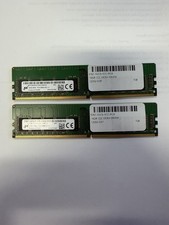
LOT OF 2 Micron 16GB 2Rx8 PC4-2666V-EE1-11 P/N: MTA18ASF2G72AZ-2G6D1ZG
$199.95
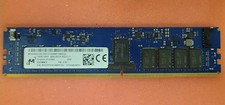
Micron MTA18ASF2G72XF1Z-2G9WP1ABVGD 16GB 1Rx4 NN4-2933Y DDR4 ECC NVDIMM
$74.50

USB 3.0 Flash Drive 32GB 64GB 128GB Memory Stick Thumb Stick Lot Pack
$826.09
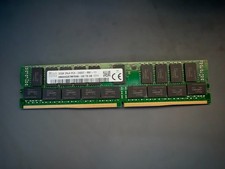
SK Hynix 32GB Server Memory 2Rx4 PC4-2400T-R81-11 HMA84GR7MFR4N-UH Server RAM
$169.99
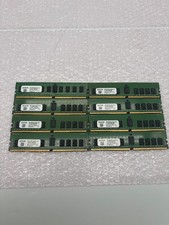
Lot of 8 A2ZEON 8GB DDR4-2133 RDIMM ECC 1Rx4 Server Memory RD4R8G44S2133
$529.99

USB 3.0 Micro SD SDHC TF Card Reader Memory Adapter for PC Laptop Camera lot
$3.75

LOT OF 4 Samsung 16GB DDR4-2666 ECC UDIMM 2Rx8 PC4-21300 M391A2K43BB1-CTDQ
$469.95

TF/SD Card Adapter Camera Reader Android Type-c For iPhone17 Pro Max Plusm lot
$573.98



 Reply With Quote