

Hi all, I often set up routers and other devices that start off with default IP addresses that aren't in the "normal" range of private addresses. For example, a Linksys WPG54G device has the default fixed address of 192.168.1.200, but my network has addresses on 192.168.0.* range with DHCP. So how to access the web configuration when you're on a "different" network? Easy peasy. Just launch a terminal, and type "sudo ifconfig 192.168.1.1 up" to assign yourself a address in the 192.168.1.* range. Then you should be able to "ping 192.168.1.200" and get a response. Now you can launch a web browser and do the web configuration on the router or other device. When you want to go back to your normal DHCP, just type "sudo ifconfig down" and wait until the icon on the notification area says "network disconnected", then "sudo ifconfig up" and you will get your DHCP assigned ip address back.
 Posting Permissions


Vintage Mainframe Computer Disk Drive Pack Dyson SMD 5 Level Disks
$79.00

Vintage Jetway J-620BF Socket 370 Celeron AT Motherboard SiS 620 Brand New
$75.00

Vintage HP Hewlett Packard 2112A 21MX 1000 M-Series 16-Bit Minicomputer
$599.99
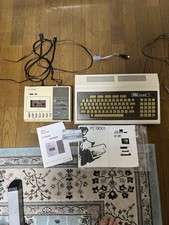
Vintage NEC PC-8001 32KB RAM Fully Working Set w/ Monitor Cable & Tape
$499.00
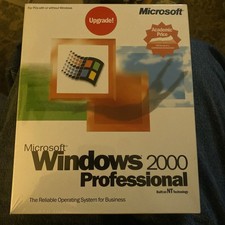
Factory Sealed Windows 2000 Professional Upgrade Edition Vintage PC Software NOS
$50.00

Vintage AppleCare Protection Plan Box for Mac Model 607-3517 COLLECTIBLE ONLY
$20.00
![Apple Macintosh Boot Disk System [1.0 - 8.0] 400/800k/1.4 Floppy for Vintage Mac picture](/store/img/g/EhEAAOSwg7ZnexmU/s-l225/Apple-Macintosh-Boot-Disk-System-1-0-8-0-400-800k-.jpg)
Apple Macintosh Boot Disk System [1.0 - 8.0] 400/800k/1.4 Floppy for Vintage Mac
$11.75

Rare Vintage Macintosh Apple Wooden Disk Storage Box Dovetailed
$69.95

Vintage ECS Micro-ATX Desktop Case | Beige/Dark Grey | *READ*
$80.00

Vintage 1986 Goldenrod Research Corp CP/M Desktop Computer Syste w/Keyboard
$350.00


 Reply With Quote