-
 Booting from USB flash in Virtualbox
I have a knoppix USB bootable flash that I can boot PC from it correctly. I want to boot it in VirtualBox.
So I created a disk by:
Code:
VBoxManage internalcommands createrawvmdk -filename mydisk.vmdk -rawdisk /dev/sdc
Then I created a new virtual machine and used mydisk.vmdk as existing disk. When I boot virtual machine, it shows error:
Code:
    Waiting (USB)...
    Waiting (USB)...
    Waiting (USB)...
    Waiting (USB)...
    Could not mount disk to /mnt-system. Starting debugging shell...
    sh: can't access tty: job control turned off.
    / #
-
Sometimes Knoppix has difficulties to find the folder '/mnt/system' immediately if you use an USB-device; therefore it starts to look if there are other devices with this folder. In your case you can influence the start of Knoppix using the cheatcode
Code:
knoppix fromhd=/dev/sda1
Now Knoppix will only search for this folder at '/dev/sda1'.
You can use Micro-Remastering to have this cheatcode fromhd=/dev/sda1 permanent within your flash disk installation.
-
My USB doesn't have syslinux.cfg but it has boot/isolinux/isolinux.cfg:
Code:
DEFAULT knoppix
APPEND ramdisk_size=100000 lang=en apm=power-off initrd=minirt.gz nomce libata.force=noncq hpsa.hpsa_allow_any=1 loglevel=1 tz=localtime
TIMEOUT 0
# TOTALTIMEOUT 0
# KBDMAP german.kbd
PROMPT 1
F1 boot.msg
F2 f2
F3 f3
DISPLAY boot.msg
LABEL knoppix
KERNEL linux
APPEND ramdisk_size=100000 lang=en apm=power-off initrd=minirt.gz nomce libata.force=noncq hpsa.hpsa_allow_any=1 loglevel=1 tz=localtime no3d wheelmouse
Where should I change? Where should I put fromhd=/dev/sdc1? Should I recreate vmdk from sdc1 instead of sdc?
VBoxManage internalcommands createrawvmdk -filename mydisk.vmdk -rawdisk
/dev/sdc
-
My USB doesn't have syslinux.cfg but it has boot/isolinux/isolinux.cfg:
Are you sure you has removed the Knoppix CD/DVD within VirtualBox? Isolinux is the bootloader for CDs.
I have a knoppix USB bootable flash
I supposed, you had done a "Flash disk install". Please tell us what kind of Install you really did.
Your
Code:
VBoxManage internalcommands createrawvmdk -filename mydisk.vmdk -rawdisk /dev/sdc
is correct, if the USB device is the 3.rd device within your Host system. Within VirtualBox - the Guest system - the USB device is the 1.st device. Therefore you have to use cheatcode fromhd=/dev/sda1 (not sdc1).
-

I supposed, you had done a "Flash disk install". Please tell us what kind of Install you really did.
My friend gave me this bootable USB flash. I can boot PC by it but I want to use it in VirtualBox. I don't know how this is created? Can I realize it?
-
Connect within VirtualBox your mydisk.vmdk with SATA controller port 0 and let IDE controller port 0 empty (without Knoppix CD/DVD). Can you boot without the cheatcode? If not, try to boot with the cheatcode I've told you in the other posting. What happens?.
-

Without cheat code, the same error is shown which I've told you.
I changed isolinux.cfg to:
Code:
DEFAULT knoppix fromhd=/dev/sda1
APPEND ramdisk_size=100000 lang=en apm=power-off initrd=minirt.gz nomce libata.force=noncq hpsa.hpsa_allow_any=1 loglevel=1 tz=localtime
TIMEOUT 0
# TOTALTIMEOUT 0
# KBDMAP german.kbd
PROMPT 1
F1 boot.msg
F2 f2
F3 f3
DISPLAY boot.msg
LABEL knoppix fromhd=/dev/sda1
KERNEL linux
APPEND ramdisk_size=100000 lang=en apm=power-off initrd=minirt.gz nomce libata.force=noncq hpsa.hpsa_allow_any=1 loglevel=1 tz=localtime no3d wheelmouse
but the same error is shown.
-
There ist something wrong with your friends USB flash if you have "isolinux.cfg". I suggest you create an USB install by yourself following Flash disk install.
 Posting Permissions
- You may not post new threads
- You may not post replies
- You may not post attachments
- You may not edit your posts
-
Forum Rules


TP-Link TL-SG105 5-Port Gigabit Ethernet Unmanaged Metal Desktop Network Switch
$19.99

TP-Link TL-SX105 10GB 5-Port Switch - Unopened
$195.00

NETGEAR GS308EP Essential Series 8-Port Gigabit PoE+ Unmanaged Switch
$39.99

10-Port Gigabit PoE Network Switch with 8 PoE+ Ports with 2 Combo SFP Slots 125W
$39.99
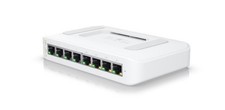
Switch Lite 8 PoE
$65.00

TP-Link TL-SG105, 5 Port Gigabit Unmanaged Ethernet Switch, Network Hub, Ethern
$15.25

5 Port Gigabit Unmanaged Ethernet Switch, Home Network Hub, Office Ethernet S...
$14.86

TP-Link Omada SG3428 24-Port Gigabit L2+ Managed Switch 4x SFP w/ Ears
$99.99

5Ports Gigabit Network Switch w/ 4 PoE+ Ports Total 52W each port 30W Plug&Play
$31.99

NETGEAR 5-Port Gigabit Ethernet Unmanaged Switch (Gs305) - Desktop Quiet Fanless
$25.99



 Reply With Quote