

 Reply With Quote
See this thread the post by Fabianx is the one to look at. Or you can manually edit the /etc/fstab as root and remove the # that are in front of the lines knoppix created when it installed and right click on the desktop and create the icons.


If you start Knoppix from cd you know that all types of hdd (Partitions) are shown , right ? And now I installed Knoppix to hdd and booted it and my windows HDD are away !! I can't find them !! Is there a way to include them ?
See this thread the post by Fabianx is the one to look at. Or you can manually edit the /etc/fstab as root and remove the # that are in front of the lines knoppix created when it installed and right click on the desktop and create the icons.
 Posting Permissions


Samsung 2.5" 870 EVO SSD SATA III 250GB 500GB 1TB Internet Solid State Drive Lot
$100.00

External SSD 1TB 2TB 4TB Portable Hard Drive USB 3.0 Type-C High Speed PC Mac
$19.99

Samsung 1TB SSD BM91H 1TB (MZ-VMA1T00) Internal SSD M.2
$135.00

Dell Latitude 14" Laptop Computer Intel i5 Up To 32GB RAM 1TB SSD Windows 11 Pro
$545.25
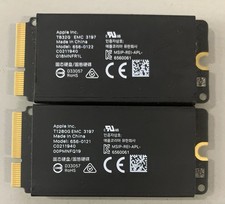
Apple Mac Pro 2019 1TB OEM SSD Kit-832GB +128GB - 656-0122/ 656-0121
$69.99

Acer Predator Helios Neo 16S AI 16" i9 275HX 2S RTX 5070 Ti 32GB 1TB SSD Refurb
$1746.47

SAMSUNG T7 Portable SSD 1TB Indigo Blue USB 3.2 Gen2 External MU-PC1T0H/AM
$159.99

1TB Kingston DataTraveler Max DTMAX/1TB USB Type-C Flash Drive
$86.95

Seagate Desktop 1TB/1000GB SATA 3.5" HDD Hard Drive
$29.99
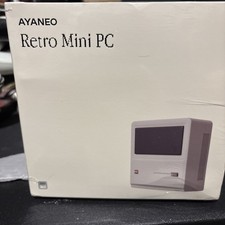
AYANEO AM01 AMD Ryzen 7 5800U Gaming Mini PC Retro Classic DP DDR4 32GB 1Tb
$400.00